Marketo Engage connector in Adobe Learning Manager
Introduction
The Marketo Engage Connector allows Adobe Learning Manager to seamlessly integrate with Marketo Engage, a marketing automation platform. This integration helps marketers track and act on learner behavior data from Adobe Learning Manager by syncing it with the Marketo database.
The Marketo Engage connector enables seamless data synchronization between the two systems and allows marketers to use learning activity data to create targeted marketing campaigns.
The Marketo Engage connector allows you to:
- Automatically add or update leads in the Marketo Engage database when users are added to Adobe Learning Manager.
- Sync user learning behaviors such as course enrollments, completions, skill assignments, and skill completions as custom objects in Marketo.
- Create dynamic campaigns in Marketo using this data, leveraging features like Smart Lists.
This integration helps marketers target audiences based on their learning journey within Adobe Learning Manager.
Key features
-
Automated lead creation and updates based on Adobe Learning Manager users.
-
Export learning activity (enrollments, completions, skill achievements) as custom objects to Marketo.
-
Schedule or trigger exports on demand.
-
Support for unified reports, including:
- User Report
- Learning Transcript
- User Skill Report
Prerequisites
Before integrating, ensure your Marketo account supports schema creation via APIs.
You will need the following details to create the connection:
- Connection Name
- Client ID
- Client Secret
- Marketo Engage Domain
Set up the connector
To set up the Marketo Engage connector:
-
Log in to Adobe Learning Manager as an integration administrator.
-
Hover over the Marketo Engage tile and select Connect.
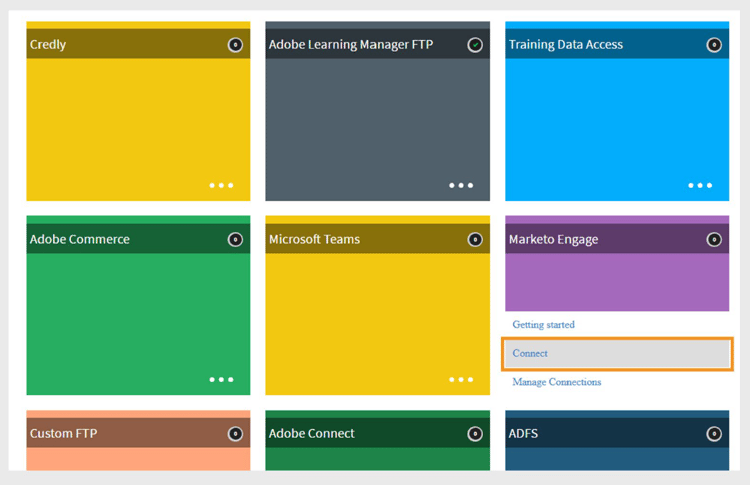
Select Connect to configure Marketo Engage connector -
Type the required credentials
- Connection Name
- Client Id
- Client Secret
- Marketo Engage Domain
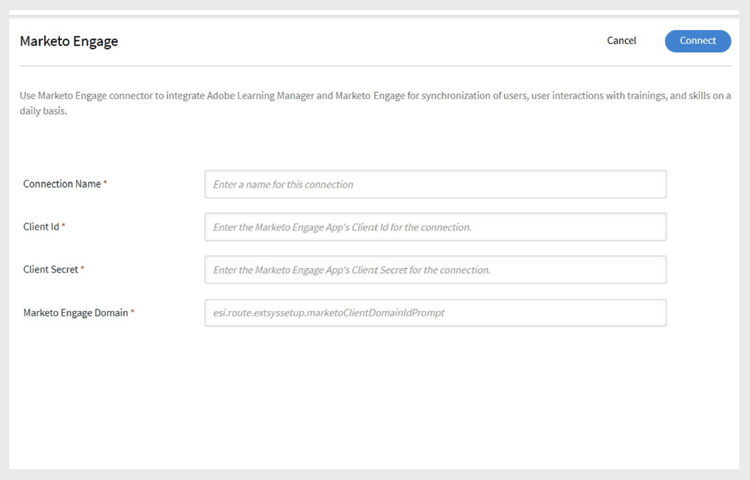
Type the required details for Marketo Engage connector -
Select Connect to establish the connection.
Events and campaign triggers
You can trigger data exports to Marketo Engage based on the following events:
- A new user is added to Adobe Learning Manager.
- A user is enrolled in a course.
- A user completes a course.
- A user is enrolled in a skill.
- A user completes a skill.
These events can be exported on demand or on a scheduled basis.
Column mapping
Marketo uses two databases:
- Lead Database – for user records (leads)
- Custom Object Database – for custom activity and event records
To map fields between Adobe Learning Manager and Marketo:
- The User Report fields from Adobe Learning Manager are displayed in one column.
- Corresponding Marketo fields are listed in the adjacent column.
- Map the appropriate fields from Learning Manager to Marketo to create and update leads.
- After mapping, all exported users appear as leads in the Marketo Lead Database.
The exported reports in the Marketo Custom Objects section are prefixed with “cp_”.
Supported export events
You can export the following user-related events to your Marketo Engage instance:
- New user added
- User metadata updated
- User activity updated
- Training enrollment
- Self-enrollment
- Skill completion
These exports help drive engagement and personalize outreach campaigns using the learning activity data.