Adobe Commerce connector in Adobe Learning Manager
Adobe Commerce connector
Adobe Learning Manager integrates with Adobe Commerce, an extensible and scalable eCommerce solution that lets you deliver multi-channel commerce experiences for B2B and B2C customers. Use the Adobe Commerce connector to connect Adobe Learning Manager with Adobe Commerce to enable paid training and eCommerce capabilities within your learning platform.
When the connector is enabled, Learning Manager sends training data to Adobe Commerce so learners can purchase courses, learning paths, or certifications. The connector also collects purchase information to validate transactions and grant learners access to their training.
Prerequisites
Before you set up the Adobe Commerce connector, ensure the following:
To enable these, edit the following files:
- .magento.app.yaml
- .magento/services.yaml
- .magento.env.yaml
Other setup requirements:
- Override options limit using a custom module. This step is optional but recommended for large datasets.
- Enable all asynchronous APIs. Large training datasets are exported asynchronously. When Learning Manager calls Adobe Commerce APIs, requests are queued and processed by a consumer that creates products on the commerce side. Asynchronous processing must be enabled because it is not available by default in Adobe Commerce.
- Add a return link to Learning Manager on the payment success page in Adobe Commerce.
- Use this return URL:
- Change indexing from On Save to Scheduled. See the Knowledge Base for more information.
- Apply the required patches. See Apply patches documentation for instructions.
- Configure Fastly for Adobe Commerce on cloud infrastructure (Staging and Production). See Set up Fastly for more information.
Configure the connector
To configure Adobe Commerce Connector:
-
Log in to Adobe Learning Manager as an integration administrator.
-
Hover over the Adobe Commerce connector tile and select Connect.
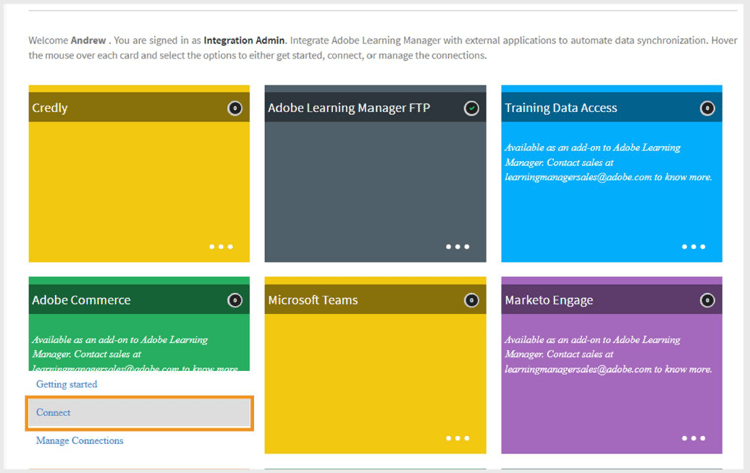
Select Connect to configure Adobe Commerce connector -
Type the following details:
- Connection Name
- Access Token
- Adobe Commerce URL
- Store Code
-
Select the Type of interface from the following:
- Native Learning Manager
- Custom-made using AEM Sites
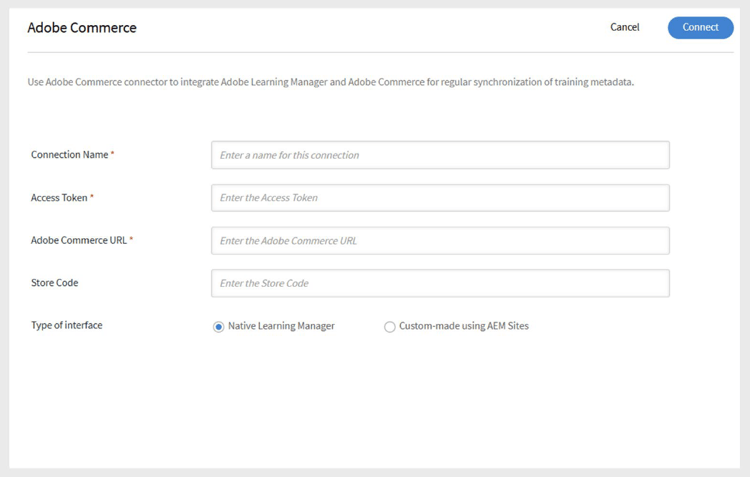
Type the required details for Adobe Commerce configuration -
Select Connect.
Set pricing for training
Once the connection is enabled:
- Authors can set prices for courses, learning paths, or certifications.
- After publishing, learners can buy training through Adobe Learning Manager or a custom AEM site.
Purchase flow
Native Adobe Learning Manager
- Learners log in to Adobe Learning Manager to buy a course, learning path, or certificate.
- When learners click Buy Now, they are redirected to Adobe Commerce to complete the payment.
- After payment, learners are prompted to return to Adobe Learning Manager to start the training.
- Learners must log in separately to Adobe Commerce to complete the purchase.
- Learners receive purchase confirmation emails from both Learning Manager and Adobe Commerce. Adobe Commerce emails can be enabled or disabled as needed.
Custom AEM Sites
When using custom AEM sites:
- Learners can browse and buy courses through the AEM site.
- The AEM site uses metadata synced from Adobe Learning Manager for search and display.
- Both logged-in and guest users can browse. However, only logged-in users can purchase.
- After login, learners can add courses to their cart, preview details, and complete the purchase.
Export courses to Adobe Commerce
Schedule export
To schedule the export:
-
Select Export Training Metadata and then select Configure Schedule.
-
Select Enable training metadata export using this connection.
-
Select Enable schedule and set the start date, time, and interval.
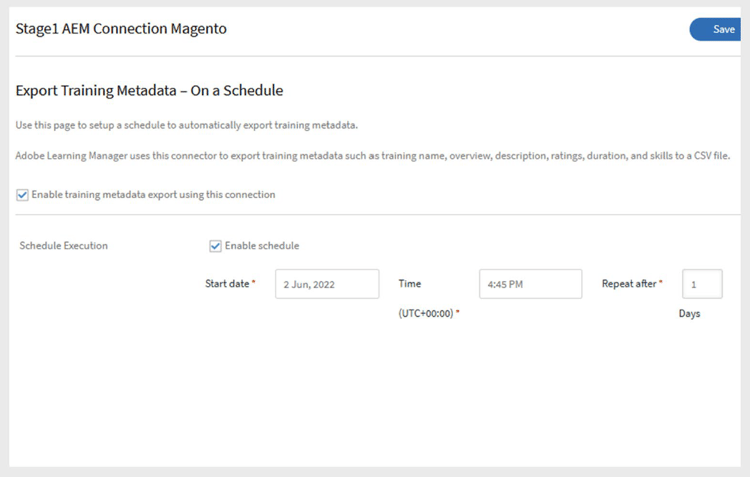
Enable the scheduled export -
Select Save.
On demand export
After authors set prices for training, the integration administrator must export the training data:
-
Select Export Training Metadata and then select On Demand.
-
Select the date range.
-
Select Execute to export.
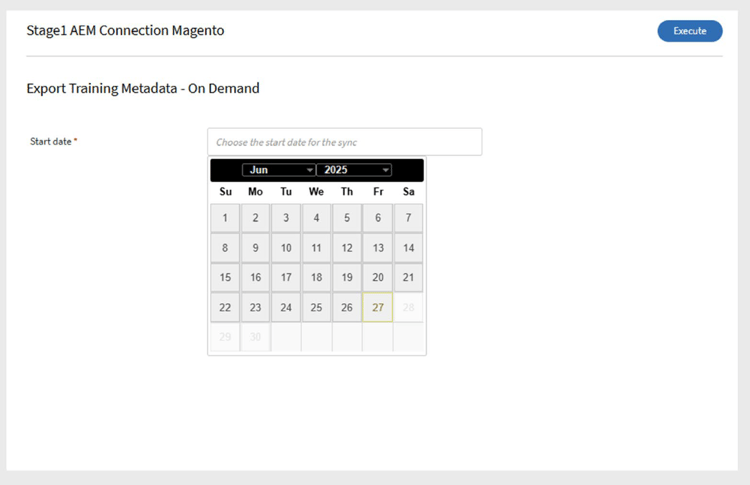
Create on-demand export -
Upon success, priced courses and learning paths are moved to Adobe Commerce for purchase.