Add a content component
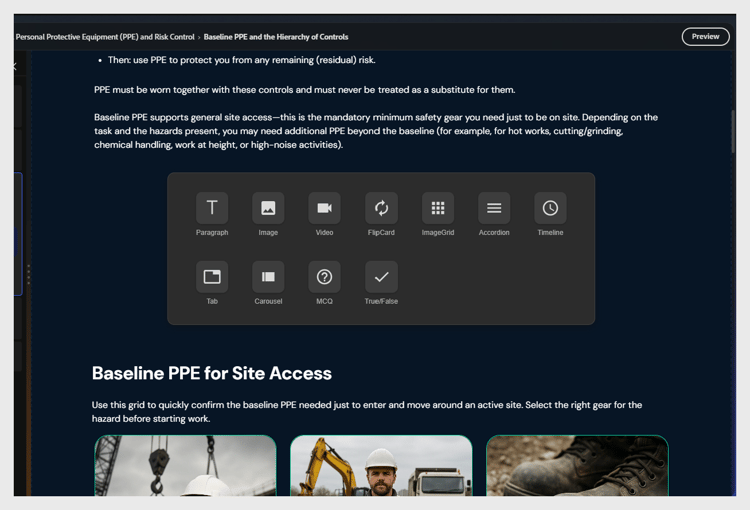
Select between two existing elements. The + button appears. Select it to open the component picker.
Available components:
Component
Use for
Paragraph
Body text and explanations
Image
Illustrations, screenshots, diagrams
Video
Embedded MP4 or linked video
Flip Card
Term or definition pairs, reveal interactions
Image Grid
Multiple images in a grid layout
Accordion
Expandable sections, step-by-step procedures
Timeline
Sequential events or process steps
Tab
Parallel content - comparisons, regional variants
Carousel
Swipeable series of images or content cards
MCQ
Inline ungraded knowledge check
True/False
Inline ungraded true or false check
NOTE
Use Accordion for step-by-step procedures where learners benefit from controlling their pace. Use Flip Card for term or definition content.
Move content blocks within a topic
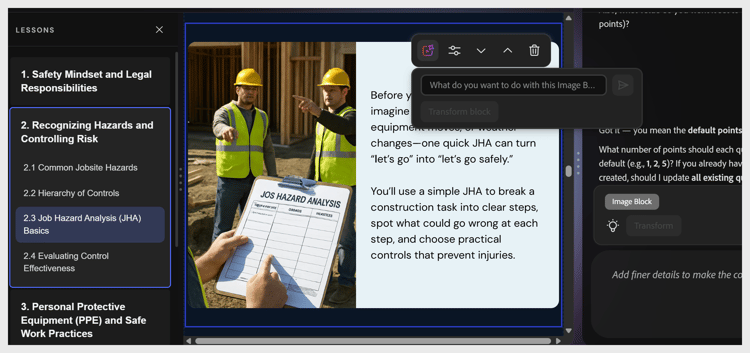
You can reorder content blocks within a topic using either the edit options in the toolbar or the AI.
recommendation-more-help
learning-manager-help-migrated