Module access time control
Overview
The enhancement lets authors and administrators in Adobe Learning Manager define a time window during which learners are allowed to start a module. Outside the configured start/end window, the module remains visible in the course structure, but learners cannot initiate it.
This capability is critical for users who need tighter control over when certain content becomes available or should stop being initiated, for example, in timed programs, cohortbased training, or timesensitive exercises.
What’s new
Authors can now configure, at the module level within a course, a start date/time and end date/time that governs when learners are allowed to launch that module. Within this window, the module behaves as usual; before the start time or after the end time, the learner sees the module in the course outline but cannot start it.
The configuration appears in the course authoring user interface as additional scheduling controls for specific module types, such as self-paced content, quizzes, or activities. Administrators can use these controls to create modules that open in phases or to prevent late starts in programs where content must be consumed within a defined timeframe.
Key benefits
The main advantage is the ability to control when modules are accessible. Training teams can synchronize module availability with real-world events, such as new product launches, regulatory deadlines, and internal programs. This ensures that learners complete prerequisite content before they can access later modules.
For instance, cohort 1 can access module 2 only in week 2, while module 3 will remain locked until week 3, eliminating the need to manually hide and unhide content or create separate course versions.
This enhances the learner experience: instead of facing modules that can technically be accessed but shouldn’t be at that time (or should already be completed), learners see a course structure where the modules they are permitted to start are clearly aligned with the intended schedule.
Use cases
Cohort-based enablement program: In this program, each week opens a new module. The content for Week 1 is available immediately, while Week 2 is visible but cannot be started until a specified date. Week 3 follows the same gating process. Learners can see the entire learning path, but the system controls when they can actually begin each step.
Timebound product or campaign training: Marketing or product teams may create a training module that should only be accessed while a campaign is active or when a specific version of a product is still available. This designated start window ensures that learners don’t begin a module about a discontinued product version after the specified end time.
Assessment or exam environments: Organizations can open a module (such as a test) for a short, welldefined window (for example, “you may start the exam anytime between 9:00 and 12:00 on a given date”). Learners cannot begin the exam outside that window, which supports fair scheduling across time zones and cohorts.
Setting module access time
- Log in to Adobe Learning Manager as an Author.
- Go to Learning section > Courses. ALM displays a list of courses.
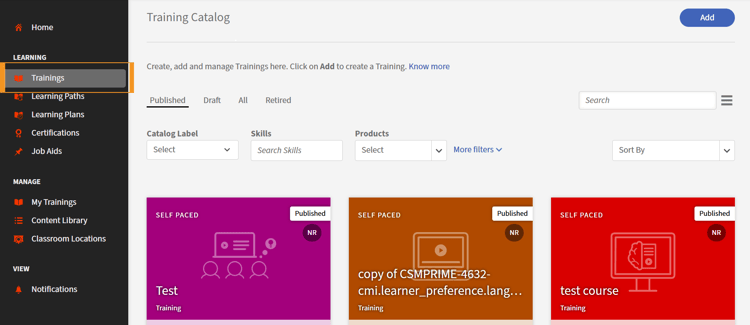
- Select the course for which you want to set the restriction.
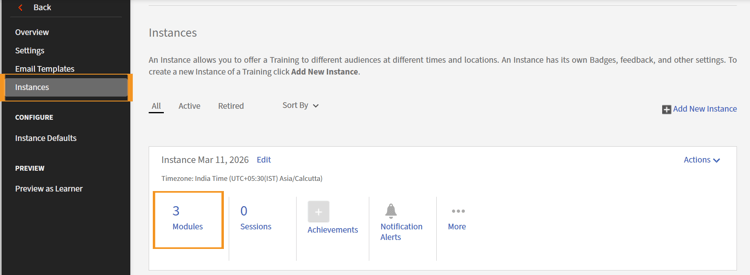
- Select Instances. ALM displays a list of instances.
- Select Modules in the instance section for which you want to set the access limit. The Edit button appears.
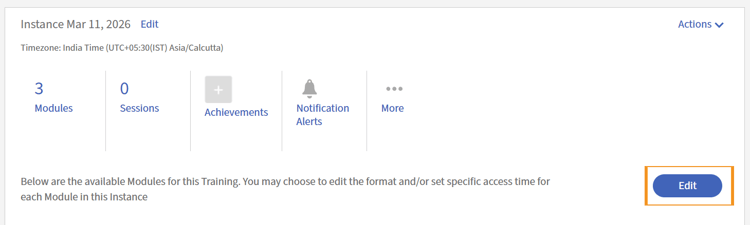
- Select Edit. The relevant sections related to the module open towards the bottom of the page.
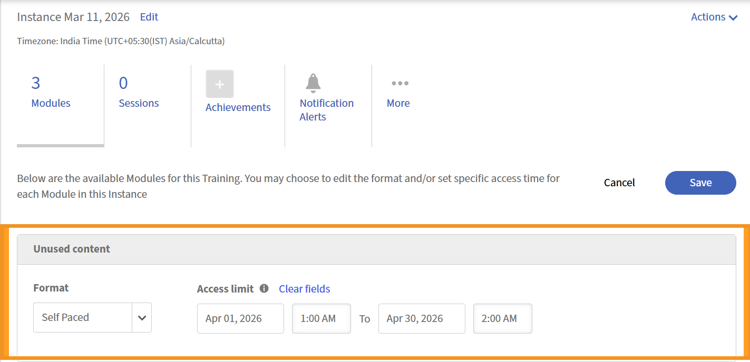
- For each section, select a from date, a from time, a to date, and a to time.
- Select Save. ALM displays a message which says, “Mapping saved successfully.”