Alternates and equivalents
Introduction
In many organizations, learners encounter training situations where different courses can legitimately satisfy the same requirement. For example, when should a new course replace an older one? When should a more comprehensive course stand in for a shorter one or when should a special substitute course be offered?
The Alternate Courses or Learning Path feature gives ALM a formal way to say:
“If the learner completed this training, treat them as having satisfied that related training requirement.”
The feature works across courses and Learning Paths, ensures downstream requirements such as prerequisites and compliance rules are honored, and does this without forcing learners to sit through redundant content. It also keeps reporting accurate by recording what was completed directly versus what was satisfied via an alternate.
At the core, the feature introduces the concept of an alternate completion: a special completion state created automatically when a learner finishes a configured source training that counts towards another target training.
Alternate relationships
Some training relationships are bidirectional, meaning each course can satisfy the other’s requirement. This is effectively a scenario where two trainings are treated as mutually substitutable. In contrast, unidirectional relationships allow one training to satisfy the requirement for another, but not vice versa. ALM models both scenarios using the same underlying alternate completion mechanism.
- Bidirectional relationship (equivalents): Completing either training satisfies the requirement for the other.
- Unidirectional relationship: Completing Training A satisfies Training B, but completing B does not satisfy A. This is common when a newer or more comprehensive version should count toward an older requirement, but not the reverse.
For example, when a more comprehensive superset course covers everything in a simpler subset course. Completing the superset should satisfy the requirement for the subset, but not necessarily the other way around.
A newer, expanded course that should count toward an older requirement.
A course designed for a specific audience (for example, a regional or accessibility-adapted variant) that still fulfills the same requirement as the primary course.
An enhanced new version of a course that the organization wants to count for an older requirement, but the older version should not count for the new requirement.
In Alternates, the relationship is normally one way. If course A is an alternate for course B, completing A can satisfy B’s requirement, but completing B does not necessarily satisfy A.
When a configured source training is completed, ALM automatically produces an alternate completion for one or more target trainings.
What problems does this solve?
Without alternates, administrators and learners face several recurring issues:
- Learners are frequently asked to repeat courses that cover content they already completed in a different version or format.
- Updating compliance programs is simpler because admins can replace or restructure trainings without forcing learners who completed older versions to retake alternate or superseded content.
- Prerequisite logic is rigid. If a path requires a particular course as a prerequisite, there is no clean way to recognize that another training is good enough.
- Reporting and audits are harder. There is no formal signal showing that a requirement was satisfied via an alternate completion and no straightforward way to trace the source of the credit.
The alternates feature addresses these issues by:
- Preventing duplicate effort for learners when alternates are valid.
- Allowing admins to modify training structures (for example, swap a course inside a path) without breaking completions for learners who took the earlier version.
- Allowing prerequisites and compliance checks to respect both direct completions and alternate or equivalent completions.
- Recording clearly, in transcripts and reports, whether a training was completed directly or satisfied via an alternate relationship, along with which training served as the source.
How the feature works conceptually
The feature is built on three main ideas: relationships, alternate completion, and downstream behavior.
Relationships between trainings
Administrators define relationships between courses and Learning Paths. For each relationship, they choose a source and one or more targets. A single course might have up to 30 targets depending on how many earlier or related trainings it should satisfy.
For equivalents, admins can make the relationship bidirectional if they want both trainings to satisfy each other. For alternates, admins normally keep the direction one*way to reflect that only some substitutions are allowed.
These relationships are stored at the training level, not at the learner level. Once configured and enabled, they may apply to all current and future completions of the source training, subject to account*level settings such as whether retroactive completion is enabled.
Alternate completion
When a learner completes a source training, ALM examines all configured alternate relationships and, for each relevant target training, creates an alternate completion record. This record is distinct from a normal completion:
- It marks the target training for the learner but keeps track that it was completed via alternates rather than directly.
- It records which source training was used to satisfy the target.
- It is stored in a dedicated structure so reporting can distinguish between direct and alternate completions.
Learners will see alternate completion even if they’re not enrolled. The Learner Transcript (LT) report includes only records of trainings that the learner has enrolled in.
Learner app experience for alternate and equivalent completions
Alternate completions are surfaced distinctly in the learner app so learners can clearly understand how a training requirement was satisfied, while maintaining consistency with transcripts and reports.
LO card behavior
Alternate completion status
When a learner completes a training via an alternate relationship, the Learning Object (LO) card displays a distinct status which is Completed via Alternate. This visual distinction helps learners differentiate between direct completions and completions granted through configured relationships.
Completion method indicator
The LO card includes a completion method indicator (for example, a label or icon) to show that the completion was achieved through an Alternate. If an alternate completion is later revoked due to changes such as retroactive incompletion or deletion of the source training, ALM will undo all the UI additions it did for alternate completion. The learner will still not be able to target LO as per the current catalog access behavior.
Transparency and audit details
Learners can open the LO card to view additional details, including:
- The source course or learning path that granted the alternate completion
This ensures transparency.
Filtering and views
Completion method filter
The learner app provides a filter that allows learners to distinguish between:
- Completed
- Completed via alternate (This filters LOs that only have alternate completions. If a LO has alternate as well as direct completion then it won’t be included.)
- When you select Completed and Completed via alternate, you’ll be able to see all completions
This enables learners to quickly understand how their learning requirements were fulfilled.
Transcript and progress views
The completion method filter is available in learner-facing views. For example:
- Progress and completion tracking sections
These views clearly indicate which trainings were completed directly and which were satisfied through alternates.
End-to-end flow
For learners
- Navigate to My Learning or Completed Courses in the learner app.
- Review LO cards to identify trainings marked as Completed via Alternate.
- Open an LO card to view details (in the Overview page) about the source training.
- Use the filter to select Direct, Alternate, or All.
- Review the updated list based on the selected completion method.
For administrators and authors
- Configure alternate relationships between courses or learning paths in the admin interface.
Retroactive completion and incompletion behavior
ALM supports retroactive completion and retroactive incompletion to ensure that alternate relationships remain accurate over time, even when relationships are modified or removed after learners have already completed training.
Retroactive completion
Definition
When retroactive completion is enabled, learners who completed a source course in the past automatically receive an alternate completion for the target course if an alternate relationship is created later. This ensures that historical learning is honored without requiring learners to retake training.
How it works
- An administrator enables retroactive completion at the account level.
- The administrator defines an alternate relationship between a source and target training.
- The system scans historical completion records for the source training.
- Eligible learners are granted alternate completion for the target training.
- These records appear as Completed via Alternate in learner transcripts and reports.
Retroactive incompletion
Definition
When retroactive incompletion is enabled, alternate completions are revoked if the underlying alternate relationship is removed or if the source training is deleted.
This ensures the system reflects the current and valid training relationships.
How it works
- An administrator enables retroactive incompletion at the account level.
- The administrator removes an alternate relationship or deletes the source training.
- The system identifies learners who received alternate completion through the affected relationship.
- The corresponding alternate completion records are revoked.
- Revoked records are marked as Alternate (Revoked) in transcripts and reports for audit visibility.
Impact on prerequisites
Alternate completions—including those granted retroactively—are treated as valid completions when evaluating prerequisites. If a learner has Completed via Alternate, they are allowed to proceed with courses that require the target training.
If an alternate completion is later revoked through retroactive incompletion, the learner may lose eligibility for courses that depend on that prerequisite. If learner did not start the dependent/subsequent LO, the eligibility administered by source LO will be reverted. If learner already started or completed dependent/subsequent LO then there will be no impact.
Impact on learning paths and certifications
Alternate completions contribute toward completion of learning paths and perpetual certifications. Learners can advance or complete these programs when required trainings are satisfied via alternate relationships.
If an alternate completion is revoked, affected learning paths or certifications may lose progress until the requirement is met through a valid completion.
End-to-end workflow
Enabling retroactive completion or incompletion
- Administrators navigate to account settings and enable retroactive completion and/or retroactive incompletion.
- Administrators create, modify, or remove alternate relationships between trainings.
System actions
- For retroactive completion:
The system grants alternate completions based on historical source completions. - For retroactive incompletion:
The system revokes alternate completions when relationships are removed or source trainings are deleted.
Learner experience
Learners see updated completion statuses on LO cards and in transcripts, such as:
- Completed via Alternate
When an alternate completion is revoked, no label is shown on the learner UI. In reports and transcripts, completion methods appear as:
- Alternate
- Alternate (Revoked)
- Direct
Prerequisite checks, learning path progress, and certification status update dynamically based on the current completion state.
Ordered LOs unlock dynamically based on alternate completion.
Skills, badges, gamification points, or feedback will not be awarded to learners upon alternate completion of targets.
Reporting and audit
All retroactive changes are reflected in the Learning Transcript (LT) report. After the source is deleted, the Learner Transcript can still show a source training ID next to Alternate Revoked. Reports clearly distinguish between direct completions, alternate completions, and revoked alternate completions to support compliance, support investigations, and audits.
The Enrollment Report leaves the Completion Source field as blank in the case of direct completion while the Learner Transcript shows the email and type for the same.
When a target is removed from the source (or the source itself is deleted), the Enrollment Report may not display the same Alternate or Alternate (Revoked) status as shown in the Learner Transcript.
Even when Alternates are disabled, historical entries in the Content Audit or Enrollment rows may still display activity related to alternates.
The completion date may precede the enrollment date when a LO is completed via an alternate path before the learner actually enrolls. Since alternate completions can occur regardless of learner status (Enrolled, Not Enrolled, or In Progress), learners may complete the LO first and only enroll in the target course later.
Impact of retiring and deleting source training in alternates
The lifecycle state of a source training (retired or deleted) directly affects how alternate completions are maintained for learners. ALM handles these scenarios differently to preserve historical accuracy while ensuring current relationships remain valid.
Retire source training
Definition
Retiring a course makes it unavailable for new enrollments while keeping it in the system for historical reference, reporting, and audit purposes.
Impact
- Existing alternate completions granted through the retired source course remain valid.
- Learners who previously completed the source course continue to hold alternate completion for the target course.
- No new alternate completions are generated from the retired course, since it cannot be completed by new learners.
- Learner transcripts and reports continue to display Completed via alternate for affected learners.
Delete source training
Definition
Deleting a course removes it entirely from the system, including its completion records and configured relationships.
Impact
- If a source training is deleted, the status may change to Alternate (Revoked). Retiring an LO does not trigger this status.
- If retroactive incompletion is enabled, all alternate completions granted through the deleted source course are revoked.
- Learner transcripts and reports update to show Alternate (Revoked) for audit and compliance visibility.
- Completion of learning paths and availability of certificates are not affected.
- No further alternate completions can be granted from the deleted course.
Workflow
-
An administrator retires or deletes the source course using the admin interface.
-
The system evaluates all alternate completions derived from the source course.
-
Completion status is updated based on the course state:
- Retired: Existing alternate completions remain unchanged.
- Deleted: Alternate completions are revoked if retroactive incompletion is enabled.
-
Learner transcripts and reports reflect the updated status to support compliance and audit requirements.
No chaining of relationships
ALM does not support chaining of alternate relationships. Alternate completions are granted only for directly configured relationships and do not cascade across multiple levels of courses.
Concept: no chaining of relationships
Definition
Chaining refers to allowing alternate relationships to propagate across multiple courses. For example, if Course A is an alternate for Course B, and Course B is an alternate for Course C, chaining would imply that completing Course A grants completion for Course C.
Policy
Chaining is not supported. Alternate and equivalent relationships are evaluated only at a single level. Completing a source course grants alternate completion only to its immediate target course or courses, not to any downstream targets.
Workflow
Relationship setup
An administrator defines alternate relationships between courses, such as:
- Course A → Course B
- Course B → Course C
Completion event
A learner completes Course A directly.
System action
- The system grants alternate completion for Course B, if the A → B relationship is defined.
- The system does not grant alternate completion for Course C, even if a B → C relationship exists.
Direct completion requirement
To receive alternate completion for Course C, the learner must:
- Directly complete Course B, or
- Complete a course that is explicitly configured as a direct alternate or equivalent for Course C.
Implications
No indirect benefits
Learners cannot receive completion credit for courses further down a relationship chain unless each course (or its direct alternate) is completed. This ensures that learning requirements are met explicitly and predictably.
Simplified audit and reporting
Reports and learner transcripts display alternate completions only for direct relationships. This avoids complex, multi-hop audit trails and ensures clarity when reviewing how a completion was granted.
Catalog sharing with peer accounts: relationships not shared
Catalog sharing allows LOs to be shared across peer accounts, but alternate and equivalent relationships are managed independently within each account and are not shared.
Concept: catalog sharing and relationships
Catalog sharing
Accounts can share catalogs with peer accounts to provide access to courses, learning paths, and other LOs across accounts.
Relationships not shared
Alternate, equivalent, and alternate-completion relationships configured in the source account are not shared or replicated when a catalog is shared. Each account maintains and evaluates its own relationships independently.
Workflow
Catalog sharing
An administrator in Account A shares a catalog containing LOs with Account B.
Relationship configuration
Account A may have alternate relationships defined among the LOs in the shared catalog.
Peer account access
Account B receives access to the shared learning objects but does not inherit any alternate relationships configured in Account A.
Independent management
If Account B requires similar alternate behavior, an administrator in Account B must manually configure the relationships within that account.
Implications
No automatic relationship propagation
Alternate relationships are not automatically available in peer accounts through catalog sharing.
Manual setup required
Each peer account is responsible for defining and managing its own relationships for shared LOs.
Consistency considerations
Completion behavior, prerequisite satisfaction, and reporting may differ across accounts unless relationships are intentionally aligned through manual configuration.
Downstream behavior
Once an alternate completion exists for a target training, ALM uses it in downstream checks:
- If the target training is a prerequisite for other trainings, the learner becomes eligible for those trainings as if they had completed the target.
- If the target is a mandatory course in a learning path, the path’s completion logic can treat the learner as having completed that part and proceed to mark the path complete when other conditions are met.
- Compliance and other dashboards such as Group Success Dashboard that rely on whether a training requirement is met can include learners who only have alternate completions.
The system distinguishes between actual completion and alternate completion so that:
- If the learner later takes the target training directly and completes it, this direct completion can override the need for the alternate completion.
- If the relationship between source and target is removed or changed, ALM can remove the alternate completions without touching genuine completions, provided retroactive incompletions are enabled for the account.
Alternate completions are designed not to interfere with actual learner activity on the target training. They act as an overlay that can be revised if the relationships change.
Emails and notifications
As soon as a learner finishes a course, the learner will get an in-app notification and an email showing the status of the course and how it was finished—whether it was completed via an alternate course.
Add an alternate course
As an admin, you can add an alternate courses and paths so that learners have multiple choices to complete their courses and paths.
-
Navigate to Learning section > Courses. A list of available courses will appear.
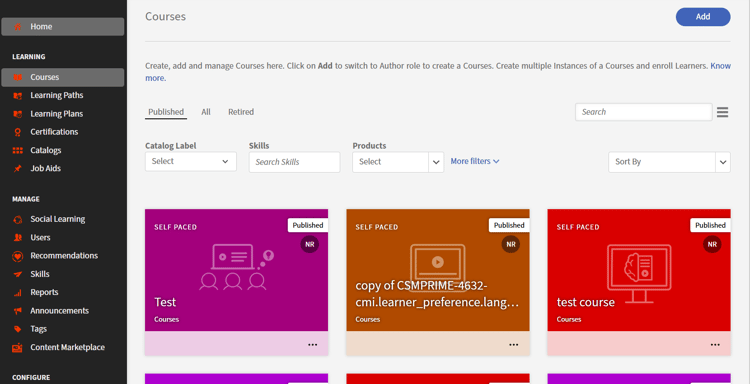
List of courses -
Navigate to the course for which you want to add an altrenate course.
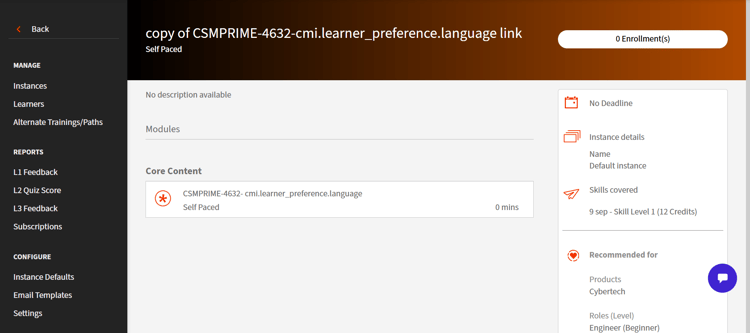
Add an alternate course to a course -
Navigate to Manage section > Alternate Courses/Paths.
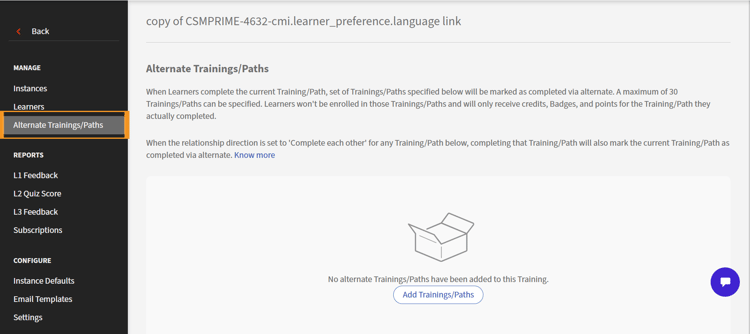
Alternate trainings/paths -
Select Add Courses/Paths. A list of available courses will appear.
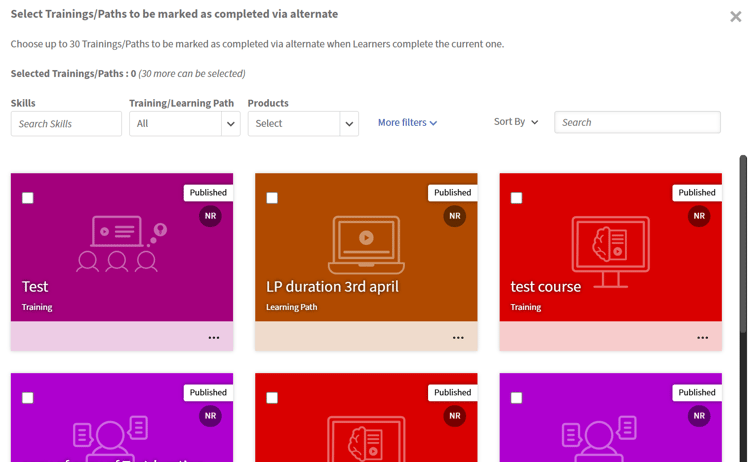
List of available courses -
Select the courses that you want to be marked as Alternate by selecting the checkbox of each course on the top left of the tile.
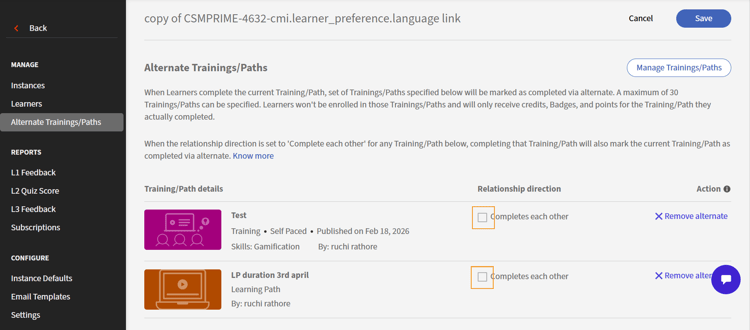
Add alternate course -
Select Add.
note NOTE At this point, you can remove the alternate courses if you wish so. To remove the alternate courses, select Remove alternate next to each course on to the right. -
Select Save. The alternate courses are now saved.
The progress is not affected by alternate completion. When a course or learning path is completed via an alternate completion, the learner can still access and consume it directly to reinforce learning and obtain downstream benefits (for example, gamification points). In such cases, the progress status reflects the learner’s actual progress from direct consumption, independent of the alternate completion state. You’ll also receive an in-app notification and an email notification about the completion via an alternate.
There are multiple benefits of this completion, which are listed below:
- This counts as completion as part of the learning path where this is present.
- This also opens up any other linked courses/paths.
Settings for power users
The following settings allow power users to use retroactive completions and incompletions.
- Navigate to Configure section > Settings > Basics section > General > Alternate Course/Paths section.
- Select Activate retroactive completions and Activate retroactive incompletions or just one of the two according to your requirement.
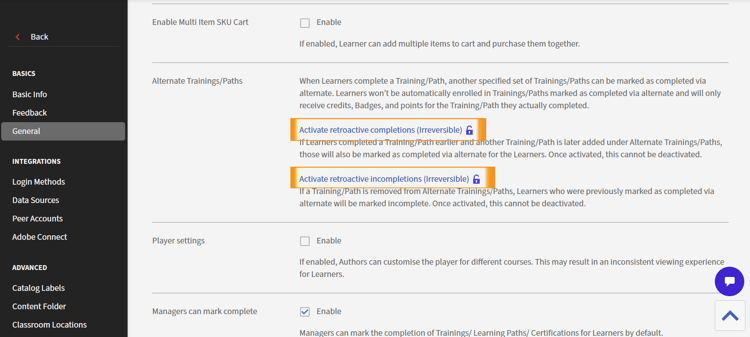
Activate retroactive completion or incompletion
Learner Transcript reports
The way a learner completes a courses/paths is captured in Learner Transcript report. The following scenarios are captured:
- When a learner completes a course directly without opting for an alternate course, it is reflected in the Learner Transcript report
- When a learner completes an alternate course, it is reflected in the Learner Transcript report
- When all alternate completions are revoked due to retroactive incompletion and relationship removal, it is reflected in the Learner Transcript report.