Create Datastream
A datastream in Adobe Experience Platform (AEP) acts as the endpoint that receives data sent from the Web SDK. It routes this data to configured services such as AEP, Adobe Analytics, or Adobe Journey Optimizer. In this tutorial, the datastream is used to send web push subscription data and price.drop events into AEP for activation.
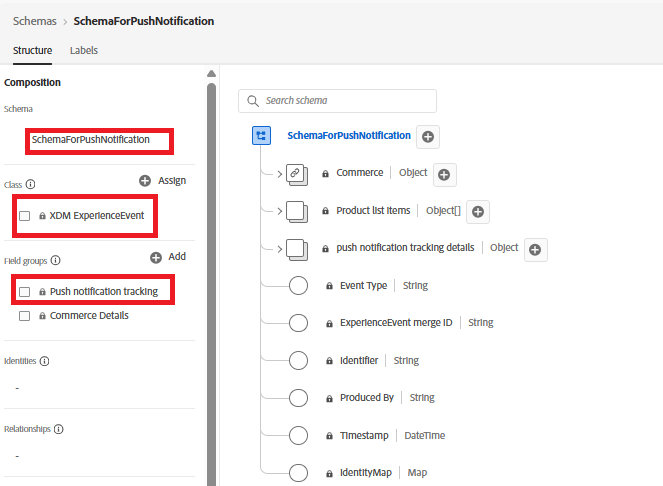
Create event schema for tracking push notifications
Create a new XDM ExperienceEvent schema named SchemaForPushNotification. Add the Push Notification Tracking and Commerce Details field groups to this schema. The fields from the Commerce Details field group will be used to capture product information and trigger the custom price.drop event.
Create profile schema to save user’s consent
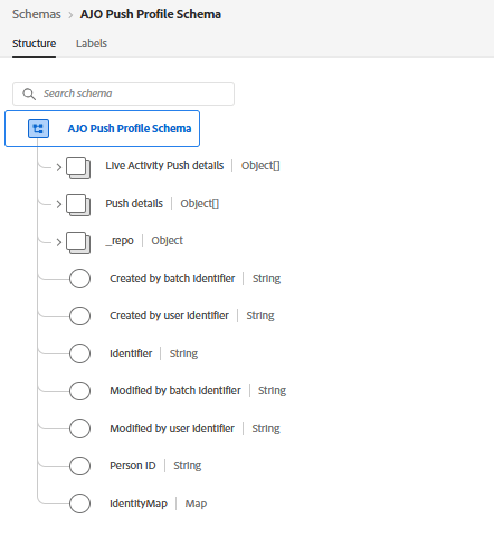
For this tutorial, we use the out-of-the-box AJO Push Profile Schema. This schema stores the user’s push subscription details, including the push token required to deliver web push notifications.
Create datasets for the schema
Create a dataset named DataSetForPushNotification using the event schema created earlier. For profile data, use the out-of-the-box AJO Push Profile Dataset, which is associated with the push profile schema. Make a note of the DataSetForPushNotification ID, as it will be required later in the tutorial when configuring the application via the .env file.
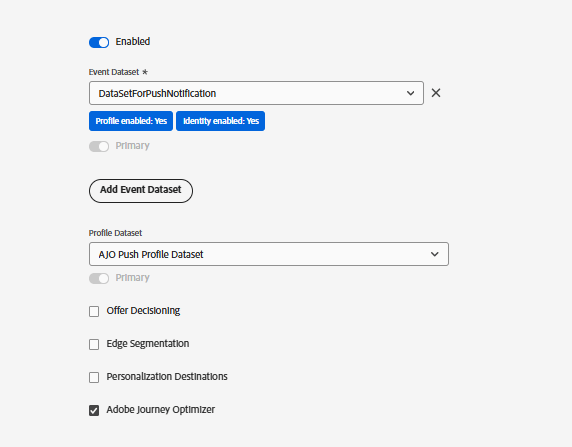
Create Datastream using the event and profile dataset
Create a new datastream named WebPushDataStream using the event and profile datasets created in the previous step. Make a note of the Datastream ID, as it will be required later in the tutorial when configuring the application via the .env file.