SDK instance configuration settings sdk-instance
This configuration section governs the Web SDK instance name, the IMS org it applies to, and the location that you want to send data to. By default, an instance is named alloy.
- Log in to experience.adobe.com using your Adobe ID credentials.
- Navigate to Data Collection > Tags.
- Select the desired tag property.
- Navigate to Extensions, then select Configure on the Adobe Experience Platform Web SDK card.
- Locate the instance name just below the expanded SDK instances accordion.
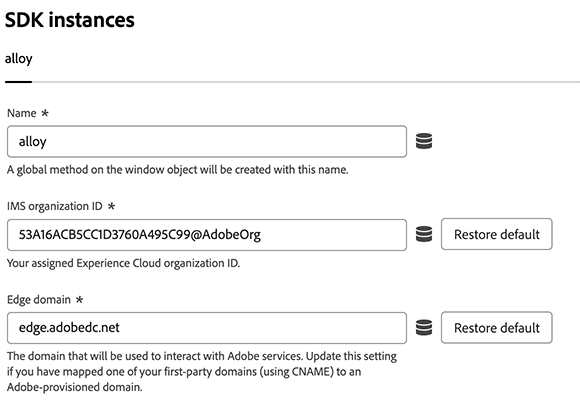
The following options are available:
Name
The Adobe Experience Platform Web SDK tag extension supports multiple instances on the page. The name is used to send data to multiple organizations without requiring duplicate Web SDK tag libraries. You can change the instance name to any valid JavaScript object name.
IMS organization ID
The ID of the organization that you would like the data sent to at Adobe. Most of the time, use the default value that is autopopulated. When you have multiple instances on the page, populate this field with the value of the second organization you want to send data to.
Edge domain
The domain that the extension sends and receives data from. By default, the field contains <COMPANYID>.data.adobedc.net. Older implementations might contain a default value of edge.adobedc.net, which is also valid.
Adobe recommends using a first-party domain in most cases. See the Adobe-managed certificate program for instructions on how to set up a first-party domain suitable for data collection. See also edgeDomain in the JavaScript library documentation for guidance setting this value.