Consent configuration settings consent
The Consent section allows you to select the default level of consent that is assumed if no other explicit consent preference is provided. Default consent level is not saved to user profiles.
- Log in to experience.adobe.com using your Adobe ID credentials.
- Navigate to Data Collection > Tags.
- Select the desired tag property.
- Navigate to Extensions, then select Configure on the Adobe Experience Platform Web SDK card.
- Scroll down to the Consent section.
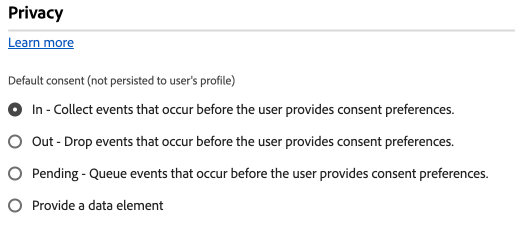
This section contains a single set of radio buttons which determines the default consent level:
- In: Collect events that occur before the user provides consent preferences.
- Out: Drop events that occur before the user provides consent preferences.
- Pending: Queue events that occur before the user provides consent preferences. When consent is granted, queued events are sent to Adobe. When consent is denied, queued events are discarded.
- Provide a data element: Select a data element that determines one of the above configuration settings. Valid values include the strings
"in","out", or"pending".
If your organization requires explicit user consent to collect data, Adobe recommends setting default consent to either Out or Pending.
recommendation-more-help
12b4e4a9-5028-4d88-8ce6-64a580811743