Send event
The Send event action sends a payload to a datastream on the Adobe Experience Platform Edge Network. It is a core feature of data collection and personalization; almost all organizations use this action as part of their Web SDK implementation.
- Log in to CX Enterprise using your Adobe ID credentials.
- Navigate to Data Collection > Tags.
- Select the desired tag property.
- Navigate to Rules, then select the desired rule.
- Under Actions, select an existing action or create an action.
- Set the Extension dropdown field to Adobe Experience Platform Web SDK, then set the Action type to Send event.
General fields
-
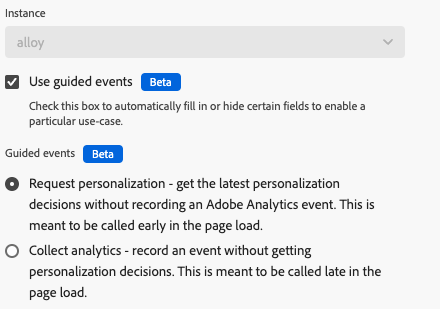
Instance: The SDK instance that the action applies to. This drop-down menu is disabled if your implementation uses a single SDK instance.
-
Use guided events: Enable this option to automatically fill in or hide certain fields to enable a particular use case. This setting can help reduce noise of available options when setting up the action for each respective purpose, and follows Adobe’s best practices of Top/bottom page events. Enabling this checkbox triggers the display of the following radio buttons:
-
Request personalization: Get the latest personalization decisions without recording an Adobe Analytics event. It is most commonly called at the top of the page. When selected, this radio button sets the following fields:
- Type is locked to Decisioning Proposition Fetch
- Render visual personalization decisions is locked to enabled
- Automatically send a display event is locked to disabled
-
Collect analytics: Record an event without getting personalization decisions. It is most commonly called at the bottom of the page. When selected, this radio button sets the following fields:
- Include rendered propositions is locked to enabled
-
Data fields
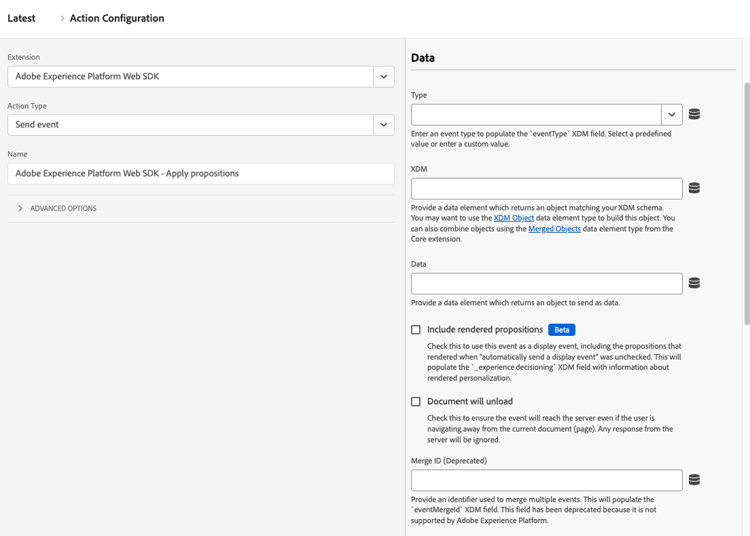
- Type: The event type. You can select from a pre-defined set of values, or define your own value. See Accepted values for
eventTypefor more information. The JavaScript library equivalent to this field iseventType. - XDM: The XDM payload that you want to send to Adobe. You can use either an XDM object or Variable in this field. If you have rules that populate multiple XDM objects, you can use Merged objects to combine them.
- Data: The data payload that you want to send to Adobe. Some apps and services do not require adhering to an XDM schema, such as Adobe Analytics or Adobe Target. Use a Variable data element type for this field.
- Include rendered propositions: Enable this checkbox to use this event as a display event, including the propositions that rendered when “automatically send a display event” was unchecked. The
_experience.decisioningXDM field populates with information about rendered personalization. - Document will unload: Enable this checkbox to make sure that the event reaches the server even if the user navigates away from the page. This setting allows events to reach the server, but responses from the Edge Network are ignored.
- Merge ID (Deprecated): Populates the
eventMergeIdXDM field.
Personalization fields
-
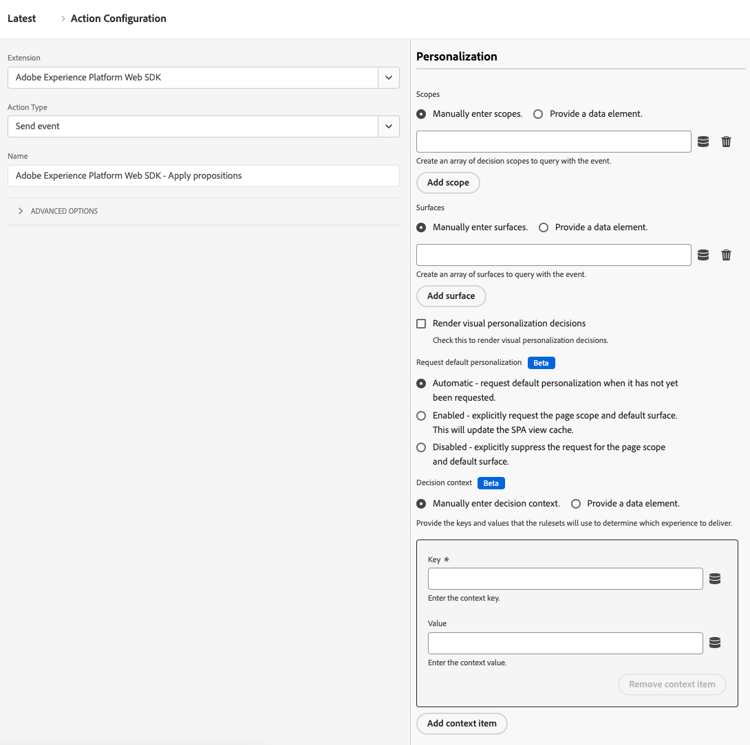
Scopes: An array of scopes that you want to explicitly request from personalization. You can enter the scopes manually, or provide a data element. When manually entering scopes, each field represents one scope. Select Add scope to add more scopes to the action.
-
Surfaces: An array of surfaces to query with the event. See Create web experiences in the Adobe Journey Optimizer documentation for more information. When manually entering surfaces, each field represents one surface. Select Add surface to add more surfaces to the action.
-
Render visual personalization decisions: A checkbox that, when enabled, lets you render personalized content on the page. See Render DOM actions automatically for more information.
-
Request default personalization: Controls whether the page-wide scope and default surface is requested. By default, it is requested automatically during the first
sendEventcall of the page load. The JavaScript library equivalent to these radio buttons isrequestDefaultPersonalization. You can choose from the following options:- Automatic: The default behavior. Only request default personalization when it has not yet been requested.
- Enabled: Explicitly request the page scope and default surface. This updates the SPA view cache.
- Disabled: Explicitly suppress the request for the page scope and default surface.
-
Decision context: A key-value map that is used when evaluating Adobe Journey Optimizer rulesets for on-device decisioning. You can provide the decision context manually or through a data element.
Advertising fields
-
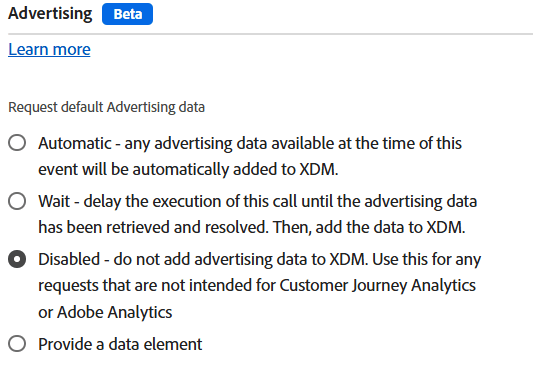
Request default advertising data: Determines when (or if) the library adds advertising information to the XDM payload. You can choose from the following options:
- Automatic: Any advertising data available at the time of the event is added to the event payload.
- Wait: Delay sending the event until advertising data is received.
- Disabled: Do not add advertising data to the event payload. Select this option if your implementation does not use Adobe Analytics or Customer Journey Analytics.
Datastream configuration overrides
This command supports datastream configuration overrides, giving you control over which apps and services receive this data. When you set a datastream configuration override in both an individual command and within the tag extension configuration settings, the individual command takes precedence. See Datastream configuration overrides for more information.