[Beta]{class="badge informative"}
Connect TikTok Ads to Experience Platform using the UI
Learn how to connect your TikTok for Business account to Adobe Experience Platform using the Sources workspace. The TikTok Ads source retrieves campaign, ad, and performance data and maps it to Experience Data Model (XDM) compatible datasets.
Getting started
This tutorial requires a working understanding of the following Experience Platform components:
- Sources: Experience Platform allows you to ingest data from external applications and services.
- Experience Data Model (XDM): The standardized framework that Experience Platform uses to organize customer experience data.
- Datasets: The storage construct used to hold ingested data.
- Real-Time Customer Profile: Provides a unified profile from data collected across multiple sources.
For more information, read the TikTok Ads source overview.
Prerequisites
Before you connect TikTok Ads to Experience Platform, complete the app setup and approval steps described in the TikTok Ads source overview, including business verification and app permission group configuration.
You must also have a TikTok for Business account that you can use to sign in.
Connect your TikTok Ads account
In the Experience Platform UI, select Sources to open the Sources workspace. Select the Catalog tab, then select Set up on the TikTok Ads source card.
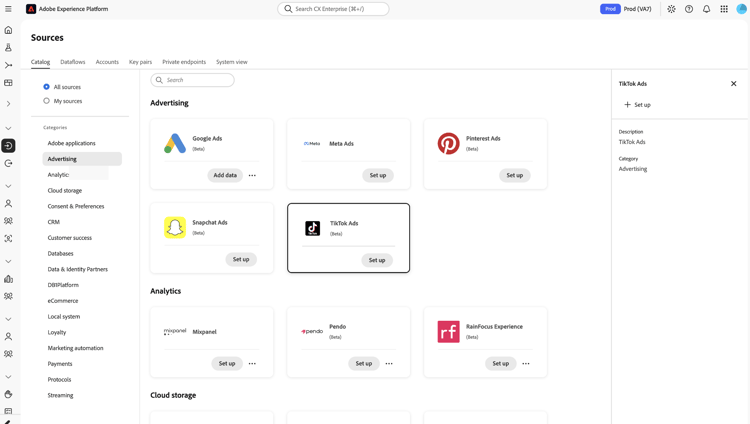
The Authentication tab is where you create the account that stores your TikTok connection details. Select New account, or select Existing account to reuse an account, then provide the following under Source connection details:
Select Connect to source to open the TikTok sign-in page.
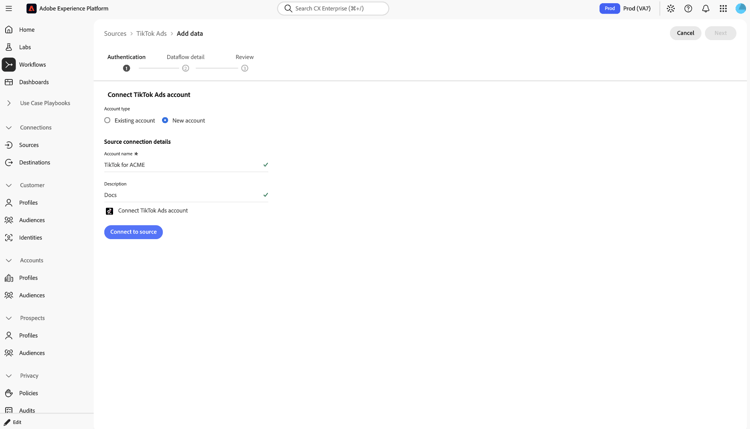
Sign in with your TikTok for Business account. After you sign in, you are redirected back to Experience Platform.
You do not select an advertiser account.
After you return to Experience Platform, select Next to continue. You can reuse this connection across multiple dataflows.
Provide dataflow details
Enter a Dataflow name and an optional Description.
Select Next to continue to the review step.
Review your dataflow
Review your dataflow, then select Finish.
Next steps
By following this tutorial, you have connected your TikTok Ads account to Experience Platform. Read the TikTok Ads source overview to understand the backfill and incremental jobs that run against your new dataflow.