Oracle Eloqua (V2) source overview
Oracle Eloqua is a powerful, enterprise-grade marketing automation platform designed to help organizations, primarily in the B2B space, automate and personalize the complex process of managing leads and orchestrating buyer journeys. It serves as a central hub where marketing teams can define, deploy, and measure sophisticated campaigns across multiple digital channels, ensuring prospects receive the right content at the precise moment they are most engaged. The supported objects for ingestion through Eloqua are Contacts, Accounts, Campaigns, and Activities. Once the initial ingestion is completed, any changed data is imported using a scheduled incremental process.
You can use the Eloqua source to connect your Eloqua account to Adobe Experience Platform. Read the documentation below to learn how to get started.
Use case examples use-case-examples
Below is a table outlining the marketing objects supported by the Eloqua (V2) integration with Adobe Experience Platform. For each object, you’ll find a description along with sample use cases to illustrate how integrating Eloqua data with Real-Time CDP can boost marketing effectiveness and campaign outcomes.
Prerequisites prerequisites
Read the sections below for prerequisite set up that you must complete before you can connect your source to Experience Platform.
Set up application for authentication
Follow the steps below to learn how to set up your Eloqua account and connect to Experience Platform using basic authentication.
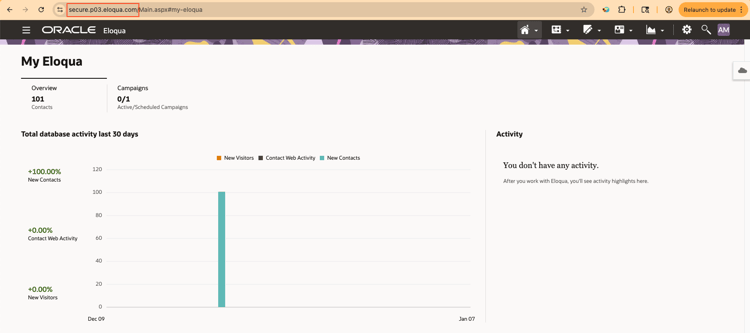
To get started, log in to your Eloqua instance as an admin (or as a user who has access to create users, security groups, and apps).
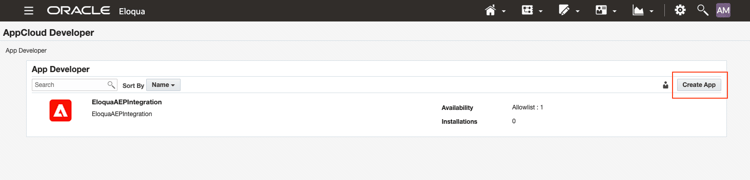
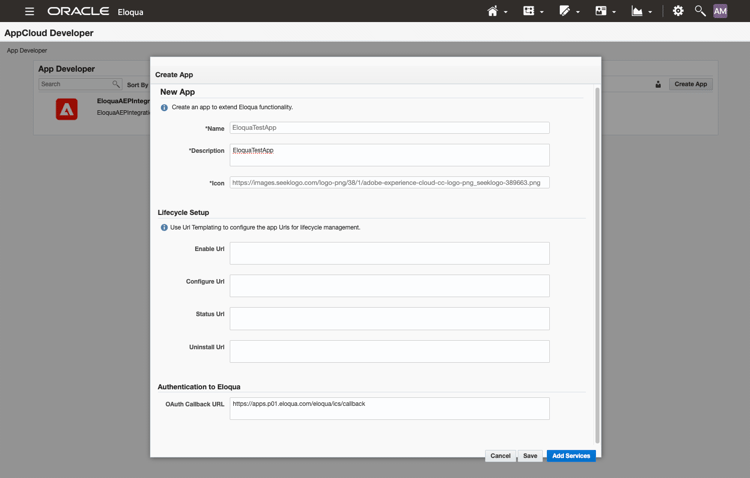
Navigate to Settings > Platform Extensions > App Cloud Developer > Create App. Provide details for your app, including its name, description, icon, and the OAuth Callback URL. Select Save when finished.
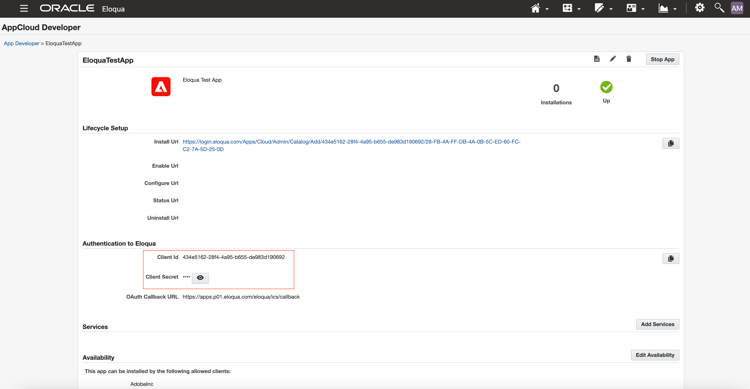
With your app created, navigate to Authentication to Eloqua and retrieve the Client ID and Client secret from the newly created app. These values will be used later when connecting to Experience Platform.
Security groups allow administrators to control what levels of access users have to assets, features, interfaces, and so on. To create a security group, navigate to Settings > Users. Then, select the Group tab on the left panel and then select Create new Security Group.
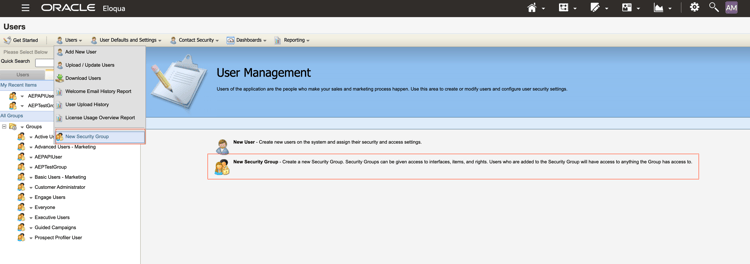
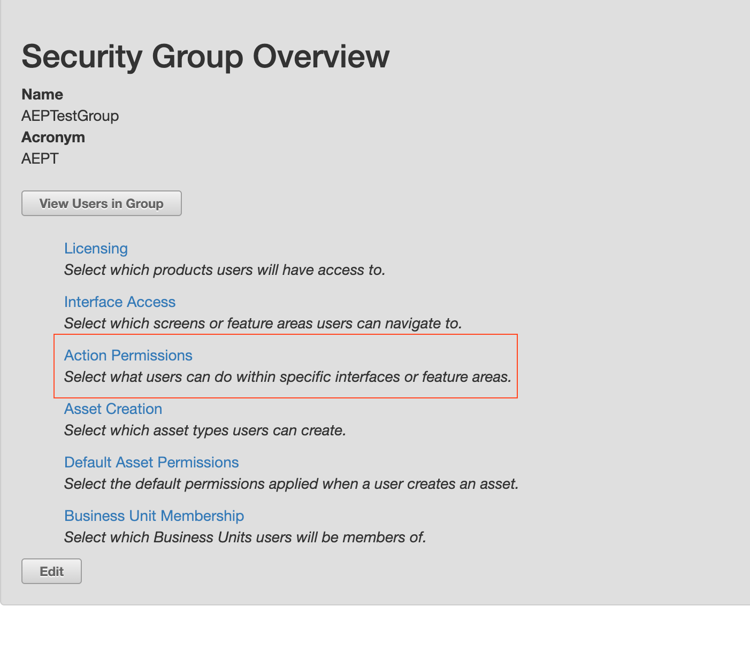
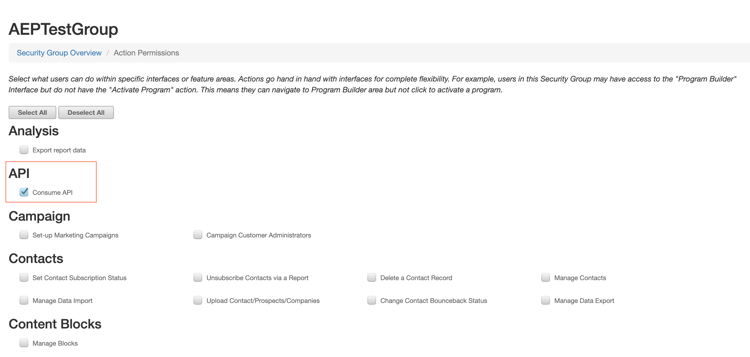
Use the Security Group Overview window to provide a name and an acronym for your security group. Once created, navigate to Action Permissions and add the Consume API permission from the list and select Save.
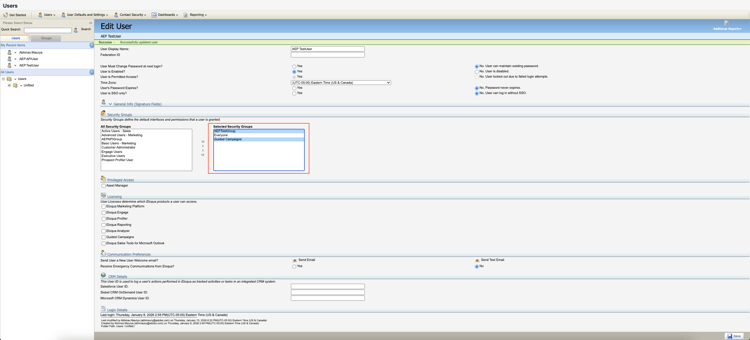
To ingest campaign data, navigate to the Edit User interface and add Guided Campaigns to your selected security group.
You can optionally create additional an additional user and add that user to a security group. For detailed steps, read the Eloqua documentation on creating a user and assigning a user to a security group.
Gather required credentials
You must provide values for the following credentials to connect Eloqua to Experience Platform.
CompanyName\Username.http:// or https:// when authenticating.Eloqua mapping guide
- Contacts:
C_DateModified - Accounts:
M_DateModified - Activity:
CreatedAt - Campaign:
updatedAt
The following tables provide detailed mappings between Eloqua source fields and their corresponding Experience Data Model (XDM) destination fields in Experience Platform. Each row outlines the transformation logic, whether the field is immutable, and provides additional notes to help you understand how your Eloqua data will be ingested and structured in Experience Platform.
Accounts
"Eloqua""${SOURCE_INSTANCE_ID}"SOURCE_INSTANCE_ID will be automatically replaced by the connector.Idconcat(Id, "\\@${SOURCE_INSTANCE_ID}.Eloqua")SOURCE_INSTANCE_ID will be automatically replaced by the connector.M_CompanyNameM_CountryM_Address1M_CityM_State_ProvM_Zip_PostalM_BusPhoneM_Fax1M_Account_Engagement_ScoreM_Account_Type1M_Wesbsite1M_Employees1to_decimal(M_Annual_Revenue1)M_DateModifiedM_DateCreatedM_Industry1iif(M_SFDCAccountID != null && M_SFDCAccountID != "", to_object("sourceType", "Salesforce", "sourceInstanceID", "${CRM_INSTANCE_ID}", "sourceID", M_SFDCAccountID, "sourceKey", concat(M_SFDCAccountID, "\\@${CRM_INSTANCE_ID}.Salesforce")), iif(M_MSCRMAccountID != null && M_MSCRMAccountID != "", to_object("sourceType", "Dynamics", "sourceInstanceID", "${CRM_INSTANCE_ID}", "sourceID", M_MSCRMAccountID, "sourceKey", concat(M_MSCRMAccountID, "\\@${CRM_INSTANCE_ID}.Dynamics")), null))${CRM_INSTANCE_ID} with your actual CRM instance ID, either your Salesforce or Dynamics instance ID. During ingestion, if M_SFDCAccountID is present, the connector will generate the external key using that value and append \@CRM_INSTANCE_ID.Salesforce. If that field is empty, the connector will use M_MSCRMAccountID and append \@CRM_INSTANCE_ID.Dynamics instead. If both fields are empty, this field will be set to null.Activities
"Eloqua""${SOURCE_INSTANCE_ID}"SOURCE_INSTANCE_ID will be automatically replaced by the connector.ContactIdconcat(ContactId, "\\@${SOURCE_INSTANCE_ID}.Eloqua")SOURCE_INSTANCE_ID will be automatically replaced by the connector.ExternalIdiif(ActivityType!=null && ActivityType!="", iif(ActivityType=="EmailSend", "directMarketing.emailSent", iif(ActivityType=="EmailOpen", "directMarketing.emailOpened", iif(ActivityType=="EmailClickthrough", "directMarketing.emailClicked", iif(ActivityType=="Unsubscribe", "directMarketing.emailUnsubscribed", iif(ActivityType=="Bounceback", "directMarketing.emailBounced", iif(ActivityType=="FormSubmit", "web.formFilledOut", iif(ActivityType=="PageView", "web.webpagedetails.pageViews", ActivityType))))))), null)ActivityDateiif(AssetType == "Email", AssetName, null)iif(AssetType == "Email", to_object("sourceType", "Eloqua", "sourceInstanceID", "${SOURCE_INSTANCE_ID}","sourceID",${AssetId}, "sourceKey", concat(${AssetId},"\\@${SOURCE_INSTANCE_ID}.Eloqua")), null)SOURCE_INSTANCE_ID will be automatically replaced by the connector.iif(AssetType == "Email", EmailAddress, null)iif(ActivityType == "Bounceback", SmtpStatusCode, null)iif(AssetType == "Email", SmtpMessage, null)iif(AssetType == "Email", EmailWebLink, null)iif(ActivityType == "FormSubmit", AssetName, null)iif(ActivityType == "FormSubmit", to_object("sourceType", "Eloqua", "sourceInstanceID", "${SOURCE_INSTANCE_ID}","sourceID",${AssetId}, "sourceKey", concat(${AssetId},"\\@${SOURCE_INSTANCE_ID}.Eloqua")), null)SOURCE_INSTANCE_ID will be automatically replaced by the connector.iif(ActivityType == "PageView", AssetName, null)iif(ActivityType == "PageView", to_object("sourceType", "Eloqua", "sourceInstanceID", "${SOURCE_INSTANCE_ID}","sourceID",${AssetId}, "sourceKey", concat(${AssetId},"\\@${SOURCE_INSTANCE_ID}.Eloqua")), null)SOURCE_INSTANCE_ID will be automatically replaced by the connector.iif(ActivityType == "PageView", Url, null)Campaigns
"Eloqua""${SOURCE_INSTANCE_ID}"SOURCE_INSTANCE_ID will be automatically replaced by the connector.idconcat(id, "\\@${SOURCE_INSTANCE_ID}.Eloqua")SOURCE_INSTANCE_ID will be automatically replaced by the connector.nameendAtstartAtactualCostbudgetedCostdescriptioncurrentStatuscampaignTypecreatedAtupdatedAtContacts
"Eloqua""${SOURCE_INSTANCE_ID}"SOURCE_INSTANCE_ID will be automatically replaced by the connector.Idconcat(Id, "\\@${SOURCE_INSTANCE_ID}.Eloqua"SOURCE_INSTANCE_ID will be automatically replaced by the connector.C_CompanyC_Website1C_Job_Title1C_FaxC_MobilePhoneiif(C_SFDCLeadID != null && C_SFDCLeadID != "\\", to_object("sourceType", "Salesforce", "sourceInstanceID", "${CRM_INSTANCE_ID}", "sourceID", C_SFDCLeadID, "sourceKey", concat(C_SFDCLeadID, "\\@${CRM_INSTANCE_ID}.Salesforce")), iif(C_SFDCContactID != null && C_SFDCContactID != "\\", to_object("sourceType", "Salesforce", "sourceInstanceID", "${CRM_INSTANCE_ID}", "sourceID", C_SFDCContactID, "sourceKey", concat(C_SFDCContactID, "\\@${CRM_INSTANCE_ID}.Salesforce")), null))iif(C_MSCRMLeadID != null && C_MSCRMLeadID != "\\", to_object("sourceType", "Dynamics", "sourceInstanceID", "${CRM_INSTANCE_ID}", "sourceID", C_MSCRMLeadID, "sourceKey", concat(C_MSCRMLeadID, "\\@${CRM_INSTANCE_ID}.Dynamics")), iif(C_MSCRMContactID != null && C_MSCRMContactID != "\\", to_object("sourceType", "Dynamics", "sourceInstanceID", "${CRM_INSTANCE_ID}", "sourceID", C_MSCRMContactID, "sourceKey", concat(C_MSCRMContactID, "\\@${CRM_INSTANCE_ID}.Dynamics")), null))"iif(C_SFDCLeadID != null && C_SFDCLeadID != "\\", to_object("sourceType", "Salesforce", "sourceInstanceID", "${CRM_INSTANCE_ID}", "sourceID", C_SFDCLeadID, "sourceKey", concat(C_SFDCLeadID, "\\@${CRM_INSTANCE_ID}.Salesforce")), iif(C_SFDCContactID != null && C_SFDCContactID != "\\", to_object("sourceType", "Salesforce", "sourceInstanceID", "${CRM_INSTANCE_ID}", "sourceID", C_SFDCContactID, "sourceKey", concat(C_SFDCContactID, "\\@${CRM_INSTANCE_ID}.Salesforce")), null))"iif(C_MSCRMLeadID != null && C_MSCRMLeadID != "\\", to_object("sourceType", "Dynamics", "sourceInstanceID", "${CRM_INSTANCE_ID}", "sourceID", C_MSCRMLeadID, "sourceKey", concat(C_MSCRMLeadID, "\\@${CRM_INSTANCE_ID}.Dynamics")), iif(C_MSCRMContactID != null && C_MSCRMContactID != "\\", to_object("sourceType", "Dynamics", "sourceInstanceID", "${CRM_INSTANCE_ID}", "sourceID", C_MSCRMContactID, "sourceKey", concat(C_MSCRMContactID, "\\@${CRM_INSTANCE_ID}.Dynamics")), null))C_DateCreatedC_DateModifiediif(C_SFDCAccountID != null && C_SFDCAccountID != "\\", to_object("sourceType", "Salesforce", "sourceInstanceID", "${CRM_INSTANCE_ID}", "sourceID", C_SFDCAccountID, "sourceKey", concat(C_SFDCAccountID, "\\@${CRM_INSTANCE_ID}.Salesforce")), iif(C_MSCRMAccountID != null && C_MSCRMAccountID != "\\", to_object("sourceType", "Dynamics", "sourceInstanceID", "${CRM_INSTANCE_ID}", "sourceID", C_MSCRMAccountID, "sourceKey", concat(C_MSCRMAccountID, "\\@${CRM_INSTANCE_ID}.Dynamics")), null))iif(C_SFDCAccountID != null && C_SFDCAccountID != "\\", to_object("sourceType", "Salesforce", "sourceInstanceID", "${CRM_INSTANCE_ID}", "sourceID", C_SFDCAccountID, "sourceKey", concat(C_SFDCAccountID, "\\@${CRM_INSTANCE_ID}.Salesforce")), iif(C_MSCRMAccountID != null && C_MSCRMAccountID != "\\", to_object("sourceType", "Dynamics", "sourceInstanceID", "${CRM_INSTANCE_ID}", "sourceID", C_MSCRMAccountID, "sourceKey", concat(C_MSCRMAccountID, "\\@${CRM_INSTANCE_ID}.Dynamics")), null))C_Lead_Source___Original1C_Lead_Source___Original1C_Lead_Status1C_Lead_Status1C_FirstNameC_LastNameC_Middle_Name1C_SalutationC_CityC_CountryC_Zip_PostalC_State_ProvActivity type mapping reference
EmailSendEmailOpenEmailClickthroughUnsubscribeBouncebackFormSubmitPageViewOtherVariable placeholders
The mapping templates use the following variable placeholders that are replaced once a dataflow runs:
${SOURCE_INSTANCE_ID}${CRM_INSTANCE_ID}Connect Eloqua to Experience Platform
Proceed to configure your Eloqua source connection within Experience Platform. For a step-by-step guide on setting up the connection through the UI, refer to the tutorial here. Read this tutorial to learn about connecting your Eloqua account, selecting data, mapping fields, scheduling ingestions, and monitoring your dataflows.