[Ultimate]{class="badge positive"}
Databricks
Databricks is a cloud-based platform designed for data analytics, machine learning, and AI. You can use Databricks to integrate and provide a holistic environment for building, deploying, and managing data solutions at scale.
Use the Databricks source to connect your account and ingest your Databricks data to Adobe Experience Platform.
Prerequisites
Complete the prerequisite steps to successfully connect your Databricks account to Experience Platform.
Retrieve your container credentials
Retrieve your Experience Platform Azure Blob Storage credentials to enable your Databricks account to access it later.
To retrieve your credentials, make a GET request to the /credentials endpoint of the Connectors API.
API format
GET /data/foundation/connectors/landingzone/credentials?type=dlz_databricks_source
Request
The following request retrieves the credentials for your Experience Platform Azure Blob Storage.
| code language-shell |
|---|
|
Response
A successful response provides your credentials (containerName, SASToken, storageAccountName) for later use in Apache Spark configuration for Databricks.
| code language-json |
|---|
|
| table 0-row-2 1-row-2 2-row-2 3-row-2 4-row-2 5-row-2 | |
|---|---|
| Property | Description |
containerName |
The name of your Azure Blob Storage container. You will use this value later when completing your Apache Spark configuration for Databricks. |
SASToken |
The shared access signature token for your Azure Blob Storage. This string contains all of the information necessary to authorize a request. |
storageAccountName |
The name of your storage account. |
SASUri |
The shared access signature URI for your Azure Blob Storage. This string is a combination of the URI to the Azure Blob Storage for which you are being authenticated to and its corresponding SAS token. |
expiryDate |
The date when your SAS token will expire. You must refresh your token before the expiry date in order to continue using it in your application for uploading data to the Azure Blob Storage. If you do not manually refresh your token before the stated expiry date, then it will automatically refresh and provide a new token when the GET credentials call is performed. |
Refresh your credentials
To refresh your credentials, make a POST request and include action=refresh as a query parameter.
API format
POST /data/foundation/connectors/landingzone/credentials?type=dlz_databricks_source&action=refresh
Request
The following request refreshes the credentials for your Azure Blob Storage.
| code language-shell |
|---|
|
Response
A successful response returns your new credentials.
| code language-json |
|---|
|
Configure access to your Azure Blob Storage
-
If your cluster has been terminated, the service will automatically restart it during a flow run. However, you must ensure that your cluster is active when creating a connection or a dataflow. Additionally, your cluster must be active if you are performing actions like data preview or exploration as these actions cannot prompt the automatic restart of a terminated cluster.
-
Your Azure container includes a folder named
adobe-managed-staging. To ensure the seamless ingestion of data, do not modify this folder.
Next, you must ensure that your Databricks cluster has access to the Experience Platform Azure Blob Storage account. In doing so, you can use Azure Blob Storage as an interim location for writing delta lake table data.
To provide access, you must configure an SAS token on the Databricks cluster as part of your Apache Spark configuration.
In your Databricks interface, select Advanced options and then input the following in the Spark config input box.
fs.azure.sas.{CONTAINER_NAME}.{STORAGE-ACCOUNT}.blob.core.windows.net {SAS-TOKEN}
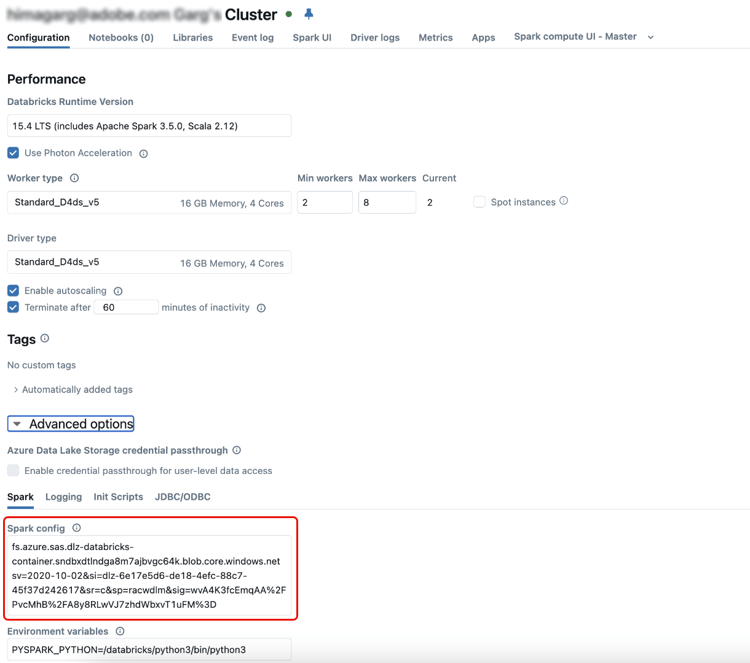
If unprovided, the copy activity in the flow run fails and returns the following error:
Unable to access container '{CONTAINER_NAME}' in account '{STORAGE_ACCOUNT}.blob.core.windows.net' using anonymous credentials. No credentials found in the configuration. Public access is not permitted on this storage account.
Unity Catalog governance and cluster access mode
The Databricks source connector performs read and write (I/O) operations on your Databricks cluster during ingestion. These operations require Unity Catalog object permissions and, depending on your cluster’s access mode, additional cluster-level permissions. Configure both before connecting.
Grant Unity Catalog permissions
Grant the following Unity Catalog permissions on the source objects to the identity used by the connection (a service principal):
USE CATALOGUSE SCHEMASELECTConfigure your cluster’s access mode
Select the access mode used by your Databricks cluster and complete the corresponding configuration.
Standard (Shared) access mode
Standard (Shared) access mode enforces Table Access Control. In addition to the Unity Catalog grants above, the connector’s I/O operations require the ANY FILE privilege. Grant it to the connector’s service principal:
GRANT SELECT ON ANY FILE TO `{SERVICE_PRINCIPAL}`;
GRANT MODIFY ON ANY FILE TO `{SERVICE_PRINCIPAL}`;
ANY FILE is a legacy privilege for direct file access and is not governed by Unity Catalog — it has a broader scope than Unity Catalog object permissions, and does not itself grant or bypass access to Unity Catalog objects (Unity Catalog tables still require their own UC grants). Review it with your security team; to avoid granting it, use Dedicated access mode instead.If the permissions required for your cluster’s access mode are not in place, ingestion fails during execution with the following error:
[INSUFFICIENT_PERMISSIONS] ... on any file. SQLSTATE: 42501.
Connect Databricks to Experience Platform
Now that you have completed the prerequisite steps, you can now proceed and connect your Databricks account to Experience Platform: