Audience validation
When you write an audience definition in Adobe Experience Platform, audience validation provides built-in validations and guardrails to ensure your audiences are not only accurate, but also stable and scalable.
By adhering to audience definition best practices, you ensure your audiences can evaluate faster, ensure your logic remains efficient even when your audience size grows, and reduce the risk of evaluation failures during high-traffic periods. Optimized audiences also improve activation speed to destinations, reduce real-time personalization latency, and maintain overall sandbox stability.
Experience Platform runs these validations in real-time as you build your audience in Audience Builder. When you add events or attributes that exceed validation thresholds, you receive immediate feedback within the Audience Builder interface.
Validation types validation-types
When audience validation runs on your audiences, there are two different types of constructs that can be violated: Critical validation constructs and performance optimization constructs.
If a critical validation construct is violated, the system will prevent you from saving your audience to protect the stability of your sandbox. If a performance optimization construct is violated, you will be able to save your audience, but it is highly recommended you update your audience definition to avoid performance issues.
Validation checks validation-checks
Currently, the following validations are supported:
[Critical validation]{class="badge negative"} Logical complexity logical-complexity
The logical complexity validation analyzes the structure of your logical statements (AND, OR, NOT) within your audience definition. Specifically, it looks for audience definitions that will force the system to perform an excessive number of comparisons per profile.
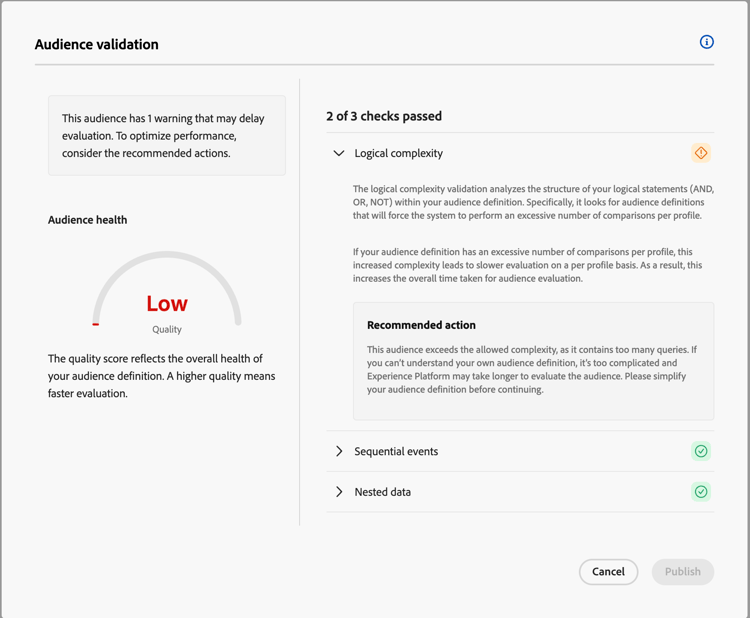
If your audience definition has an excessive number of comparisons per profile, this increased complexity leads to slower evaluation on a per profile basis. As a result, this increases the overall time taken for audience evaluation.
To avoid triggering this validation, keep your audience definition simple. If you can’t understand your own audience definition, it’s too complicated and Experience Platform may take longer to evaluate the audience.
Example
Let’s say you want to find customers who live in certain states. You could write this inefficiently by checking to see if the profile has the value for a state that matches one of the listed 45 values, as follows:
| code language-none |
|---|
|
However, by using a not check, you only need to check if the profile does not have one of the 5 listed values, resulting in a much more efficient query.
| code language-none |
|---|
|
Alternatively, let’s say you want to find customers who are Canadians on your trial plan. A less efficient approach would be to look for Canadians on your trial plan by manually excluding every other plan, one by one, and checking that the profile isn’t in any of them.
| code language-none |
|---|
|
Instead, you should be direct and target the specific plan you want to include.
| code language-none |
|---|
|
[Critical validation]{class="badge negative"} Sequential event complexity sequential-event-complexity
The sequential event complexity validation limits the number of sequential events in a sequence to 3 events.
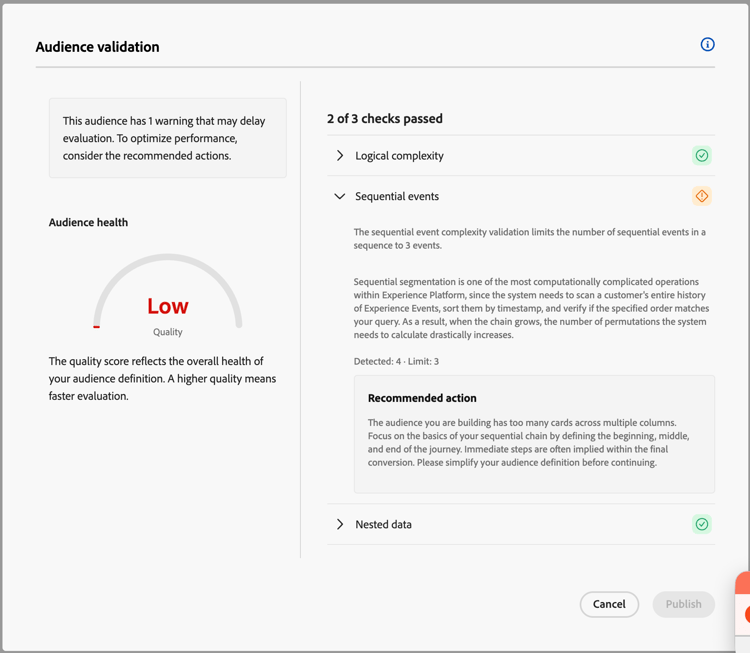
Sequential segmentation is one of the most computationally complicated operations within Experience Platform, since the system needs to scan a customer’s entire history of Experience Events, sort them by timestamp, and verify if the specified order matches your query. As a result, when the chain grows, the number of permutations the system needs to calculate drastically increases.
To avoid triggering this validation, focus on the basics of your sequential chain by defining the beginning, middle, and end of the journey. Immediate steps are often implied within the final conversion.
Example
Let’s say you want to target users who have viewed a product, added it to the cart, and purchased it. A less efficient approach would check every individual state of the user’s path. For example, the following query goes through this sequence of events: Logs into website -> Searches for product -> Views a product page -> Adds to cart -> Navigates to checkout -> Purchase event
| code language-none |
|---|
|
However, by reducing the sequence to its beginning, middle, and end, you only need to have a sequence of events that is 3 events long, resulting in a more efficient query. For example, the following query goes through this sequence of events: Views a product page -> Adds to cart -> Purchase event
| code language-none |
|---|
|
[Performance optimization]{class="badge yellow"} Aggregated count aggregated-count
The aggregated count check limits the number of aggregation events used within your audience to 3 conditions.
A standard event only needs to find a single matching event to qualify a user. However, an aggregation event needs to read and analyze a user’s entire history of events before it can make a decision, leading to slower processing times with more aggregation events used.
To avoid triggering this validation, only use specific counts when it’s strictly necessary for the audience definition. If you only need to know if a user has engaged once, for example, you can use the standard “Exists” logic, rather than using a “Count > 0” event.
[Performance optimization]{class="badge yellow"} Nested data complexity nested-data-complexity
The nested data complexity validation limits the number of nested data within an audience definition to 2 layers.
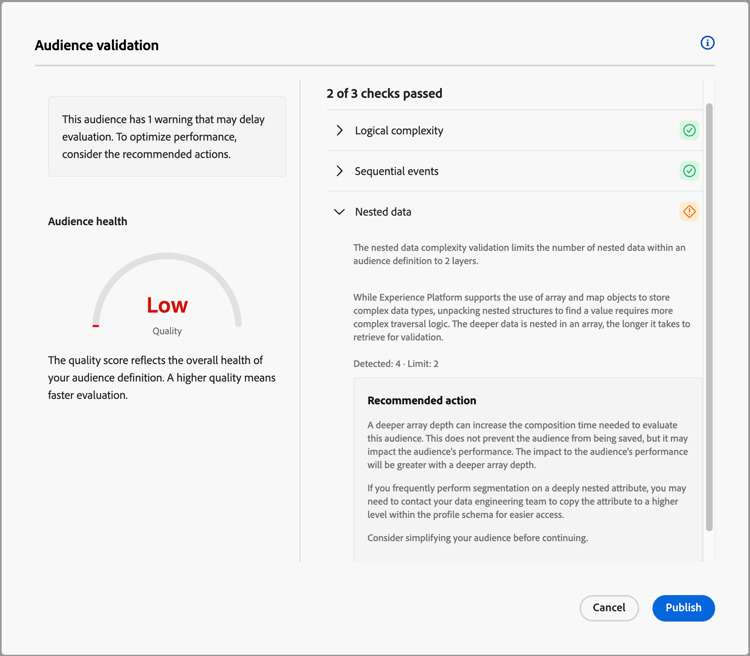
While Experience Platform supports the use of array and map objects to store complex data types, unpacking nested structures to find a value requires more complex traversal logic. The deeper data is nested in an array, the longer it takes to retrieve for validation.
If you frequently perform segmentation on a deeply nested attribute, you may need to contact your data engineering team to copy the attribute to a higher level within the profile schema for easier access.
[Performance optimization]{class="badge yellow"} Audience size audience-size
The audience size validation checks if your audience definition is so broad that more than 30% of the total profiles in your sandbox qualify for the audience.
While Experience Platform can handle large audiences, an audience definition that is too vague (such as All Active Customers) can increase evaluation time and activation latency.
If you need to create an audience that qualifies more than 30% of your profile store, ensure that the audience’s first evaluation is done using flexible audience evaluation. Evaluating the audience with an on-demand evaluation can reduce the overall impact of a large audience on the daily segmentation job.
Next steps
After reading this guide, you have a better understanding of how Experience Platform runs automatic validations to improve evaluation, stability, and scalability. For more information on creating audiences using the UI, read the Audience Builder documentation.
Appendix
The following appendix lists frequently asked questions about audience validation in Experience Platform.
Frequently asked questions faq
What happens if I ignore the warnings and save the audience?
For performance optimization warnings, the audience will be saved and the system will attempt to evaluate it. However, you may experience significantly slower processing times. In extreme situations, if the data volume is high enough, the segmentation job may fail or time out, forcing you to redesign your audience.
For critical validation errors, you will not be able to save the audience.
Can I request an increase to the “Sequential Event” limit?
Will these new validations break my existing audiences?
I have complex data requirements. How can I avoid the “Nested Data” warning?
subscriptionStatus and loyaltyTier) to the top level of the profile.Will these checks apply to both Draft and Published audiences?