Flexible audience evaluation guide

AVAILABILITY
Flexible audience evaluation is only available on instances of Experience Platform running on Microsoft Azure. To learn more about the supported Experience Platform infrastructure, see the Experience Platform multi-cloud overview.
Additionally, flexible audience evaluation is only available for use with Real-Time CDP B2C Edition.

Flexible audience evaluation lets you run a batch segmentation job on demand. With flexible audience evaluation, you can run ad-hoc campaign launches, just-in-time communications, or other time-sensitive activities.

Guardrails guardrails

When you run flexible audience evaluation, please keep the following conditions in mind:

  • You can only use flexible audience evaluation twice per day per sandbox. This limit resets at midnight (UTC).
  • You have a maximum of 50 flexible audience evaluation runs per year per production sandbox.
    • A year is defined as one year starting on the date of your Experience Platform contract for flexible audience evaluation. For example, if you contract started on May 18th, your number of flexible audience evaluation runs will reset every May 18th.
  • You have a maximum of 100 flexible audience evaluation runs per year per development sandbox.
    • A year is defined as one year starting on the date of your Experience Platform contract for flexible audience evaluation. For example, if you contract started on May 18th, your number of flexible audience evaluation runs will reset every May 18th.
  • All the audiences must have an origin of “Segmentation Service”.
  • All the audiences must be evaluated using batch segmentation.
  • All the audiences must be people-based audiences.
  • You can only select a maximum of 20 audiences per flexible audience evaluation run.
NOTE
You can purchase additional flexible audience evaluation runs per year. For more information, contact Adobe Customer Care.

Access access

In order to use flexible audience evaluation, you must have the following permission:

  • Evaluate Segment to an Audience under the Profile Management section.

For more information on role-based access control, please read the access control overview.

Running flexible audience evaluation

You can run flexible audience evaluation by using either the Experience Platform APIs or UI.

Experience Platform APIs

To run flexible audience evaluation within the Experience Platform APIs, you’ll need to create a segment job that contains the IDs of all the segment definitions (audiences) you want to evaluate.

note
NOTE
You can only add a maximum of 20 segment definition IDs per segment job API call.

You can create a new segment job by making a POST request to the /segment/jobs endpoint and including the IDs of the segment definitions in the request body.

accordion
A sample request for creating a new segment job
code language-shell
curl -X POST https://platform.adobe.io/data/core/ups/segment/jobs \
 -H 'Authorization: Bearer {ACCESS_TOKEN}' \
 -H 'Content-Type: application/json' \
 -H 'x-gw-ims-org-id: {ORG_ID}' \
 -H 'x-api-key: {API_KEY}' \
 -H 'x-sandbox-name: {SANDBOX_NAME}' \
 -d '[
    {
        "segmentId": "7863c010-e092-41c8-ae5e-9e533186752e"
    },
    {
        "segmentId": "07d39471-05d1-4083-a310-d96978fd7c85"
    }
 ]'
table 0-row-2 1-row-2
Property Description
segmentId The ID of the segment definition that you want to evaluate. These segment definitions can belong to different merge policies.

A successful response returns HTTP status 200 with information about your newly created segment job.

accordion
A sample response when creating a new segment job.
code language-json
{
    "id": "b31aed3d-b3b1-4613-98c6-7d3846e8d48f",
    "imsOrgId": "{ORG_ID}",
    "sandbox": {
        "sandboxId": "28e74200-e3de-11e9-8f5d-7f27416c5f0d",
        "sandboxName": "prod",
        "type": "production",
        "default": true
    },
    "profileInstanceId": "ups",
    "source": "api",
    "status": "PROCESSING",
    "batchId": "678f53bc-e21d-4c47-a7ec-5ad0064f8e4c",
    "computeJobId": 8811,
    "computeGatewayJobId": "9ea97b25-a0f5-410e-ae87-b2d85e58f399",
    "segments": [
        {
            "segmentId": "7863c010-e092-41c8-ae5e-9e533186752e",
            "segment": {
                "id": "7863c010-e092-41c8-ae5e-9e533186752e",
                "expression": {
                    "type": "PQL",
                    "format": "pql/json",
                    "value": "workAddress.country = \"US\""
                },
                "mergePolicyId": "25c548a0-ca7f-4dcd-81d5-997642f178b9",
                "mergePolicy": {
                    "id": "25c548a0-ca7f-4dcd-81d5-997642f178b9",
                    "version": 1
                }
            }
        },
        {
            "segmentId": "07d39471-05d1-4083-a310-d96978fd7c85",
            "segment": {
                "id": "07d39471-05d1-4083-a310-d96978fd7c85",
                "expression": {
                    "type": "PQL",
                    "format": "pql/json",
                    "value": "workAddress.country = \"US\""
                },
                "mergePolicyId": "25c548a0-ca7f-4dcd-81d5-997642f178b9",
                "mergePolicy": {
                    "id": "25c548a0-ca7f-4dcd-81d5-997642f178b9",
                    "version": 1
                }
            }
        }
    ],
    "metrics": {
        "totalTime": {
            "startTimeInMs": 1573203617195,
            "endTimeInMs": 1573204395655,
            "totalTimeInMs": 778460
        },
        "profileSegmentationTime": {
            "startTimeInMs": 1573204266727,
            "endTimeInMs": 1573204395655,
            "totalTimeInMs": 128928
        },
        "segmentedProfileCounter":{
            "7863c010-e092-41c8-ae5e-9e533186752e":1033
        },
        "segmentedProfileByNamespaceCounter":{
            "7863c010-e092-41c8-ae5e-9e533186752e":{
                "tenantiduserobjid":1033,
                "campaign_profile_mscom_mkt_prod2":1033
            }
        },
        "segmentedProfileByStatusCounter":{
            "7863c010-e092-41c8-ae5e-9e533186752e":{
                "exited":144646,
                "realized":2056
            }
        },
        "totalProfiles":13146432,
        "totalProfilesByMergePolicy":{
            "25c548a0-ca7f-4dcd-81d5-997642f178b9":13146432
        }
    },
    "requestId": "4e538382-dbd8-449e-988a-4ac639ebe72b-1573203600264",
    "schema": {
        "name": "_xdm.context.profile"
    },
    "properties": {
        "scheduleId": "4e538382-dbd8-449e-988a-4ac639ebe72b",
        "runId": "e6c1308d-0d4b-4246-b2eb-43697b50a149"
    },
    "_links": {
        "cancel": {
            "href": "/segment/jobs/b31aed3d-b3b1-4613-98c6-7d3846e8d48f",
            "method": "DELETE"
        },
        "checkStatus": {
            "href": "/segment/jobs/b31aed3d-b3b1-4613-98c6-7d3846e8d48f",
            "method": "GET"
        }
    },
    "updateTime": 1573204395000,
    "creationTime": 1573203600535,
    "updateEpoch": 1573204395
}

After creating the segment job, you can check on its status by making a GET request to the /segment/jobs endpoint, providing the ID of your newly created segment job in the request path.

accordion
Sample request to retrieve a segment job
code language-shell
curl -X GET https://platform.adobe.io/data/core/ups/segment/jobs/b31aed3d-b3b1-4613-98c6-7d3846e8d48f \
 -H 'Authorization: Bearer {ACCESS_TOKEN}' \
 -H 'x-gw-ims-org-id: {ORG_ID}' \
 -H 'x-api-key: {API_KEY}' \
 -H 'x-sandbox-name: {SANDBOX_NAME}'

A successful response returns HTTP status 200 with detailed information about the specified segment job.

accordion
A sample response for retrieving a segment job.
code language-json
{
    "id": "b31aed3d-b3b1-4613-98c6-7d3846e8d48f",
    "imsOrgId": "{ORG_ID}",
    "sandbox": {
        "sandboxId": "28e74200-e3de-11e9-8f5d-7f27416c5f0d",
        "sandboxName": "prod",
        "type": "production",
        "default": true
    },
    "profileInstanceId": "ups",
    "source": "api",
    "status": "SUCCEEDED",
    "batchId": "678f53bc-e21d-4c47-a7ec-5ad0064f8e4c",
    "computeJobId": 8811,
    "computeGatewayJobId": "9ea97b25-a0f5-410e-ae87-b2d85e58f399",
    "segments": [
        {
            "segmentId": "7863c010-e092-41c8-ae5e-9e533186752e",
            "segment": {
                "id": "7863c010-e092-41c8-ae5e-9e533186752e",
                "expression": {
                    "type": "PQL",
                    "format": "pql/text",
                    "value": "workAddress.country = \"US\""
                },
                "mergePolicyId": "25c548a0-ca7f-4dcd-81d5-997642f178b9",
                "mergePolicy": {
                    "id": "25c548a0-ca7f-4dcd-81d5-997642f178b9",
                    "version": 1
                }
            }
        },
        {
            "segmentId": "07d39471-05d1-4083-a310-d96978fd7c85",
            "segment": {
                "id": "07d39471-05d1-4083-a310-d96978fd7c85",
                "expression": {
                    "type": "PQL",
                    "format": "pql/json",
                    "value": "workAddress.country = \"US\""
                },
                "mergePolicyId": "25c548a0-ca7f-4dcd-81d5-997642f178b9",
                "mergePolicy": {
                    "id": "25c548a0-ca7f-4dcd-81d5-997642f178b9",
                    "version": 1
                }
            }
        }
    ],
    "metrics": {
        "totalTime": {
            "startTimeInMs": 1579304313411
        },
        "profileSegmentationTime": {}
    },
    "requestId": "4e538382-dbd8-449e-988a-4ac639ebe72b-1573203600264",
    "schema": {
        "name": "_xdm.context.profile"
    },
    "_links": {
        "cancel": {
            "href": "/segment/jobs/d3b4a50d-dfea-43eb-9fca-557ea53771fd",
            "method": "DELETE"
        },
        "checkStatus": {
            "href": "/segment/jobs/d3b4a50d-dfea-43eb-9fca-557ea53771fd",
            "method": "GET"
        }
    },
    "updateTime": 1579304339000,
    "creationTime": 1579304260897,
    "updateEpoch": 1579304339
}
Experience Platform UI

To run flexible audience evaluation within the Experience Platform UI, select Audiences in the Customers section.
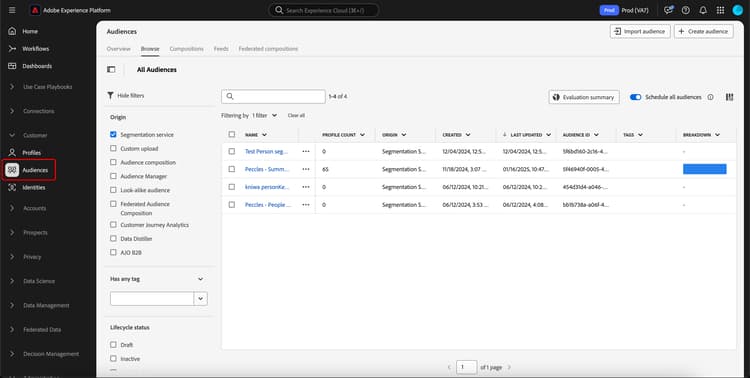
The Audiences button within the Customers section is highlighted. The Audience Portal for customer profiles is displayed.

The Audience Portal is displayed, showing a list of all the people audiences for the organization. In Audience Portal, you can choose the audiences you want to have evaluated and select Evaluate audience.
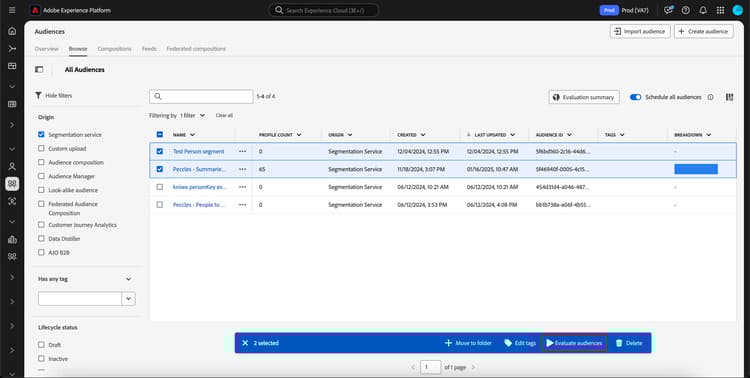
The audiences that you want to use flexible audience evaluation on are selected.

The Evaluate audiences on demand popover appears, displaying the list of audiences that will be evaluated with the on-demand-segment job. If an audience is ineligible to be evaluated on demand, it will automatically be removed from the evaluation job. Confirm that the listed audiences are the ones you want to be evaluated.
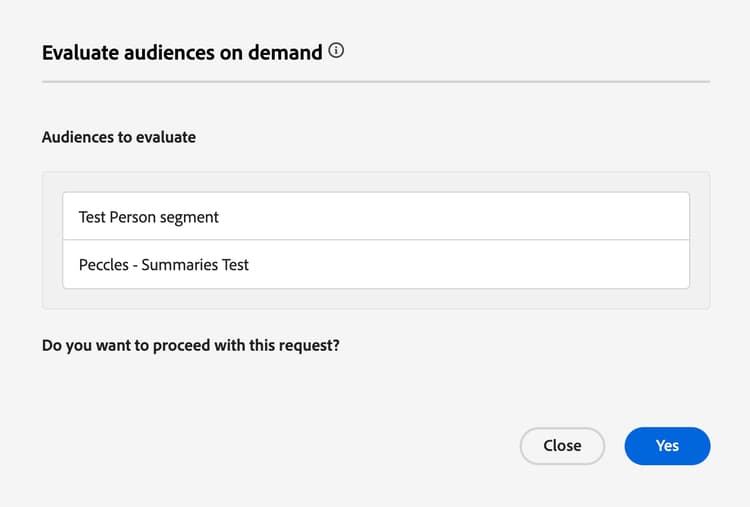
The audiences that can be evaluated using flexible audience evaluation are displayed.

After confirming the correct audiences are listed, you can proceed with the request, and the flexible audience evaluation will begin. You can view the status of this audience evaluation in the evaluation job monitoring view.

note
NOTE
The status of the segment job may be reported as in the “Queued” state within the monitoring dashboard. You can view the most up-to-date status of the segment job by making a GET request to the /segment/jobs endpoint, providing the ID of the segment job in the request path. More information about using this endpoint can be found in the API tab.
If you run flexible audience evaluation and want the evaluation to activate the audience to a destination, you need to ensure the frequency is set to After segment evaluation. Running flexible audience evaluation on audiences which are already set to be activated after segment evaluation, will activate audiences as soon as the flexible audience evaluation job finishes, regardless of any previous daily activation jobs.

Video video

The following video demonstrates how to access and use flexible audience evaluation in Experience Platform.

Frequently asked questions faq

The following section lists frequently asked questions related to flexible audience evaluation.

How soon can I activate an audience using flexible audience evaluation?

Answer
You can activate an audience using flexible audience evaluation immediately after its creation.

How long does flexible audience evaluation take?

Answer
A flexible audience evaluation job can take up to four hours to complete.

Can I run scheduling with flexible audience evaluation?

Answer
No, scheduling is not available to use with flexible audience evaluation.

Do I need to run an additional export job when using flexible audience evaluation?

Answer
No, the export job is automatically run after the corresponding segment job is completed.

What services can I use audiences evaluated with flexible audience evaluation?

Answer
You can use audiences in all downstream services including destinations and Adobe Journey Optimizer journeys.

When are the flexible audience evaluation limits reset?

Answer
The daily limit is reset at midnight (UTC). The yearly limit is reset on your contract’s anniversary date.

Which types of audiences are supported with flexible audience evaluation?

Answer
Only audiences with the origin of Segmentation Service are supported for flexible audience evaluation. Other audiences, such as compositions, custom upload, or Data Distiller, are not supported for flexible audience evaluation.

What runs contribute to my flexible audience evaluation run count?

Answer
Flexible audience evaluation runs that were created either using the API or the UI count towards the maximum limit. However, the daily batch segmentation job run that runs on a nightly basis does not contribute towards this limit.

Do I need to evaluate all dependent audiences when evaluating the main audience with flexible audience evaluation?

Answer
No. Flexible audience evaluation will automatically evaluate all dependent audiences. For example, if Audience A depends on Audience B, you only need to evaluate Audience B. Flexible audience evaluation will automatically evaluate Audience A and then Audience B.
recommendation-more-help
experience-platform-help-segmentation