Using the Adobe Client Data Layer with AEM Core Components overview
The Adobe Client Data Layer introduces a standard method to collect and store data about a visitor’s experience on a webpage and then make it easy to access this data. The Adobe Client Data Layer is platform agnostic, but is fully integrated into the Core Components for use with AEM.
Explore the Data Layer
You can get an idea of the built-in functionality of the Adobe Client Data Layer just by using the developer tools of your browser and the live WKND reference site.
-
Navigate to https://wknd.site/us/en.html
-
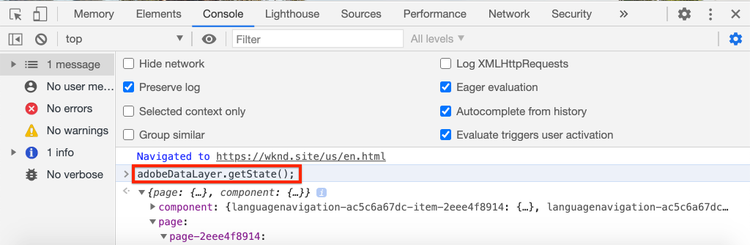
Open your developer tools and enter the following command in the Console:
code language-js window.adobeDataLayer.getState();To see the current state of the data layer on an AEM site inspect the response. You should see information about the page and individual components.
-
Push a data object on to the data layer by entering the following in the console:
code language-js window.adobeDataLayer.push({ "component": { "training-data": { "title": "Learn More", "link": "learn-more.html" } } }); -
Run the command
adobeDataLayer.getState()again and find the entry fortraining-data. -
Next add a path parameter to return just the specific state of a component:
code language-js window.adobeDataLayer.getState('component.training-data');
Working with Events
It is a best practice to trigger any custom code based on an event from the data layer. Next, explore registering and listening to different events.
-
Enter the following helper method in your console:
code language-js function getDataObjectHelper(event, filter) { if (event.hasOwnProperty("eventInfo") && event.eventInfo.hasOwnProperty("path")) { var dataObject = window.adobeDataLayer.getState(event.eventInfo.path); if (dataObject != null) { for (var property in filter) { if (!dataObject.hasOwnProperty(property) || (filter[property] !== null && filter[property] !== dataObject[property])) { return; } return dataObject; } } } return; }The above code inspects the
eventobject and uses theadobeDataLayer.getStatemethod to get the current state of the object that triggered the event. Then helper method inspects thefilterand only if the currentdataObjectmeets the filter criteria it is returned.note caution CAUTION It is important not to refresh the browser throughout this exercise, otherwise the console JavaScript is lost. -
Next, enter an event handler that is called when a Teaser component is shown within a Carousel.
code language-js function teaserShownHandler(event) { var dataObject = getDataObjectHelper(event, {"@type": "wknd/components/carousel/item"}); if(dataObject != null) { console.log("Teaser Shown: " + dataObject['dc:title']); console.log(dataObject); } }The
teaserShownHandlerfunction calls thegetDataObjectHelperfunction and passes a filter ofwknd/components/carousel/itemas the@typeto filter out events triggered by other components. -
Next, push an event listener onto the data layer to listen for the
cmp:showevent.code language-js window.adobeDataLayer.push(function (dl) { dl.addEventListener("cmp:show", teaserShownHandler); });The
cmp:showevent is triggered by many different components, like when a new slide is shown in the Carousel, or when a new tab is selected in the Tab component. -
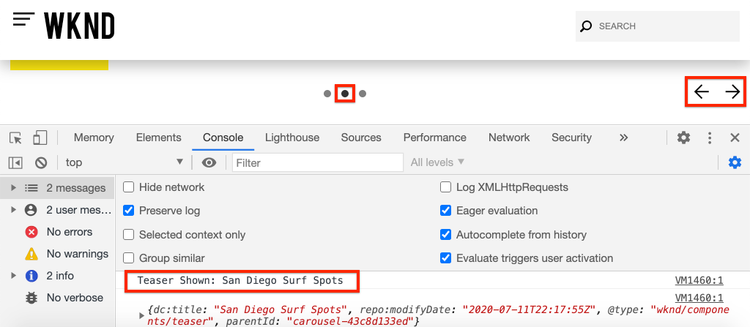
On the page, toggle the carousel slides and observe the console statements:
-
To stop listening for the
cmp:showevent, remove the event listener from the data layercode language-js window.adobeDataLayer = window.adobeDataLayer || []; window.adobeDataLayer.push(function(dl) { dl.removeEventListener("cmp:show", teaserShownHandler); }); -
Return to the page and toggle the carousel slides. Observe that no more statements are logged and that the event is not being listened to.
-
Next, create an event handler that is called when page shown event is triggered:
code language-js function pageShownHandler(event) { var dataObject = getDataObjectHelper(event, {"@type": "wknd/components/page"}); if(dataObject != null) { console.log("Page Shown: " + dataObject['dc:title']); console.log(dataObject); } }Notice that the resource type
wknd/components/pageis used to filter the event. -
Next, push an event listener onto the data layer to listen for the
cmp:showevent, calling thepageShownHandler.code language-js window.adobeDataLayer = window.adobeDataLayer || []; window.adobeDataLayer.push(function (dl) { dl.addEventListener("cmp:show", pageShownHandler); }); -
You should immediately see a console statement fired with the page data:

The
cmp:showevent for the page is triggered on each page load at the top of the page. You might ask, why did the event handler get triggered, when the page has clearly already been loaded?One of the unique features of the Adobe Client Data Layer is you can register event listeners before or after the Data Layer has been initialized, it helps to avoid the race conditions.
The Data Layer maintains a queue array of all events that have occurred in sequence. The Data Layer by default will trigger event callbacks for events that occurred in the past and events in the future. It is possible to filter the events from past or future. More information can be found in the documentation.
Next Steps
There are two options to keep learning, first one, check out the collect page data and send it to Adobe Analytics tutorial that demonstrates the use of Adobe Client Data layer. The second option is, to learn how to Customize the Adobe Client Data Layer with AEM Components