Frequently asked questions (FAQ) headless-adaptive-forms-faq
Should I know React.js to use Headless adaptive forms?
You can use any framework, library, or language to render Headless adaptive forms and use Adobe’s REST APIs to validate and submit the forms. The AF-core library, provided to you out-of-the-box, is framework independent. React-Render and React-componet libraries, also provided to you out-of-the-box, are for your convenience. You can build your own components; you are not limited to the ones provided.
Do I require Forms as a Cloud Service sandbox to use Headless adaptive forms?
You can use the starter app to start developing and styling your Headless adaptive forms. You require Forms as a Cloud Service to host and serve Headless adaptive forms along with backend forms capabilities.
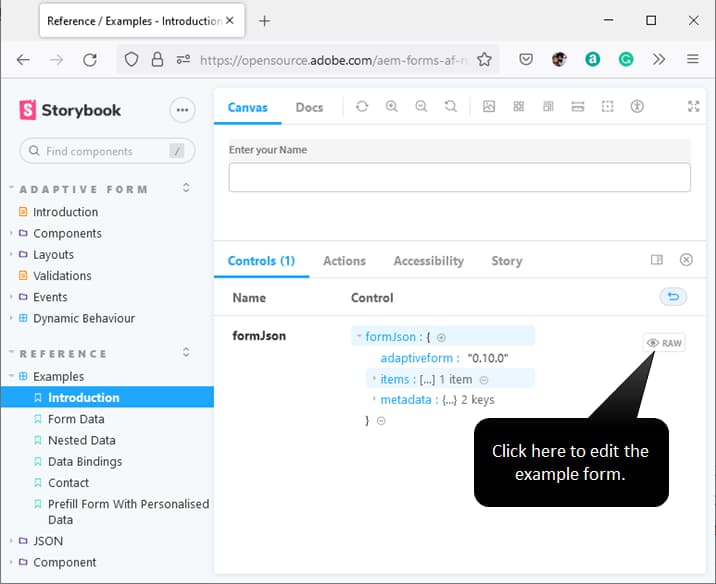
Where can I get a preview of a Headless adaptive form? storybook-example
You can use the starter app to render and preview a custom Headless adaptive form. You can also modify a storybook example to preview a Headless adaptive form.
Is it possible to use Headless adaptive forms with custom frameworks?
Headless adaptive forms are based on standard specification. You can extend the specification to use it to build custom components. For example, components for Chakra UI, Vue.js, and more.
Do Headless adaptive forms support cascading fields?
In cascading fields, the content of the second field depends on the content chosen in the first field. The Storybook provides an example of cascading fields.
Do Headless adaptive forms allow prefilling forms with personalized data?
Headless adaptive forms allow prefilling forms with personalized data. The Storybook provides an example of how to prefill a Headless adaptive form.
Can I use Headless adaptive forms with Angular SPA?
You can use the Web SDK to integrate Headless adaptive forms with Angular SPA. It is independent of any framework. You can use the React SDK as a reference.
Is there any plugin to make development easier for Headless AF?
Yes — a Visual Studio Code extension lets you manually author headless adaptive forms in JSON.
What is the recommended approach for mobile or offline forms? mobile-offline-forms
Build your own native app and fetch form definitions via the Headless Adaptive Forms API. You can optionally implement offline support (for example, local storage and sync). See Mobile forms best practices for the recommended approach and links to APIs.
How do you use GraphQL or headless APIs with AEM Forms?
AEM Headless Adaptive Forms use HTTP/REST APIs, not GraphQL. Your app calls these APIs to list forms, fetch a form definition (JSON), validate, submit, and track submission status. Use the Headless adaptive forms HTTP APIs for the full reference. For how forms are fetched and rendered, see Architecture and Understanding headless forms.
How can I implement and style headless forms using React components in Adobe AEM Forms?
You implement and style headless forms by using your own React components and CSS (or a UI library such as Material UI). The form logic—state, validation, and rules—comes from the Forms Web SDK and the form JSON; your app supplies the UI that renders it.
- To style a headless form with a React UI library, see Use a custom react library to render a headless form.
- To build and map custom React components to form fields, see Use custom components to render a headless form.
For concepts such as when to use headless forms, state management, and validation, see Understanding headless forms.
How can I implement and customize AEM Forms with custom CSS, themes, rule editors, and headless forms?
Headless forms: Styling and look-and-feel are entirely under your control. You use your own React (or other) components and your own CSS; there are no built-in themes. See Use a custom react library to render a headless form and Use custom components to render a headless form to implement and style headless forms.
Classic AEM Forms (themes, rule editor, visual editor): Custom CSS, the theme editor, and the rule editor apply to the classic (non-headless) Adaptive Forms authoring experience. For those topics, see the AEM Forms documentation on Experience League.
Can a Headless adaptive form connect to any CRM to read or write data?
You can use Microsoft Dynamics and Salesforce to submit or prefill a Headless adaptive form. Apart from CRMs, Headless adaptive forms support submit or prefill using REST endpoints, email, and custom submit actions.