Release notes for Cloud Manager 2025.5.0 in Adobe Experience Manager as a Cloud Service release-notes
Learn about the release of Cloud Manager 2025.5.0 in AEM (Adobe Experience Manager) as a Cloud Service.
See also the current release notes for Adobe Experience Manager as a Cloud Service.
Release dates release-date
The release date for Cloud Manager 2025.5.0 in AEM as a Cloud Service is Thursday, May 8, 2025.
The next planned release is Thursday, June 5, 2025.
What’s new what-is-new
Configure the content source in one click for Edge Delivery Services
Adobe Experience Manager (AEM) Edge Delivery Services allows content delivery from multiple sources such as Google Drive, SharePoint, or AEM itself, using a fast, globally distributed edge network.
The content source configuration differs between Helix 4 and Helix 5. Learn the difference and follow the comprehensive configuration steps, examples, and validation instructions for both versions.
See Configure your content source.
Private beta program private-beta-program
Participate in Cloud Manager’s private beta Program to get exclusive access to upcoming features before their general release.
The following private beta opportunities are currently available:
Add Edge Delivery Config Pipeline add-eds-pipeline
Config Pipelines are now supported for sites built with Edge Delivery Services, expanding this capability beyond just Cloud Service environments. You can use Config Pipelines to manage settings such as traffic filtering rules and Web Application Firewall (WAF) configurations, where applicable. See Supported Configurations.
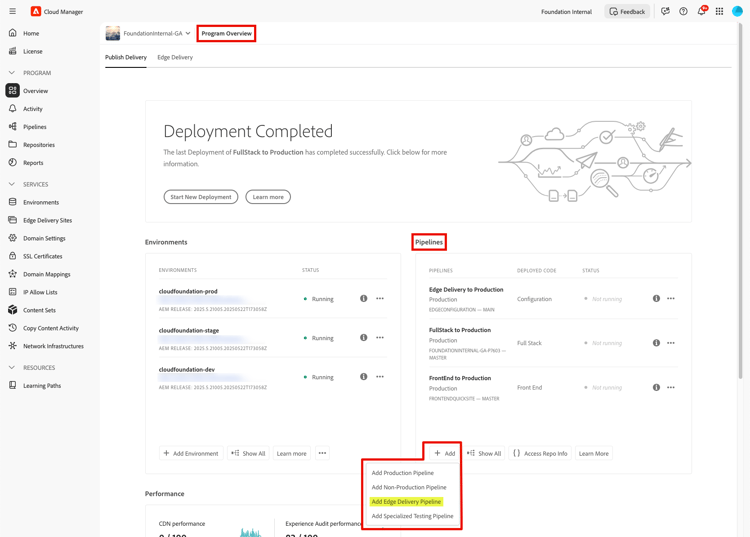
If you are interested in testing this new feature and sharing your feedback, send an email to grp-aemeds-config-pipeline-adopter@adobe.com from your email address associated with your Adobe ID.
Bring Your Own Git - now with support for Azure DevOps gitlab-bitbucket-azure-vsts
Customers can now onboard their Azure DevOps Git repositories into Cloud Manager, with support for both modern Azure DevOps and legacy VSTS (Visual Studio Team Services) repositories.
- For Edge Delivery Services users, the onboarded repository can be used to sync and deploy site code.
- For AEM as a Cloud Service and Adobe Managed Services (AMS) users, the repository can be linked to both full-stack and frontend pipelines.
Support for additional pipeline types and pull request validation through code quality pipelines is coming soon.
See Add external repositories in Cloud Manager.
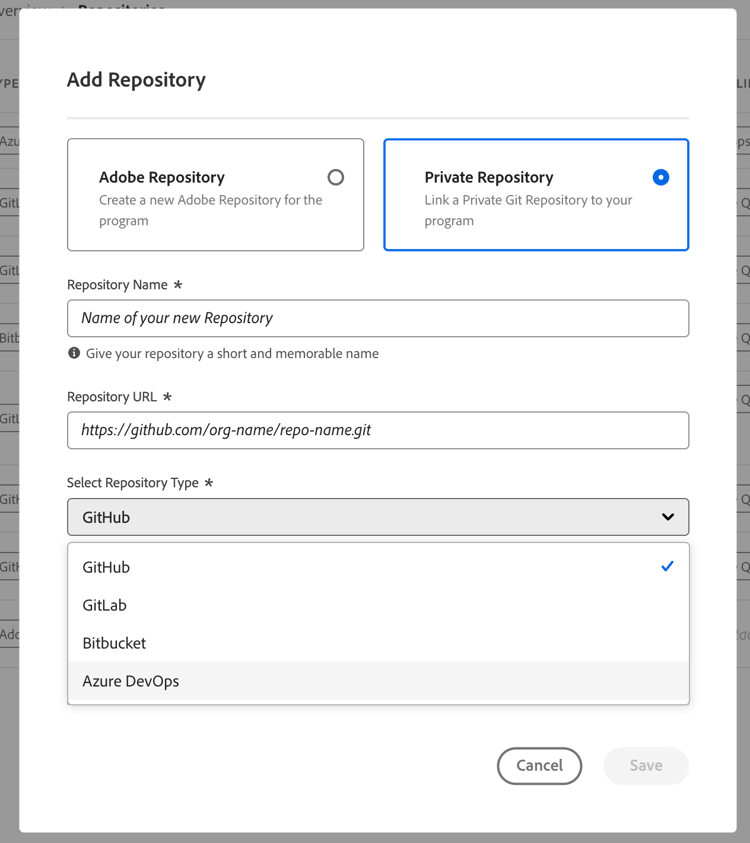
If you are interested in testing this new feature and sharing your feedback, send an email to Grp-CloudManager_BYOG@adobe.com from your email address associated with your Adobe ID. Be sure to include which Git platform you want to use and whether you are on a private/public or enterprise repository structure.
Frequently asked questions about Bring Your Own Git
https://gitlab_dedicated_url.com/path/repo-name.git, which differs from the example in the documentation.https://git-vendor-name.com/org-name/repo-name.git).