[AEM Forms]{class="badge positive" title="Applies to AEM Forms)."}
Support XDP Editing in Interactive Communication Editor
Introduction
The Interactive Communication (IC) Editor now offers seamless support for editing XDP (XML Data Package) files within the authoring environment. This enhancement empowers authors to manage, modify, and maintain XDP templates effortlessly, without relying on external tools. With this capability, users can upload, view, and edit XDP files directly in the IC Editor, enabling a unified and efficient design-to-delivery workflow.
How to Use Support XDP Editing in Interactive Communication Editor
-
Navigate to Forms > Forms & Documents.
-
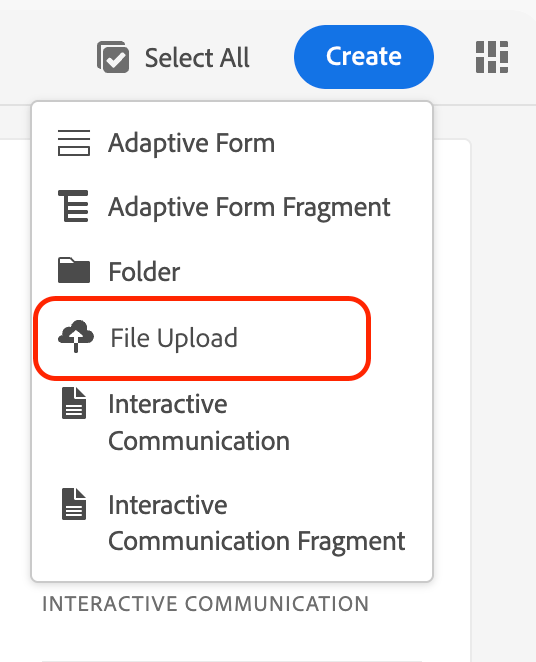
Upload your .xdp file using the Create > File Upload option.
-
Open the XDP in Interactive Communication Editor.
-
Make necessary design or data-binding changes.
-
Save your changes, updates are automatically reflected in the source XDP file.
Key Capabilities
-
Upload and Manage XDP Files:
Upload XDP templates through Forms Manager. Once uploaded, they become available for direct editing in the Interactive Communication Editor. -
Edit Using IC Editor:
Open and edit XDPs using the IC Editor with full access to existing editing features, including layout adjustments, data binding, styling, and component configuration. -
Save Back to Source:
Any modifications made through the IC Editor are saved directly to the original XDP file, maintaining version integrity and simplifying the design workflow.
Fragment Support
-
Fragment References:
If an XDP references a fragment, that fragment must exist in AEM at the same relative path as defined in the XDP file.
If a fragment is missing, the editor displays a warning message indicating that the required fragment is not present. -
Fragment Reuse in Editor:
All existing XDP fragments appear in the Fragments Panel of the IC Editor.
Authors can drag and drop these fragments directly onto the canvas. The references are preserved, ensuring that updates to fragments propagate across all XDPs using them.
Benefits
-
Eliminates dependency on external tools for XDP modification.
-
Preserves existing data bindings and fragment relationships.
-
Enables consistent design and faster iteration cycles.
Best Practices
-
Ensure all referenced fragments exist in the correct relative path before editing.
-
Use version control to manage updates across XDP and fragment dependencies.
-
Validate data bindings post-edit to confirm correct rendering.