[AEM Forms]{class="badge positive" title="Applies to AEM Forms."}
Configure Locale in Interactive Communication Editor
The Locale setting in the Interactive Communication (IC) Editor allows authors to specify the language and regional settings for an Interactive Communication. The selected locale determines how locale-sensitive content, such as dates, numbers, currencies, and other region-specific formats, is displayed and processed.
Setting the appropriate locale helps ensure that the Interactive Communication is rendered according to the language and formatting conventions of the intended audience.
Configure the Locale for an Interactive Communication
Follow these steps to configure the locale for an Interactive Communication:
-
Navigate to AEM Forms > Forms & Documents.
-
Open the required Interactive Communication in the editor.
-
From the top toolbar, click the Settings icon.
-
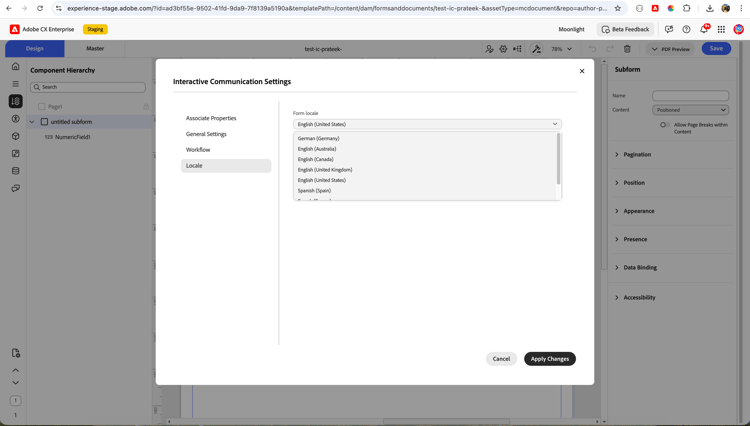
In the Interactive Communication Settings dialog, select Locale.
-
From the Form locale drop-down list, select the required locale.
The list includes supported locales such as:
- English (United States)
- English (United Kingdom)
- English (Canada)
- German (Germany)
- Spanish (Spain)
- Other supported locales
-
Click Apply Changes to save the selected locale.
The selected locale is applied to the Interactive Communication.
Key Capabilities
- Supports multiple languages and regional settings.
- Enables locale-specific formatting for dates, numbers, and currencies.
- Helps deliver localized Interactive Communications for different regions.
- Ensures consistent language and formatting across the Interactive Communication.