[AEM Forms]{class="badge positive" title="Applies to AEM Forms)."}
Start Workflow in Interactive Communication Editor
Overview
The Interactive Communication Authoring Workflow feature allows authors to apply predefined workflows to an Interactive Communication. Workflows help automate the review and approval process by routing the IC through a sequence of tasks assigned to different users.
By using workflows, author can ensure that IC content is reviewed, validated, and approved before it is finalized or published.
Applying a Workflow to an Interactive Communication
You can apply a workflow to an Interactive Communication (IC) in two ways:
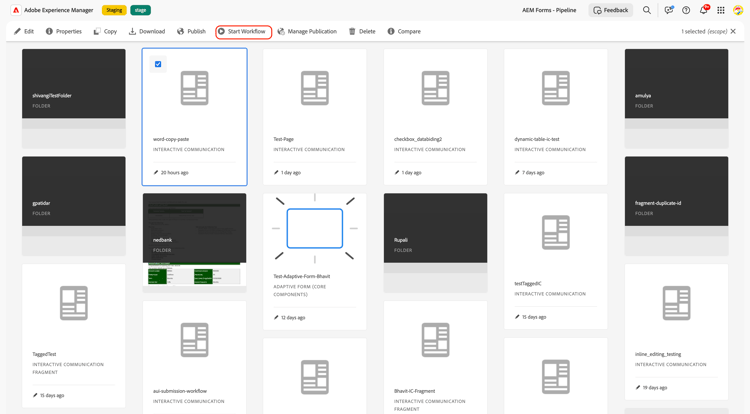
Follow these steps to start and apply a workflow:
-
Navigate to AEM Forms > Forms & Documents.
-
Select the Interactive Communication (IC) you want to process.
-
From the toolbar, click Start Workflow.
-
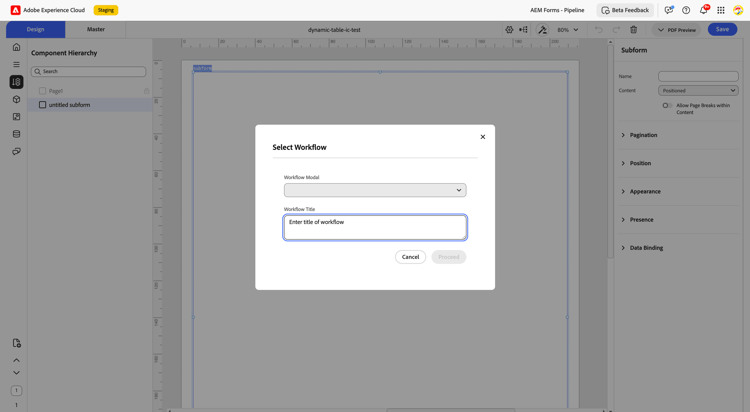
In the workflow dialog, choose the required workflow model.
-
Update workflow details (such as title, description, or assignee).
-
Click proceed to initiate the workflow.
The IC is now associated with the selected workflow and will move through the defined workflow steps.
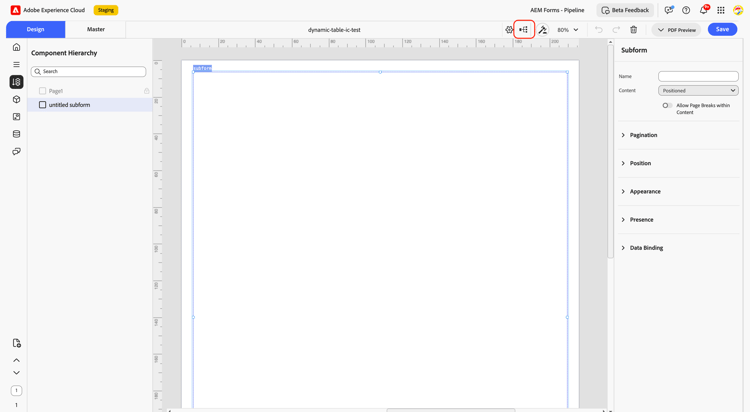
Follow these steps to apply a workflow from within the IC:
-
Navigate to AEM Forms > Forms & Document.
-
Open the required Interactive Communication in the editor.
-
From the top toolbar, select Workflow.
-
Choose the required workflow model.
- Provide the necessary details and click proceed.
The workflow is applied, and the IC proceeds through the configured workflow stages for review or processing.
Key Capabilities
- Automates review and approval processes
- Ensures content quality and compliance
- Improves collaboration between authors and editors
- Tracks workflow progress and task completion
By applying workflows, authors can automate review processes, assign tasks to editors or reviewers, and ensure that the IC is properly reviewed before completion. This structured approach improves efficiency, collaboration, and governance in IC content management.