[AEM Forms]{class="badge positive" title="Applies to AEM Forms)."}
Dynamic Page Numbering in Interactive Communication Editor
Introduction
The Dynamic Page Numbering feature in Interactive Communication (IC) allows authors to automatically display page numbers in their PDF output. Page numbering can be enabled at the master page level, ensuring consistent numbering across all associated design pages. This helps maintain clear page tracking and a professional layout throughout multipage communications.
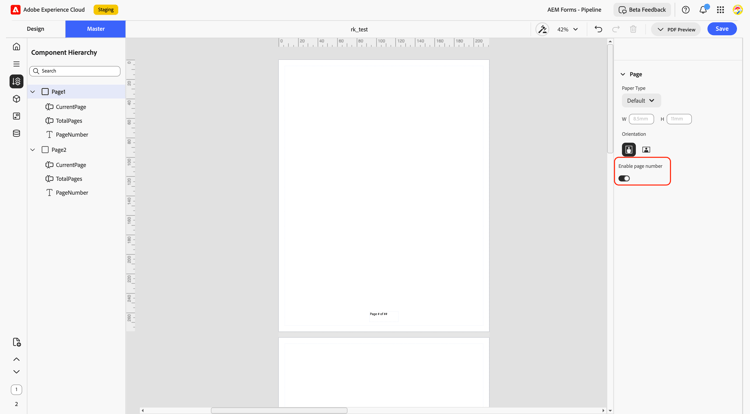
How to Use Dynamic Page Numbering in Interactive Communication Editor
-
Open the Interactive Communication Editor
Open your Interactive Communication project in the IC Editor. -
Go to Master Page
Page numbering can be enabled only in the Master Page. Navigate to the master page of your communication. -
Enable Page Numbering
In the Properties panel, turn on the Enable Page Number toggle. This automatically adds page numbers to all associated pages. -
Customize Placement
The Page Number component can be placed anywhere on the canvas after being dropped and customized freely using standard text properties. -
Preview in PDF
Page numbers appear only during PDF preview, displaying dynamic numbering on every page.
Key Capabilities
-
Master Page Configuration:
Page numbering can be enabled at the master page level. The component can be placed anywhere on the canvas after being dropped and customized freely, as it supports all properties available in the text component. -
Automatic Placement:
A page numbering component appears at the bottom center of each page with the format:
“Page # of ##”-
The first # represents the current page number.
-
The second ## represents the total number of pages in the communication.
-
-
Dynamic Display on PDF Preview:
The page numbers dynamically render during PDF preview, displaying accurate page numbering in the final output.
Example
When previewing a 5-page Interactive Communication, each page will display:
Page 1 of 5
Page 2 of 5
… and so on, dynamically updating during PDF generation.
Key Benefits
-
Enhances document readability and professionalism.
-
Automates page numbering without manual intervention.
-
Maintains consistency across all pages linked to a master page.