Micro-Frontend Content Fragment Selector micro-frontend-content-fragment-selector
The Micro-Frontend Content Fragment Selector provides a user interface that easily integrates with the Adobe Experience Manager (AEM) as a Cloud Service repository. The interface allows you to browse or search Content Fragments in the repository, and use them in your application.
The Micro-Frontend user interface is made available in your application using the Content Fragment Selector package. Any updates to the package are automatically imported and loaded into your application.
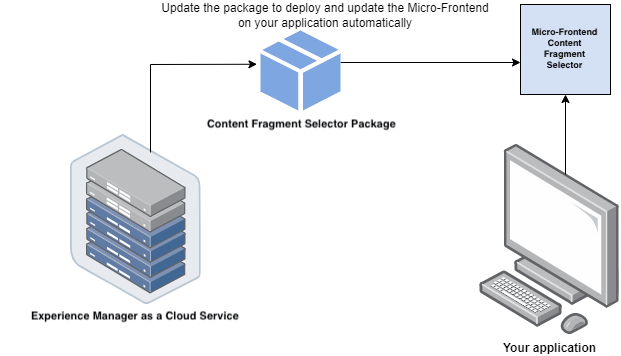
The Content Fragment Selector provides many benefits, such as:
- Ease of integration with any of the Adobe applications.
- Easy to maintain, as updates to the Content Fragment Selector package are automatically deployed to the Content Fragment Selector available to your application. This means that your application does not need to take action to load the latest modifications.
- Ease of customization, using properties that control the Content Fragment Selector display within your application.
- Full-text search, together with customizable filters, allow the quick navigation of Content Fragments within the authoring experience.
- Ability to switch repositories within an IMS organization for Content Fragment selection.
- Ability to sort Content Fragments, and view them in your selected view.
Prerequisites prerequisites
IMS Authentication ims-authentication
If you require the IMS authentication workflow you must ensure that:
- The application is running on
HTTPS. - The URL of the application is in the list of allowed redirect URLs for the IMS client.
- The IMS login flow is configured and rendered using a popup on the web browser. Therefore, popups should be enabled or allowed on the target browser.
Alternatively, if your application is already authenticated with the IMS workflow, you can add the appropriate IMS information instead.
Installation installation
Use the ContentFragmentSelector component. There are several installation options:
-
NPM Registry (Private Adobe Registry)
-
Add the following to
.npmrc:code language-html @aem-sites:registry=https://artifactory.corp.adobe.com/artifactory/api/npm/npm-aem-sites-release/ -
Then install
code language-html npm install @aem-sites/content-fragment-selector
-
-
Git Repository
-
Add the following to
package.jsondependencies:code language-html "@aem-sites/content-fragment-selector": "git+https://github.com/adobe/<your-private-repo-url>.git#version"
-
Using the Content Fragment Selector using-the-Content-Fragment-selector
Once the Content Fragment Selector is set up and authenticated to use the Content Fragment Selector with your AEM as a Cloud Service application, you can select Content Fragments or perform various other operations to search for your fragments in the repository:
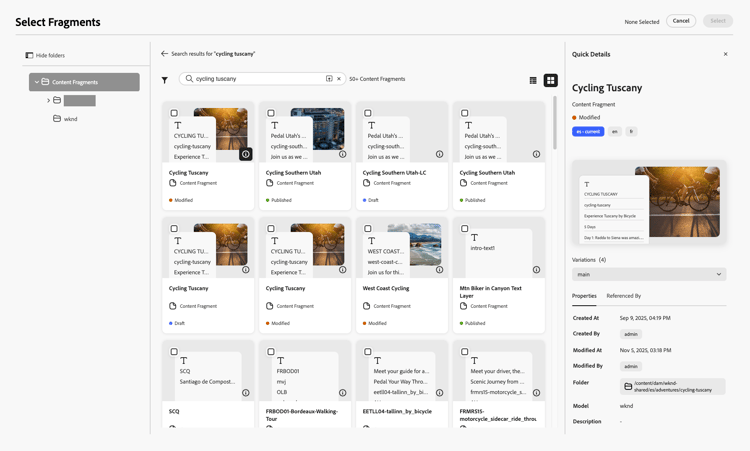
-
From the top toolbar you can:
- Use the Repository selector at the top right, to select the repository you want to use
- Select the format; list or grid
-
In the far left panel you can:
- Hide, or show, folders from the selected repository
- Select a specific folder to show Content Fragments in that folder
-
In the main panel you can:
- Select Content Fragments
- Search for Content Fragments
- Sort the current list according to various columns; both ascending or descending
- See the view format indicator
- Show, hide, and specify filters
-
In the far right panel you can:
- View properties
- View references
Hide/Show panel hide-show-panel
To hide folders in the left navigation, click the Hide folders icon. To undo the changes, click the Hide folders icon again.
Repository switcher repository-switcher
The Content Fragment Selector lets you select a repository for fragment selection.
You can select the repository of your choice from the Repository drop-down, available at the top of the main panel.
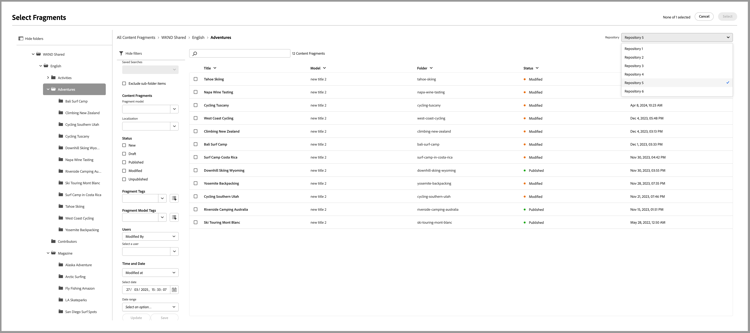
The repository options available in the drop-down list are based on the repositoryId property defined in the index.html file. This property is based on the environment from the selected IMS org accessed by the user currently logged in.
Consumers can pass a preferred repositoryID to render fragments from a specific repository, and stop rendering the repository switcher.
Content Fragments folders content-fragments-folders
The Content Fragments repository is a collection of Content Fragment folders that you can use to perform operations.
Filters filters
The Content Fragment Selector also provides out-of-the-box filter options to refine your search results. Various filters are available, including:
- Fragment model
- Localization
- Status: the current state of the fragment;
New,Draft,Published,Modified,Unpublished - Tags
- Users
- Times and dates
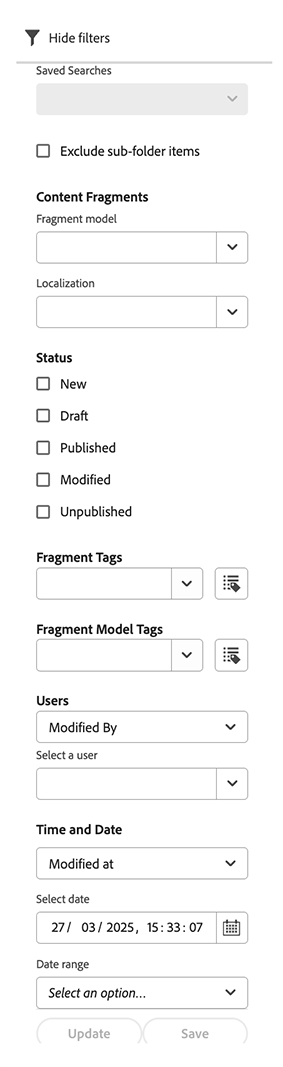
You can also create a default search filter to save for future use. To create custom search filters for your Content Fragments, you can use the filterSchema property.
Search bar search-bar
The Content Fragment Selector lets you perform a full text search of fragments within the selected repository. For example, if you type the keyword wave in the search bar, all the fragments with the wave keyword mentioned in any of the metadata properties are displayed.
Sorting sorting
You can sort fragments in the Content Fragment Selector by various properties. You can also sort the fragments in ascending or descending order.
View Type view-type
Content Fragment Selector lets you view the fragment in the:
- Table View
- Grid View
The required view can be selected from the icons in the top toolbar:

Integrate the Content Fragment Selector with applications integrate-the-content-fragment-selector-with-applications
You can integrate the Content Fragment Selector with various applications such as: