[AEM Forms]{class="badge positive" title="Applies to AEM Forms)."}
Azure Blob Storage Network Restrictions and Dedicated Egress IP Considerations
In short: AEM Forms’ Dedicated Egress IP lets you allowlist Azure Blob Storage traffic by a fixed IP address, but this only works when AEM and the Azure Storage account are in different Azure regions. When they are in the same region, Azure routes the traffic over its own internal network instead of the public internet, so the Dedicated Egress IP is never used and allowlisting it has no effect. This article explains why that happens and which network pattern to use instead.
Overview
Some organizations store form submission data that includes Protected Health Information (PHI) or Personally Identifiable Information (PII) in Azure Blob Storage. If your organization does this, your security team likely locks the storage account down with a firewall. This firewall blocks all traffic by default and only allows traffic from approved IP addresses. AEM as a Cloud Service supports this setup through a Dedicated Egress IP. This is a fixed outbound IP address that Azure, or any external vendor, can add to an allowlist. Once that IP is allowlisted, submissions from AEM Forms to Azure Blob Storage should be allowed through, while all other traffic is blocked.
In practice, some customers still see a 403 AuthorizationFailure error, even after setting up and allowlisting the Dedicated Egress IP correctly. This is not a mistake on your part. It happens because of how Azure routes traffic between services in the same Azure region. This is not obvious from the Dedicated Egress IP setup alone. This article explains why this happens and what you can do about it.
This guidance is for you if your organization handles regulated data, such as healthcare or financial data, and needs Azure Storage to block all traffic except from known IPs. It applies whether you are setting up a new integration and want to plan the network path correctly from the start, or you are troubleshooting submissions that are already failing after you set up a Dedicated Egress IP. Understanding how the routing works can save you time. Otherwise, you may allowlist an IP that is never actually used for same-region traffic, and then wrongly blame the connector or its authentication.
If you have already built a custom API layer or middleware, such as an Azure Function App, in front of Azure Storage, most of the network guidance below still applies to you.
Here is how this works at a high level. AEM Forms sends submission data to Azure Blob Storage over HTTPS. It uses the Dedicated Egress IP as the fixed source address for that outbound connection. Azure Storage’s firewall then checks this source IP against its allowlist before it accepts or rejects the request.
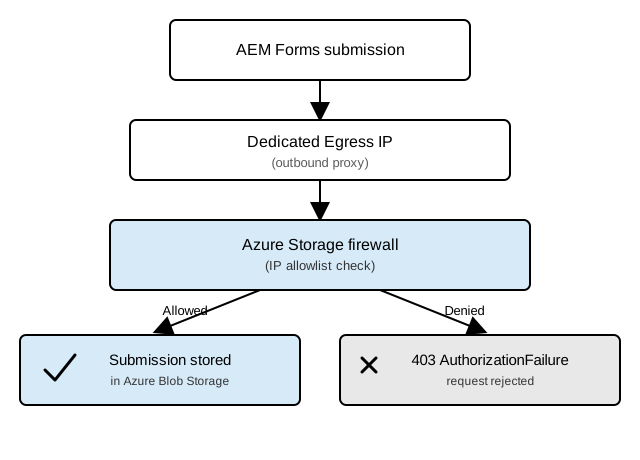
This works when AEM and the Azure Storage account are set up in different Azure regions. But when they are in the same region, Azure sends the traffic over its own internal network instead of the public internet. This means the Dedicated Egress IP is never actually used, so allowlisting it has no effect. The next section explains this region-based behavior in detail. It also covers the network patterns Adobe recommends for each case.
By the end of this article, you will understand how the Azure Blob Storage connector authenticates. You will also know why Dedicated Egress IP behaves differently depending on region, and which network pattern fits your deployment: the planned Private Link option, VPN with a private endpoint, or a CDN or Front Door layer.
Prerequisites
Dedicated Egress IP only works when your AEM as a Cloud Service program has Advanced Networking enabled and configured. Before you set up the Azure Blob Storage connector with IP allowlisting, verify:
- Your AEM as a Cloud Service program has Advanced Networking enabled and at least one Dedicated Egress IP provisioned.
- You have created and configured an Azure Storage Configuration in AEM Forms Cloud Services with your Storage Account name and Access key.
- Your Azure Storage account has a firewall rule that explicitly allows traffic from the AEM Dedicated Egress IP address.
If Advanced Networking is not enabled on your program, the traffic will not route through the Dedicated Egress IP at all, and the configuration steps below will not work. Contact your Adobe account team to enable it.
Azure Blob Storage Connector Authentication
The Azure Blob Storage connector uses Storage Account Shared Key authentication to connect to your storage account. The Azure Java SDK handles this internally. You provide the Azure Storage Account name and Azure Access key once, when you create the Azure Storage Configuration in AEM Forms Cloud Services. The connector then uses that key for every submission after that.
Adobe protects this key in two ways. It is encrypted while stored in the AEM repository (CRX). Also, every request between AEM Forms and Azure Storage travels over HTTPS.
This matters for troubleshooting. Azure returns the same 403 AuthorizationFailure error for two very different problems: an invalid or expired key, and a request blocked by the storage account’s network firewall. If you have checked that the Storage Account name and Access key are correct and unchanged, the error is likely a network problem, not a credentials problem. The rest of this article covers that network problem.
Region-Dependent Behavior of Dedicated Egress IP
Short answer: Dedicated Egress IP works when AEM and Azure Storage are in different Azure regions, but not when they are in the same region, because Azure routes same-region traffic over its own internal network instead of the public internet.

Cross-Region Deployments
When your AEM as a Cloud Service program and your Azure Storage account are set up in different Azure regions, the Dedicated Egress IP works as expected. AEM Forms submissions leave through the fixed egress IP. Azure Storage’s firewall allows the request once you add that IP to the storage account’s allowlist. In this case, the built-in Azure Blob Storage connector does not need any extra network setup.
Same-Region Deployments
When AEM and the Azure Storage account are in the same Azure region, the Dedicated Egress IP does not solve the problem. This is true even when you set it up correctly on the AEM side. Azure sends traffic between services in the same region over its own internal network, not the public internet. This means the request never actually travels over the dedicated public IP. So allowlisting that IP on the storage account has no effect. Submissions keep failing with 403 AuthorizationFailure, no matter how you set up the firewall rule.
This is the root cause of the problem described in the Overview. The Dedicated Egress IP is set up and allowlisted correctly, but submissions still fail.
Example: A healthcare provider’s AEM as a Cloud Service program and its Azure Storage account are both set up in the same Azure region (U.S. East). The provider allowlists the Dedicated Egress IP on the storage account’s firewall, exactly as documented. Submissions still fail with 403 AuthorizationFailure, because the traffic never leaves the region over the public internet, so the firewall never sees the allowlisted IP as the source. The provider implemented an Azure Function App as middleware between AEM Forms and the storage account. The Function App received submissions from AEM (routed through the Dedicated Egress IP) and then wrote them to Blob Storage from within the same region, bypassing the firewall restriction. This workaround resolved the issue while keeping data in the same region.
Troubleshooting
Submissions fail with 403 AuthorizationFailure even after allowlisting the Dedicated Egress IP
This error usually means the Dedicated Egress IP is not actually being used for the request. The most common cause is a same-region deployment.
Step 1: Verify your AEM and Azure Storage regions
- In Adobe Cloud Manager, check your program’s region. This is visible in the program’s Environments section.
- In the Azure portal, navigate to your Storage account and check its Region field.
- If both are in the same region, proceed to Step 2 (Same-Region) below. If they are in different regions, proceed to Step 3 (Different-Region) below.
Step 2: Same-Region Diagnosis
If your AEM and Azure Storage account are in the same region:
-
The 403 error is expected. Dedicated Egress IP does not protect same-region traffic because Azure routes it over an internal network instead of the public internet.
-
Allowlisting the Dedicated Egress IP will not help.
-
Review the Recommended Approaches for Restricted or Firewalled Storage Accounts section below and choose a solution that works for same-region deployments:
- Preferred long-term: Private Link (planned, not yet available)
- Available today: VPN + Azure Private Endpoint
- Situational workaround: Azure Front Door or CDN
- Application-level workaround: Middleware such as an Azure Function App or similar REST API layer
Step 3: Different-Region Diagnosis
If your AEM and Azure Storage account are in different regions, the 403 error indicates a different problem:
- Verify that the Dedicated Egress IP is correctly provisioned on the AEM side. Check the Advanced Networking configuration in Cloud Manager.
- Confirm that the Dedicated Egress IP address is added to the Storage account’s firewall allowlist in the Azure portal (under Networking > Firewalls and virtual networks).
- Verify that the Azure Storage Configuration in AEM Forms Cloud Services has the correct Storage Account name and Access key. (Invalid or expired credentials also produce a 403 error, though the root cause is different.)
- Check whether any custom code that connects to Azure Storage (such as an Azure Function App, Azure Logic App, or other middleware) is using the AEM proxy setup. Some HTTP clients, including the Azure SDK’s default client, do not automatically inherit JVM proxy settings. You must configure the proxy explicitly in that code.
- If all of the above are correct, contact Adobe Support with your program ID and Cloud Manager environment details.
Recommended Approaches for Restricted or Firewalled Storage Accounts
If your deployment falls into the same-region case described above, IP allowlisting alone cannot secure your Azure Storage account. The options below start with Adobe’s preferred long-term direction, then move to workarounds you can use today. Each option has a different setup effort and trade-off.
VPN and Private Endpoint
Using Advanced Networking VPN together with an Azure Private Endpoint is available today. It gives you private access to the storage account that does not travel over the public internet. This option needs more setup on the Azure side than IP allowlisting alone:
- An Azure Private Endpoint for the storage account
- A Private DNS zone for the storage account’s blob endpoint
- A Private DNS resolver, or inbound endpoint, so AEM can find the private IP address for that endpoint
- Extra domain name setup on the AEM side to support this private path
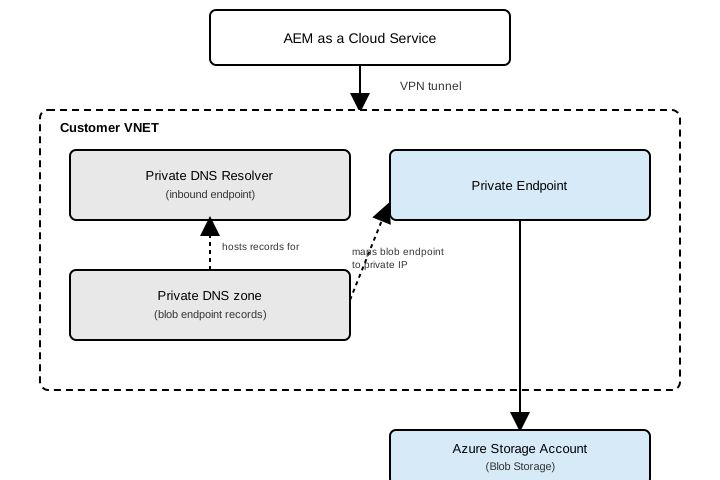
This approach meets private-access requirements. But it adds cost, setup effort, and complexity compared to public IP allowlisting. It also still depends on your outbound calls to Azure Storage using the proxy setup described earlier in this article.
Azure Front Door or CDN
You can place Azure Front Door or Azure CDN in front of the storage account. Then AEM Forms no longer connects directly to the native *.blob.core.windows.net endpoint. Azure no longer recognizes the destination as an in-region storage endpoint. So the traffic can travel through the Dedicated Egress IP path instead of Azure’s internal same-region routing. This means public IP allowlisting works again.
Decision Summary
If none of these options fit your architecture, or you need to integrate with a service other than Azure Blob Storage, use Submit to REST Endpoint with your own middleware instead.