Request an error report for Dynamic Media delivery URLs that fail
You can request an error report that identifies Dynamic Media URLs that failed at delivery time. The report is an aggregation of data up to five days and is available in a CSV format. The error report includes the following information:
- Failed Dynamic Media delivery URL – A failing URL is a Dynamic Media-generated URL that is not able to produce any content at the time of delivery.
- Referrer URL – The referrer URL from which the failed delivery URL is called.
- Failure count – The number of times the delivery URL was loaded that resulted in a failure.
When you request the error report, the Adobe Dynamic Media team emails the report to you, in CSV format. It covers a five-day period from the day that your request was made.
You can request an error report once a month, for a given company.
To request an error report for Dynamic Media delivery URLs that fail:
-
Send an email to reports-dynamic-media@adobe.com with the company name that is associated with your Dynamic Media account.
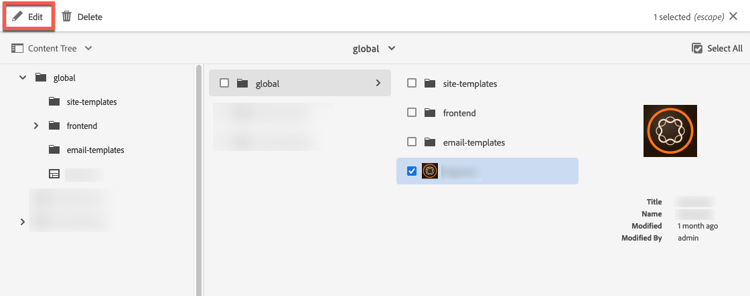
If you do not know the company name, see the Dynamic Media Configuration page in Adobe Experience Manager > Tools > Cloud Services > Dynamic Media Configuation. On the Dynamic Media Configuration Browser page, click global, select the [Dynamic_Media_folder_icon] checkbox, then select Edit. You must have Administrator rights in AEM to access the Dynamic Media Configuration page.