This document describes some of the best practices around email design resulting in a well-developed email campaign template.
The demo campaign available in AEM follows all of these best practices. How the best practices are implemented in the demo campaign is described for each best practice.
Use these best practices when creating your own newsletter.
NOTE
All campaign content should be created under a master page of type cq/personalization/components/ambitpage.
For example, if your planned campaign structure is something like
When creating a mail template for Adobe Campaign, you must include the property acMapping with the value mapRecipient in the jcr:content node of the template. If you do not, you cannot select the Adobe Campaign template in Page Properties of Experience Manager (field is disabled).
Code all structure using the <table>element. For more complicated layouts, you should nest tables to build complex structures.
Email should look good even without css.
Tables are used throughout the whole template for structuring content. Currently using a maximum of four nested tables (1 base table + max. 3 nesting levels)
<div> tags are only used in author mode to ensure proper component editing.
Use element attributes (such as cellpadding, valign, and width) to set table dimensions. This method forces a box-model structure.
All tables contain necessary attributes like border, cellpadding, cellspacing, and width.
To harmonize element positioning inside tables, all table cells have the attribute valign="top" being set.
Account for mobile-friendliness, if possible. Use media queries to increase text sizes on small screens, provide thumb-sized hit areas for links.
Make an email responsive if the design allows for it.
As far as CSS styles are being used to illustrate demo design, media queries are being used to offer a mobile friendly version.
Inline CSS is better than putting all the CSS at the beginning.
To better demonstrate the underlying HTML structure and ease the possibility to customize the newsletter structure, only some CSS definitions have been inlined.
Base styles and template variations have been extracted to a style block in the <head> of the page. On final submission of the newsletter, these CSS definitions are inlined into the HTML. An automatic inlining mechanism is planned, but currently not available.
Keep your CSS simple. Avoid compound style declarations, shorthand code, CSS layout properties, complex selectors, and pseudo-elements.
As far as CSS styles are being used to illustrate demo design, the CSS recommendations are being followed.
Emails should be 600-800 pixels maximum width. This sizing makes them behave better within the preview-pane size provided by many clients.
The width of content table is limited to 600 pixels in demo design.
Images images
/libs/mcm/campaign/components/image
Best Practice
Implementation
Add alt attributes to images
The alt attribute has been defined as mandatory for the image component.
Use jpg instead of png format for images
Images are always served as JPG by the image component.
Use <img> element instead of background images in a table.
No background image data is used in the templates.
Add attribute style=“display block” on pictures. Doing so lets them display well on Gmail.
All images contain per default the style=“display block” attribute.
Use html <font> instead of style in CSS (font-family)
The RichTextEditor (for example, in textimage component) now supports choosing and applying font-families and font-sizes to selected texts. They are rendered as <font> tags.
Use basic, cross-platform fonts such as Arial®, Verdana, Georgia, and Times New Roman®.
Depends on newsletter design.
For the demo design, the font "Helvetica®" is used, but it falls back to a generic sans-serif font, if not present.
Generic generic
Best Practice
Implementation
Use W3C validator to correct the HTML code. Make sure that all open tags are properly closed.
Code was validated. For XHTML transitional Doctype only, the missing xmlns attribute for the <html> element is missing.
Avoid using JavaScript or Flash - those technologies are often unsupported by email clients.
JavaScript or Flash is not used in the newsletter template.
Add a plain text version for multipart sending.
A new widget was built into the page properties to easily extract a plaintext version from the page content. You can use it as a starting point for the final plaintext version.
Campaign newsletter templates and examples campaign-newsletter-templates-and-examples
AEM comes with several templates and components out of the box for you to create campaign newsletters. You can use these templates and components to create your custom newsletters.
Templates templates
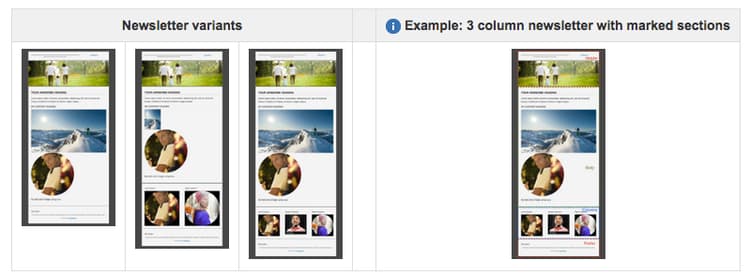
To offer a solid base and to broaden the variety of content flow possibilities, there are three slightly different template types available out-of-the-box. You can easily use these three types to build a custom newsletter.
All have a header, a footer, and a body section. Below the body section, each template differs in column design (one, two, or three columns).
Dynamic Media Classic (formerly Scene7) Image Template
/libs/mcm/campaign/s7image
Targeted Reference
/libs/mcm/campaign/components/reference
NOTE
These components are optimized for mail content; that is, they adhere to the best practices outlined in this document. Using other out-of-the-box components usually violates these rules.