Field Discovery Agent
When building audiences or onboarding data in Adobe Experience Platform, identifying the correct XDM field for a business concept often requires manually browsing schemas or knowing in advance exactly how a field is named. Different fields may represent the same concept under different names—for example, state, region, and location—and choosing the wrong one introduces errors in downstream workflows.
Field Discovery Agent is an AI-powered agent in Adobe Experience Platform that helps you find, evaluate, and select XDM fields using natural language queries in AI Assistant. You describe what you are looking for in plain language — a business concept, a workflow goal, or a specific field name — and the agent returns ranked field suggestions with supporting context.
Field Discovery Agent is invoked automatically in the background within AI Assistant when other Experience Platform agents need to resolve field or entity references. In those cases, it operates in the background to improve the accuracy of the agent you are working with. When you need field discovery for your own work, write an explicit field-finding prompt in AI Assistant. Field Discovery Agent surfaces field information only. It does not modify schemas, datasets, or audiences, and it respects your existing access controls and sandbox context.
When to use this when-to-use-this
Use Field Discovery Agent explicitly in AI Assistant when you need ranked field suggestions, sample values, and usage context for a mapping, segmentation, or query. It is used implicitly when another Experience Platform agent invokes it in the background to resolve field or entity references. In those cases, you remain in that agent’s workflow and do not issue a separate field-finding prompt.
Prerequisites prerequisites
To use Field Discovery Agent, ensure you have the following:
- Access to Adobe Experience Platform and AI Assistant
- The correct organization and sandbox
- Access to the schemas and datasets you intend to query
Basic familiarity with XDM schemas and how fields are used in segmentation or data workflows can help you interpret results more effectively. For more information, see the XDM overview and Schema Editor documentation.
For instructions on enabling AI Assistant access and granting the required permissions, see the Agent Orchestrator access guide.
Field Discovery Agent functions field-discovery-agent-functions
Field Discovery Agent processes your query and returns one of three types of output depending on your intent. These functions reflect how the agent interprets your query; you do not select them. The agent determines the appropriate response type automatically based on what you describe.
How Field Discovery Agent works how-field-discovery-agent-works
At a high level, the agent interprets your intent, searches your available data, and ranks results by relevance. How you phrase your query directly affects each stage, which in turn impacts the quality of results.
When you submit a query in AI Assistant, Field Discovery Agent processes your request in three stages:
Understand your results understand-your-results
Field Discovery Agent returns a structured result set for each query. Understanding the components of a result helps you evaluate candidate fields and act on them with confidence, without additional trial and error.
Treat a field as ready to use when its Relevance label is Highly Relevant, its sample values match the data you expect (when available), and its Usage Contexts aligns with how you plan to use it. If results are only Moderately Relevant or Relevant, sample values do not match your expectations, or usage context is limited, refine your query and review a new result set before proceeding.
Relevance labels
Field Discovery Agent assigns a relevance label in the Relevance column of the Fields Identified panel for each field result, indicating how closely the field matches your query.
- Highly Relevant — The field strongly matches your stated concept based on its name, metadata, and usage signals. Confirm the field path and review its sample values to verify it holds the data you expect.
- Moderately Relevant — The field has partial semantic overlap with your query but may differ in scope, data type, or specificity. Review the sample values and usage context to determine whether it meets your needs before selecting it.
- Relevant — The field partially matches your query. It may share semantic overlap but differ in scope, specificity, or data type. Review the sample values and usage context before deciding whether to use it.
If all results are labeled Moderately Relevant or Relevant rather than Highly Relevant, your query may be too broad or use terminology that does not match your schema metadata. Refine your prompt with more specific language or domain terms that reflect how your fields are named.
Sample values
Alongside each field suggestion, Field Discovery Agent surfaces sample values drawn from the field’s data in your sandbox. Sample values help you verify that a field contains the type of data you expect before selecting it.
Sample values are visible only for fields within your dataset access permissions. For information on data governance and usage restrictions in Experience Platform, see the Data Governance overview.
If no sample values appear for a field, the field may be empty in your current sandbox or your permissions may not include access to its underlying dataset. Fields with high cardinality (such as identifier or UUID fields) may also not return representative sample values. Sample values are aggregated and frequency-based and are not traceable to individual profiles.
Usage context
Each field result includes usage context showing where the field appears across your data ecosystem:
Audience → Dataset → Destination → Schema
A field that is used in a published audience, appears in an active dataset, is mapped to a live destination, and is defined in a schema has demonstrated real usage in your environment. This distinguishes fields that are actively relied on from fields that exist only in a schema definition but have not been used in practice. Use this signal alongside relevance label and sample values to make a more informed field selection.
Results in AI Assistant
Field Discovery Agent returns results in a Fields Identified panel within the AI Assistant response. The panel displays a table with three columns:
- Field Name — The XDM path of the candidate field.
- Relevance — The relevance label assigned to the field (Highly Relevant, Moderately Relevant, or Relevant)
- Usage Contexts — Links showing where the field appears across your data ecosystem. Select audience, dataset, destination, or schema to open a side panel showing where the field is used.
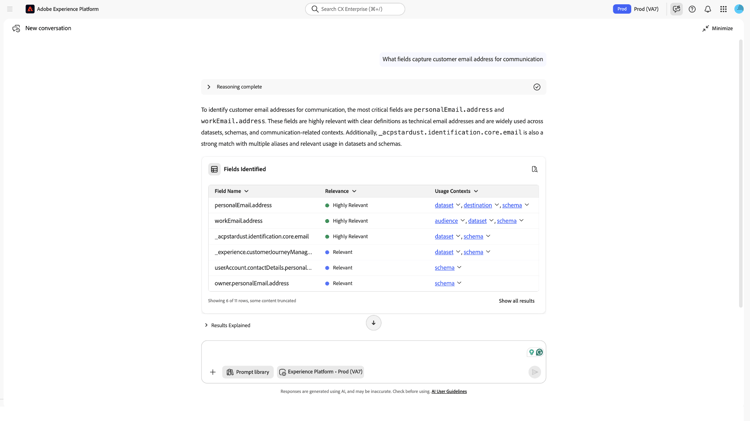
A Results Explained section appears below the Fields Identified table and provides additional field-level context, including explanations and supporting detail for each result. For guidance on navigating the AI Assistant interface, see the AI Assistant UI guide.
Use Field Discovery Agent use-field-discovery-agent
You interact with Field Discovery Agent through AI Assistant using natural language. The agent requires a clear statement of intent—a vague or overly brief query produces lower-quality results or may not invoke Field Discovery Agent at all.
For explicit field discovery, follow this workflow: identify the attribute or mapping problem, submit a field-finding query, review ranked results and usage context in the Fields Identified panel, select the Field Name path that fits your intent, and apply that XDM path in Segment Builder, Query Service, or another workflow.
To use Field Discovery Agent:
-
Navigate to AI Assistant from any enabled Experience Platform application. The AI Assistant workspace displays.
-
State your intent explicitly in the input field. Describe the concept, goal, or field characteristic you are looking for. For example: “Find fields related to customer email opt-out status.”
-
Review the ranked results in the Fields Identified panel. Each row includes a relevance label and an XDM field path in the Field Name column.
-
Select audience, dataset, destination, or schema in the Usage Contexts column to open a side panel showing where the field is used. For additional field-level context, see the Results Explained section below the results table.
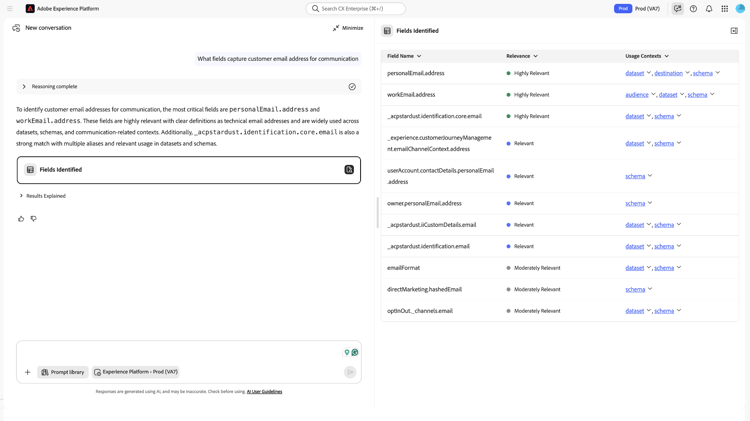
-
Use the Field Name path in downstream tools such as Segment Builder, Query Service, or data ingestion workflows, depending on your use case. Field Discovery Agent provides the field reference but does not insert it into other tools.
If needed, select the Reasoning complete dropdown above the response to confirm that Field Discovery Agent handled your request. The dropdown displays reasoning details that indicate which agent was called.
For guidance on the AI Assistant interface, see the AI Assistant UI guide.
Supported use cases supported-use-cases
The following sections describe each of Field Discovery Agent’s three functions with representative scenarios and example prompts. Results include relevance labels and usage context to help evaluate fields. For result interpretation, see Understand your results. Field Discovery Agent returns field information only — it does not create audiences, execute queries, or push data into other tools. After identifying a field, read its XDM path from the Field Name column and use it in your downstream workflow.
Identify fields for a business concept
When you describe a specific data concept or attribute, Field Discovery Agent returns a ranked list of fields that semantically match your description.
“Which fields represent a customer’s home state or province?”
“Find fields related to purchase transaction date.”
“What fields contain information about email marketing consent?”
The response lists candidate fields with their relevance label and XDM path in the Fields Identified panel. Fields labeled Highly Relevant most closely match your stated concept. If the top results are labeled Moderately Relevant or Relevant rather than Highly Relevant, refine your query using more specific terminology or field-level context.
Get field recommendations for a use case
When you describe a workflow goal or use case — such as building a segment, onboarding a dataset, or preparing a query — Field Discovery Agent recommends fields aligned to that objective, prioritized by relevance.
“I want to build an audience of high-value customers. What fields should I use?”
“Recommend fields for modeling purchase propensity.”
“What fields should I include when onboarding a retail transaction dataset?”
The response returns a prioritized list of fields with relevance context. Review the usage context for each recommended field to confirm it is actively used in your environment.
Enrich field context
When you ask about a specific field by name or path, Field Discovery Agent returns detailed context for that field, including sample values, schema location, and usage across datasets, audiences, and destinations.
“Tell me more about the field
person.name.lastName.”
“What sample values exist forhomeAddress.stateProvince?”
“Where is the fieldcommerce.purchases.valueused across my datasets and audiences?”
The response returns the field’s sample values, schema location, associated datasets, and any audiences or destinations where the field appears. Review this context to confirm the field holds the data you expect.
In scope and out of scope in-scope-and-out-of-scope
This section summarizes what Field Discovery Agent can and cannot do. For detailed task guidance, see Supported use cases. For platform constraints, see Guardrails and limitations.
In scope
The following list describes tasks Field Discovery Agent can perform; use it to confirm whether the agent can meet your request before you rely on it in your workflow.
- Identifying XDM fields that match a business concept or natural language description.
- Recommending fields for a stated workflow goal or use case.
- Enriching a specific field with sample values, schema location, and usage context.
- Returning results ranked by semantic relevance, labeled Highly Relevant, Moderately Relevant, or Relevant.
- Surfacing sample values within your authorized dataset permissions.
Out of scope
The following list describes actions Field Discovery Agent does not perform; use it to avoid relying on the agent for work outside its scope.
- Modify schemas, datasets, fields, or audiences.
- Create or publish audiences or segments.
- Execute queries or activate data to destinations.
- Access fields or datasets outside your authorized permissions.
- Expose internal embedding logic, vector database architecture, or entity linking implementation details.
- Guarantee a specific time window for knowledge base updates after schema or dataset changes.
Guardrails and limitations guardrails-and-limitations
These guardrails matter because Field Discovery Agent operates within platform-level constraints that affect result availability and quality. Use them to interpret missing, delayed, or incomplete results and to troubleshoot unexpected gaps with realistic expectations.
Knowledge base
Field Discovery Agent relies on a knowledge base that is periodically refreshed with schema and metadata from your Experience Platform environment. Results reflect the state of the knowledge base at the time of your query—not the real-time state of your schemas, and there may be a delay between data ingestion and when it is surfaced in the agent.
New schemas, fields, or datasets added to your environment may not appear in Field Discovery Agent results immediately. Results may take time to reflect recent changes.
Metadata quality and coverage
Result quality depends on the quality and completeness of field metadata in your Experience Platform environment. The agent uses field names, display names, descriptions, and usage associations to rank results. Fields with poor or missing metadata may not surface in results or may rank lower than expected.
If you have schema editing access, you can improve result quality by:
- Using clear, descriptive display names for fields in your schemas.
- Adding field descriptions where possible.
- Associating fields with active datasets rather than leaving them as schema-only definitions.
For guidance on editing field display names and descriptions in the Schema Editor, see Create and edit schemas in the UI.
If you do not have schema editing access and results are consistently poor, contact your Experience Platform administrator or data engineering team to review field metadata for the schemas you work with.
Access and PII constraints
Field Discovery Agent respects all existing Experience Platform access controls and operates within your current sandbox context. You only receive results for fields in schemas and datasets you are authorized to access.
Sample values are governed by the same dataset-level permissions. Fields in profile-enabled datasets with PII restrictions return sample values only if you have the required access. See Sample values for handling guidance. Field Discovery Agent does not bypass field-level security or profile-enabled access restrictions.
Best practices best-practices
Use the following guidance to get accurate, actionable results from Field Discovery Agent.
- Be specific about the concept, not just the field type. A prompt like “find a state field” produces lower-quality results than “find the field that holds a customer’s US state for geographic segmentation.” Specificity gives the agent more signal to match against your metadata. See How Field Discovery Agent works for why this matters.
- Use terminology that matches your schema metadata. If your schemas use the term “transaction” rather than “purchase,” use “transaction” in your prompts. The agent matches against actual field names and descriptions, not just general concepts.
- Verify fields before committing. After finding candidate fields, ask about a specific field by name or path to review its sample values and usage context before using it in a segment or query. This reduces the risk of selecting the wrong field.
- Iterate when results are Moderately Relevant or Relevant rather than Highly Relevant. Rephrase your query with different terminology or add more context about your use case. A second, more specific query often surfaces better candidates.
- Include scope context in your prompts. For geo-based segmentation, include the target region. For time-based queries, include the time attribute. The more context you provide, the more targeted the result ranking.
Example prompts example-prompts
Use this section as a quick-reference prompt library. If you are new to Field Discovery Agent, read Best practices and Supported use cases first to understand when and why each function applies.
Identification prompts
Use these prompts when you know the data concept you need but not which field holds it.
“Which field holds a customer’s state or region?”
“Find fields related to email subscription status.”
“What field contains the date of a customer’s first purchase?”
“Identify fields that represent customer lifetime value.”
“Which fields in my profile schema relate to loyalty program membership?”
Recommendation prompts
Use these prompts when you are starting a workflow and need guidance on which fields to include for a specific goal.
“What fields should I use to build a re-engagement audience?”
“Recommend fields for an audience targeting customers who have not purchased in 90 days.”
“What fields are most useful for modeling churn risk?”
“Suggest fields I should include when creating a geographic segmentation.”
“I am building a propensity-to-buy model. Which fields should I start with?”
Enrichment prompts
Use these prompts when you have a candidate field and want to verify it before using it in a segment, query, or mapping.
“Tell me more about
homeAddress.stateProvince.”
“Show me sample values forcommerce.purchases.value.”
“Where isperson.name.lastNameused across my datasets and audiences?”
“What datasets contain the fieldweb.webPageDetails.URL?”
“IssegmentMembershipmapped to any active destinations?”
Troubleshooting troubleshooting
Use this section when results are missing, unexpected, or when you are unsure whether Field Discovery Agent handled your request.
-
A recently added field does not appear in results. The knowledge base may not yet reflect the new schema or field. Allow time for the knowledge base to update after adding schemas or fields to your environment, then resubmit your query. See Knowledge base.
-
All results are labeled Moderately Relevant or Relevant rather than Highly Relevant. Your query may be too broad, or the terminology you used may not match your field metadata. Refine your prompt with more specific language or terms that align with how your fields are named in your schemas. See Best practices.
-
Field Discovery Agent was not invoked. You submitted a query in AI Assistant but the Reasoning complete panel does not indicate Field Discovery Agent. Your query may not have contained a clear field discovery intent. Restate your query explicitly — for example, “Find the field that holds customer email opt-out status” — and resubmit. See Use Field Discovery Agent.
-
Sample values are not appearing for a field. The field may be empty in your current sandbox, your permissions may not include access to its underlying dataset, or the field may have high cardinality (such as an ID field) for which sample values are not shown. Confirm your dataset access permissions and verify the field is populated with data. See Access and PII constraints.
-
Results include fields from schemas you did not expect. Field Discovery Agent searches all schemas and datasets in your current sandbox that are accessible under your permissions. If unexpected results appear, confirm your active sandbox context in AI Assistant and verify which schemas and datasets are accessible to your role.
To verify which agent handled your request, see step 6 in Use Field Discovery Agent.