CX Enterprise Coworker trial
At Adobe’s discretion, customers in the trial will get access to Coworker Chat, an evolution of the AI Assistant conversational experience. Coworker Chat enables teams to automate CXO product tasks through natural language, quickly turning ideas into actions with flexible planning, customizable skills, and intelligent execution.
All eligible customers will be transitioned from AI Assistant and Adobe Experience Platform Agents to Coworker Chat on a rolling basis. In the meantime, certain customers may retain access to AI Assistant and Experience Platform Agents until enabled for Coworker Chat. Please note that Coworker Campaigns is not in scope for this trial.
AI Assistant: A full-page, immersive conversational interface powered by Agent Orchestrator and works cross-product, enabling practitioners using enabled CX Enterprise products to leverage GenAI and Agentic AI capabilities. For more information, read the AI Assistant UI guide.
Adobe Experience Platform Agents: Purpose-built AI agents skilled in delivering common jobs across customer experience domain categories. You can leverage Agents to expand your capacity to create and deliver experiences faster and with greater impact, unlocking next level productivity and efficiency. To understand what Agents can be leveraged with each CX Enterprise application, read the documentation on Agentic AI in CX Enterprise.
Trial program details
Customer eligibility for the trial is fully at Adobe’s discretion. The trial is not available to customers who have or had a license to Experience Platform Agents AI Credits.
Eligible customers receive an initial one-time entitlement of up to 10,000 AI Credits to use for:
- Coworker Chat: Inputs entered in Coworker Chat. For a limited introductory period, inputs consume AI Credits at a rate of 25 AI credits per Input. This rate is available for a limited time only and subject to change.
- Experience Platform Agents: Any combination of Jobs performed using Experience Platform Agents (depending on your existing license(s) to CX Enterprise applications) listed in the AI Credit Consumption Table.
You can track your AI Credits using the license usage dashboard in the Adobe Experience Platform UI. For more information, read the license usage dashboard documentation.
The Agentic AI Monitoring dashboard gives you clear visibility into how Agentic AI is being adopted and used across your organization. Authorized users can easily track engagement, gather feedback, monitor AI credit usage, and review key metrics. Use these insights to uncover optimization opportunities and support your governance and adoption efforts. To learn more, visit the Agentic AI Usage Monitoring guide.
-
The trial ends when Customer consumes its initial one-time allotment of 10,000 AI Credits or separately purchases a license to additional AI Credits, whichever comes first. AI Credits only exist for the duration of the trial experience and do not roll over if Customer purchases additional AI Credits before using the full 10,000 AI Credit trial allotment. While Customer may not immediately lose access or be charged overages, the extension of those benefits is at Adobe’s discretion, and Customer must purchase additional AI Credits as soon as the trial is complete in order to continue using Coworker Chat (or Adobe Experience Platform Agents) without disruption.
-
Adobe reserves the right to suspend or terminate Customer’s access to Coworker Chat (or Adobe Experience Platform Agents) at any time and for any reason. Adobe may revoke or otherwise make changes to the trial at its discretion at any time.
Access guide
Access Coworker Chat
Users of eligible customers will have default access to Coworker Chat as part of the trial, so no action is needed. Coworker Chat operates under user guidance and oversight, and respects your organization’s existing product-level access controls. Users can only take actions they a’re already permitted to take within their organization’s underlying CX Enterprise products.
Users can access Coworker by selecting it from the application selector on the top header in CX Enterprise.
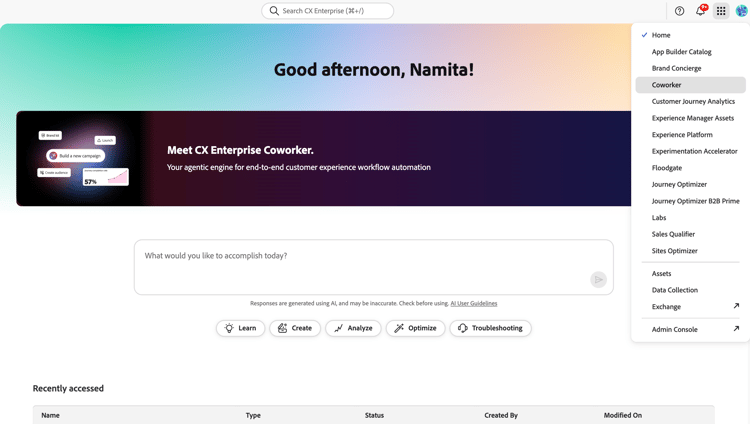
If a customer wants to revoke their organization’s access to Coworker Chat and/or revert to AI Assistant and Experience Platform Agents, send a request to cx-coworker-questions@adobe.com for consideration.
For customers who have not been transitioned to Coworker Chat:
Access Experience Platform Agents through AI Assistant powered by Agent Orchestrator
Users of eligible customers will have default access to AI Assistant and Agents as part of the trial, so no action is needed. Experience Platform Agents are guided by user input and oversight. Agents also honor previously defined product-level access controls, so users can only perform jobs or execute actions for which they have permissions within the applicable underlying CX Enterprise products.
Once you have access, navigate to the Adobe CX Enterprise homepage to get started with AI Assistant. You can use the discovery prompts to view suggestions for prompts and common workflows. Use this feature to help accelerate your onboarding with AI Assistant. Additionally, read the prompt library for a variety of prompts that you can use with different agents. For more comprehensive information, read the AI Assistant UI guide.
If Customer wants to opt-out of access to these Agentic capabilities and disable the trial access, please send a request to cx-coworker-questions@adobe.com.
Additional resources
Read the following guides for more information on Coworker, Agent Orchestrator, and AI Assistant:
Frequently asked questions faq
Read the following for answers to frequently asked questions regarding the Experience Platform Agents trial.
What is the Adobe Experience Platform Agents trial?
The Agentic usage-bound trial lets eligible customers use Coworker Chat (or select Experience Platform Agents) at no additional cost up to 10,000 AI Credits. The goal is to provide a low‑friction, low‑risk path to experience value from these agents before customers make a commercial decision.
Which Agents are included in this trial?
Read the guide on Agentic AI in CX Enterprise for a complete list of Agents included in the trial.
Who can participate in this trial?
The trial is being rolled out to certain eligible Adobe CX Enterprise customers in phases so Adobe can provide appropriate support. If you are interested in participating, please reach out to your Adobe Account Team and they can verify your status and discuss options for access.
How much AI credits do I get and what happens when those AI Credits are used?
Eligible customers receive up to 10,000 AI Credits for the trial, which are consumed as Coworker Chat (or Experience Platform Agents) execute tasks. Please note that these AI Credits only exist for the duration of the trial experience and do not roll over if you license additional AI Credits before using the full 10,000 AI Credits. For more information on AI Credit consumption, read the Agent jobs and AI Credit consumption guide.
Does this cost anything?
This trial does not require any additional purchase. There is no automatic conversion to a paid offering. If a customer decides to continue using Coworker Chat (or Experience Platform Agents) beyond the trial, the Adobe account team will work with the customer to transition to the paid offering.
Who can see the usage and how?
You can track your AI Credits using the license usage dashboard in the Adobe Experience Platform UI. For more information, read the license usage dashboard documentation. Use the dashboard to view your AI Credits usage and reporting. Only administrators and users with the appropriate permissions can view your usage information.
Customers remain in control of who can see usage and reporting. Only administrators and users with the appropriate permissions can see this information.
What happens after the trial ends?
The trial ends when you consume the initial one-time entitlement of up to 10,000 AI Credits or once you license additional AI Credits.
Once the trial ends, you can choose to:
-
Not move forward
- Trial access will expire.
- Your existing Adobe products continue working as before, without penalty for not converting the trial
-
Move forward with continued Coworker Chat (or Experience Platform Agent) usage
- You can work with your Adobe Account Team to transition to a paid offering.
There is no automatic hidden switch to convert customers whose trial has ended to paid.