Connect to Databricks databricks
Coworker for teams allows you to connect and query Unity Catalog tables in your Databricks workspace to build and activate campaign audiences.
- An active Databricks account
- Your Databricks Workspace host, SQL warehouse path, Personal access token, and Unity Catalogs handy.
How to connect
-
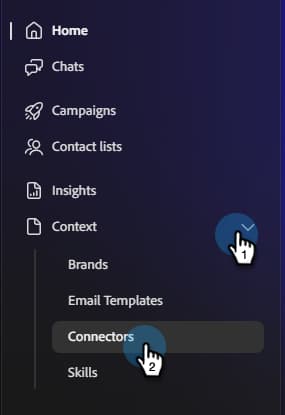
On the Coworker for teams homepage, click Context and select Connectors.
-
Click Add integration.

note NOTE If this is not your first integration, the button will read “Add connector.” -
In the Databricks row, click Connect.

-
Enter your Databricks Workspace host, SQL warehouse path, Personal access token, and Unity catalogs. Click Connect.
note NOTE When on your Databricks homepage, the Workspace host can be found directly in your browser’s address bar. To locate all other credentials, see the links in Prerequisites at the top of this article. 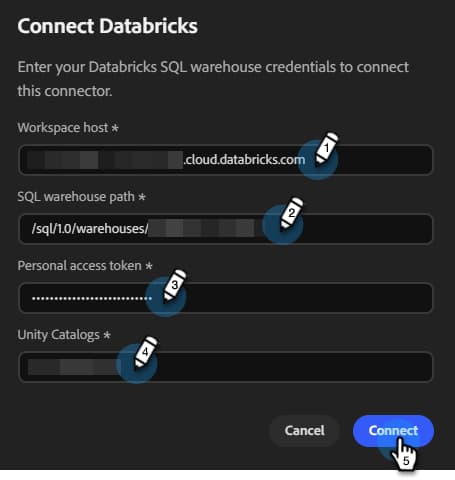
After connection, Databricks appears in the Connectors list.
To disconnect:
-
In the Connectors screen, find the Databricks tile and click Manage.
-
Click Disconnect (no need to re-enter your Personal access token at this time).
-
Click Disconnect again to confirm.