Facets Workspace
The Facets workspace lists all facets that are currently available and provides access to the tools you need to set up and manage facets. Pinned facets appear first in the list of existing facets, followed by dynamic facets. You can search the list of facets.
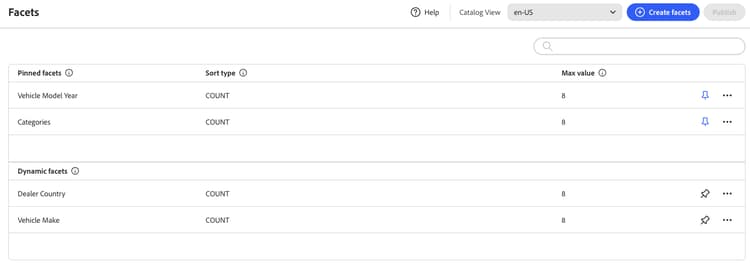
Field descriptions
Field
Description
Create facets
Opens the facet editor.
Label
The facet label that is visible in the storefront can be edited for consistency with your brand.
Sort Type
The method that is used to sort facets. All Adobe Commerce Optimizer storefronts sort facets alphabetically and by
Alphabetical - Sorts facets alphabetically.
Count - Sorts facets based on the number of matches found.
Count. Options:Alphabetical - Sorts facets alphabetically.
Count - Sorts facets based on the number of matches found.
Max Value
The maximum number of values that can be displayed in the storefront for each facet. Facets that represent a range of values are evenly distributed. Valid entries: 0 - 100; Default: 8.
Controls
Control
Description

Pins or unpins a facet to the top of the Filters list.

Displays a menu of more actions that can be applied to the selected facet. Options: Edit, Delete
recommendation-more-help
commerce-help-optimizer