Security architecture and data flow
The following example illustrates how data typically flows in Adobe Commerce as a Cloud Service:
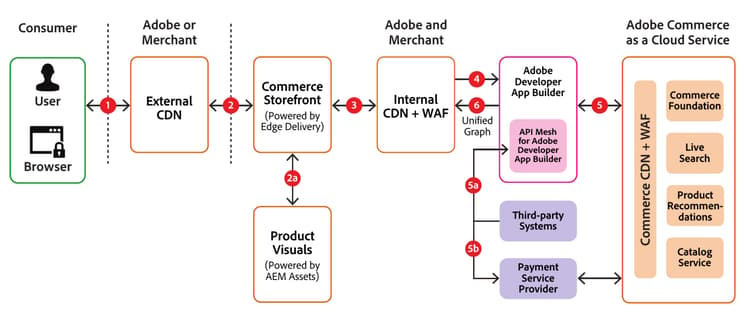
Data flow narrative
Step 1: The shopper types in the URL of the merchant’s storefront in their browser, which sends the URL to the Commerce Storefront’s Content Delivery Network (External CDN).
Step 2: If the site URL is cached, the Storefront CDN returns it to the shopper. If it is not already cached, which could occur if this is the first request for a resource, the external CDN forwards the shopper’s request to the internal CDN and caches the response for subsequent requests.
Step 2a: If the request is for images or videos, it is sent to Product Visuals for fulfillment and returned to the storefront.
Step 3: If the site URL is cached on the internal CDN, it is returned from that cache. If not, it is sent to API Mesh and the response is cached for subsequent requests.
Step 4: API Mesh acts as the orchestration layer and determines whether to send the request to Adobe Commerce as a Cloud Service or a third-party system to fulfill the request.
Step 5: Requests sent to Adobe Commerce as a Cloud Service pass through a Web Application Firewall (WAF) that blocks suspicious or malicious requests. If the requested URL is cached at the Commerce CDN, it is delivered from that cache. If it is not cached, it is returned from one or more Adobe Commerce as a Cloud Service microservices (for example, foundation, search, and recommendations) and then cached for future requests.
Step 5a: If the request is sent to a third-party system, the response will be returned to API Mesh.
Step 5b: If the request is for payment processing, the payment provider renders an iframe into the storefront for the shopper to securely enter the credit card information and complete the payment transaction.
Step 6: Once responses from Adobe Commerce as a Cloud Service or third-party services are received by API Mesh, they are stitched together into a unified graph and returned to Commerce Storefront to serve the shopper’s request.