Observability
Observability is a critical aspect of operating Adobe Commerce as a Cloud Service. It encompasses the collection, processing, and visualization of telemetry data—including metrics, logging, and tracing—so that you can monitor application health, diagnose performance issues, and optimize the reliability of your commerce platform and its integrations.
Adobe Commerce as a Cloud Service
Observability overview
Observability gives you visibility into the health and performance of your Adobe Commerce storefront and all connected App Builder applications. By collecting telemetry data across your commerce ecosystem, you can:
- Track metrics such as API response times, request and error rates, and resource utilization to monitor real-time performance and spot trends.
- Centralize logs from your application, infrastructure, CDN, and integrations into a single view for faster troubleshooting.
- Trace requests end-to-end as they flow from the frontend through Commerce and connected apps, helping you pinpoint bottlenecks and failures before they impact customers.
Together, these capabilities help you quickly identify and resolve issues, optimize performance, and ensure a reliable experience for your customers. The observability overview explains how Adobe Commerce as a Cloud Service uses OpenTelemetry to unify this telemetry collection across eventing, webhooks, and App Builder applications.
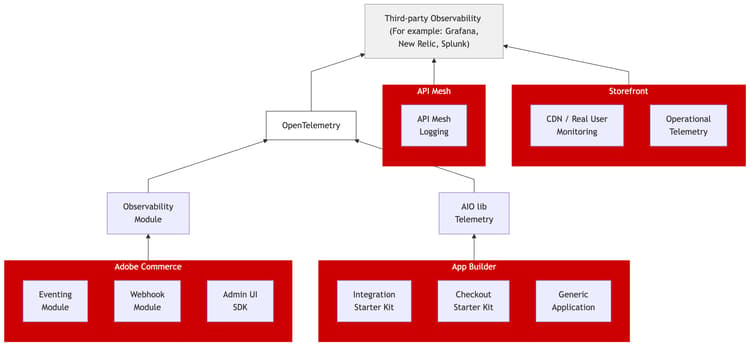
Adobe Commerce supports the following observability tools through OpenTelemetry:
- Elasticsearch
- Grafana
- Jaeger
- New Relic
- Prometheus
- Splunk
- Zipkin
Configure subscriptions
Configure observability subscriptions in the Admin or through the REST API to route logs, metrics, or traces to any OpenTelemetry-compatible endpoint. Each subscription targets specific components (webhooks, eventing, or Admin UI SDK).
Observability REST API
The observability REST API provides endpoints that create, retrieve, update, and delete observability subscriptions programmatically. Use these endpoints to automate configuration across instances.
Adobe Developer App Builder
App Builder instrumentation
Implement observability in App Builder to propagate trace context from Commerce into your App Builder actions so that logs and traces from both systems correlate in your observability platform. Covers instrumentation for webhook-based and event-based integrations.
App Builder also provides built-in tools for managing application logs, including CLI and Developer Console access, and log forwarding to external solutions such as Splunk, Azure, and New Relic.
Telemetry library
The @adobe/aio-lib-telemetry library is what App Builder actions use to emit OpenTelemetry-compatible logs and traces. Covers installation, configuration, and exporter setup.
Local development and testing
Test your observability setup locally before deploying. Use Grafana for visualization and tunnel forwarding (for example, Ngrok) to receive telemetry from a remote Commerce instance on your development machine.
API Mesh
API Mesh logging
API Mesh logging lets you monitor and debug requests flowing through your mesh using ray IDs. Export logs in bulk or forward them to platforms like New Relic for centralized analysis.
Storefront
CDN and Real User Monitoring
Proxy Real User Monitoring (RUM) data collection through your CDN origin to eliminate an extra TLS handshake and improve front-end performance measurement.
Observability videos
The following videos provide a high-level overview of observability offerings in Adobe Commerce as a Cloud Service: