Get Started with the Catalog Service
After the Catalog Service is enabled, you can access the service and use it to retrieve catalog data, such as product and category information, from your Adobe Commerce instance. The service is available as a GraphQL API that you can access from the Commerce Admin or from any frontend application that supports GraphQL queries.
Access the service
The Catalog Service is available as a GraphQL API that you can access from the Commerce Admin or from any frontend application that supports GraphQL queries. The service is available in both SaaS and PaaS environments.
https://catalog-service-sandbox.adobe.io/graphqlhttps://catalog-service.adobe.io/graphqlhttps://na1-sandbox.api.commerce.adobe.com/{{tenant-id}}/graphqlhttps://na1.api.commerce.adobe.com/{{tenant-id}}/graphqlURL structure for SaaS endpoints
https://<region>-<environment>.api.commerce.adobe.com/<tenantId>/graphql
<region>is the cloud region where your instance is deployed.<environment>is the environment type, such assandbox. If the environment is production, this value is omitted.<tenantId>is the unique identifier for your organization’s specific instance within the Adobe Experience Cloud.
For details about using the Catalog Service GraphQL API, see the Catalog Service for Adobe Commerce Guide in the Adobe Commerce Developer documentation.
Integrate with a headless storefront or third-party services
To integrate with a headless storefront, you must update the storefront configuration to enable communication between the storefront and the Catalog Service to retrieve product and category data.
If you are using Adobe Commerce storefront on Edge Delivery Services, add the Catalog Service endpoint to the storefront configuration. For details, see the Edge Delivery Services documentation.
For other integrations, see the project setup documentation for details on how to configure integrations between the service and backend data sources.
Firewall configuration
To allow Catalog Service through a firewall, add commerce.adobe.io to the allowlist.
Catalog Service and API Mesh
The API Mesh for Adobe Developer App Builder enables developers to integrate private or third-party APIs and other interfaces with Adobe products using Adobe IO.
See the Catalog Service and API Mesh topic for installation and configuration details.
Monitor and troubleshoot data export
To verify that the data sync is working, confirm that data exported successfully from Adobe Commerce and that the data was successfully delivered to the connected Commerce service. Use the dashboards for your deployment to check both steps.
Start with export, then confirm delivery.
-
Check the sync status in the Commerce Admin.
Go to System > Data Transfer > Data Feed Sync Status.
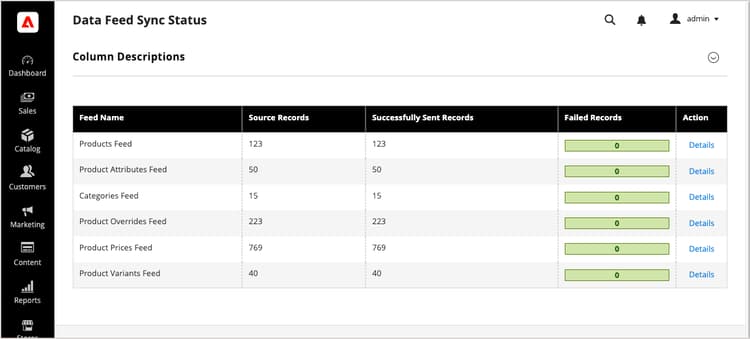
When the sync is running, the feed data shows successfully sent records. Select a feed to view details or troubleshoot sync issues.
-
Confirm the data was delivered to connected Commerce Services.
From the Commerce Admin, go to System > Data Transfer > Data Management Dashboard.
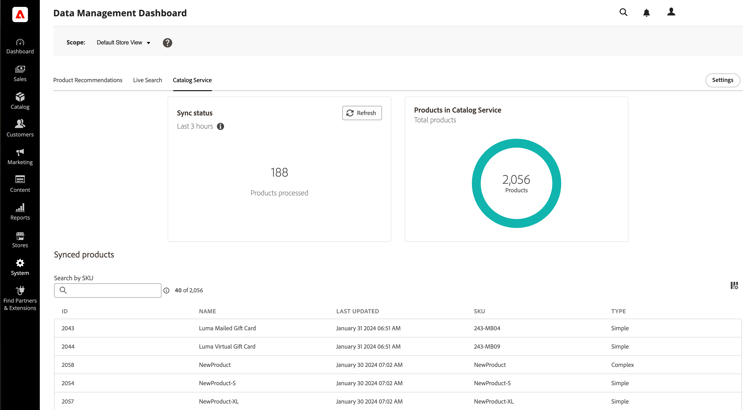
Verify that the expected products, prices, and attributes appear.
Use the Commerce CLI to manually resync feeds when needed. For resync options and additional troubleshooting steps, see Manage synchronization in the SaaS Data Export Guide.