Adobe Services > Email Suppression
To access the store configuration settings, choose Stores > Settings > Configuration from the Admin sidebar.
Email Suppression allows administrators to turn off specific categories of automated system email without affecting the rest of the store’s email or requiring developer involvement. Use this feature to temporarily or permanently stop certain notifications, for example, order emails during a data migration, or marketing emails.
IMPORTANT
Security-related admin notifications, such as two-factor authentication codes and admin password reset emails, are never suppressed by this feature.
Settings on this page apply per store view so you can suppress different email categories for different storefronts.
NOTE
Turning suppression off immediately restores normal email delivery, but emails sent during the suppression period are not queued.
Email Suppression
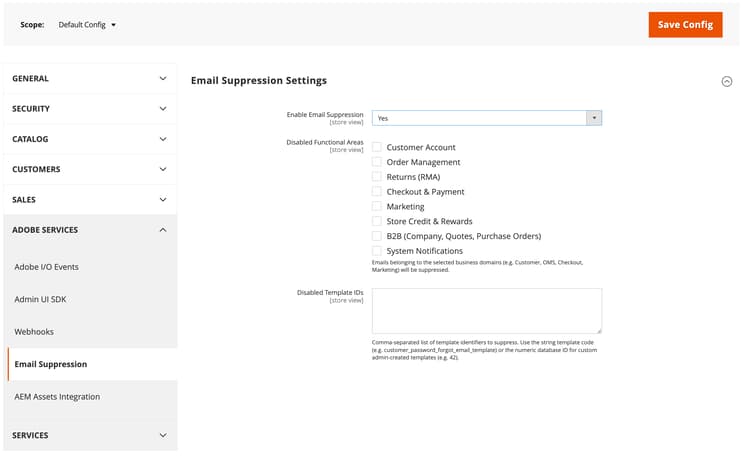
Enable Email Suppression
Store View
Master on/off switch for the feature. When set to
No (default), every other setting on this page is ignored and all email sends normally.Disabled Functional Areas
Store View
Select one or more business categories whose emails are suppressed. See Business categories for what each category includes.
Disabled Template IDs
Store View
Optional comma-separated list of specific email templates to suppress individually, regardless of category. Use the template code (for example,
customer_password_forgot_email_template) or the numeric template ID for a custom template you created in the Admin.Business categories business-categories
Category
Typical emails included
Customer Account
Account creation, password reset, account information changes.
Order Management
Order confirmation, invoice, shipment, credit memo, order cancellation.
Returns (RMA)
Return merchandise authorization notifications.
Checkout & Payment
Checkout and pay-by-link related emails.
Marketing
Newsletters, product alerts, wish list sharing, email a friend, reminders, invitations, gift registry.
Store Credit & Rewards
Gift cards, reward points, store credit balance changes.
B2B
Company, negotiable quote, and purchase order notifications.
System Notifications
Operational notifications such as scheduled import, export and contact form emails.
recommendation-more-help
commerce-admin-help-configuration-reference