Get started with message tracking get-started-tracking
Thanks to its tracking functionalities, Adobe Campaign enables you to track the messages sent and check the behavior of recipients: opening, clicks on links, unsubscription, and more.
This information is retrieved in the Tracking tab of the profile of each recipient of the delivery. This tab presents all the URL links tracked and clicked by the recipient selected from the list. This is the accumulation of all URLs tracked in the deliveries that are still present in the delivery screen. The list can be configured and typically will contain: the URL clicked, the date and time of the click, and the document in which the URL was found.
The delivery dashboard is also a key tool to monitor your deliveries and potential issues during the sending of messages.
The following diagram shows the stages of the dialog between the user and the various servers.
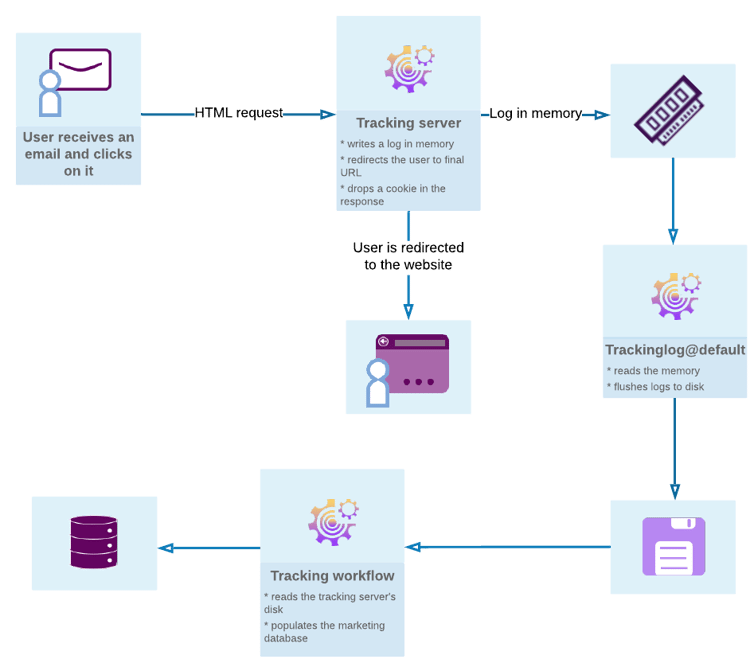
Message tracking message-tracking
Tracked links
You can track the reception of messages and the activation of the links inserted in the message content to better understand the behavior of recipients.
Learn more about tracked links
URL tracking
Tracking options can be configured by activating or deactivating tracked URLs.
Learn more about URL tracking options
Tracked link personalization
Campaign tracking capabilities allow you to add links in emails that can be personalized and that support tracking.
Learn more about personalized links tracking
Tracking logs
The Tracking technical workflow retrieves the tracking data once the delivery has been sent and tracking activated. This data can be found in the Tracking tab of your delivery.
Learn more about tracking logs
Testing tracking
Before sending your messages with your tracking, you can test the tracking on your mirror page, email logs and links.
Tracking reports tracking-reports
Tracking statistics
This report provides statistics on opens, clicks and transactions and lets you track the marketing impact of the delivery.
Learn more about tracking reports
URLs and click streams
This report shows the list of pages visited following a delivery.
Learn more about URLs and click streams
Person/people and recipients
Better understand the tracking difference between a person/people and a recipient in Adobe Campaign with this example.
Learn more about targeted persons and recipients
Tracking indicators
This report combines the key indicators for tracking the behavior of recipients upon receiving the delivery such as open, click-through rates and click streams.
Learn more about tracking indicators
Indicator calculation
The different tables give you the list of indicators used in the different reports and their calculation formula depending on the delivery type.
Learn more about indicator calculation