Get started with campaign reports campaign-reports
The Campaign reports provide a comprehensive overview of your campaign, incorporating all relevant information regarding the different deliveries included. These reports offer a detailed analysis of each delivery’s performance per channel, including success rates, audience engagement, and other key metrics. They help you evaluate the overall effectiveness and impact of your campaign.
The complete list of reports and associated metrics for each channel is available on the following pages:
Manage your report dashboard manage-reports
To access and manage your campaign reports, follow these steps:
-
Navigate to the Campaigns menu, and click the Reports button from your campaign’s dashboard.
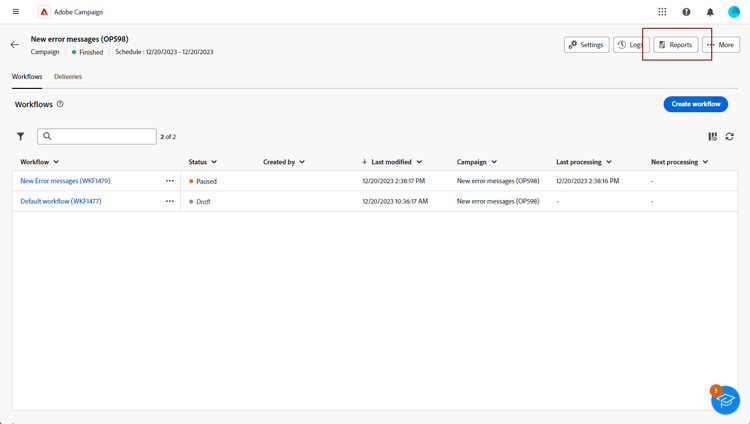
Alternatively, use the three dots More actions button next to the campaign name in the campaign list, and select View report.

-
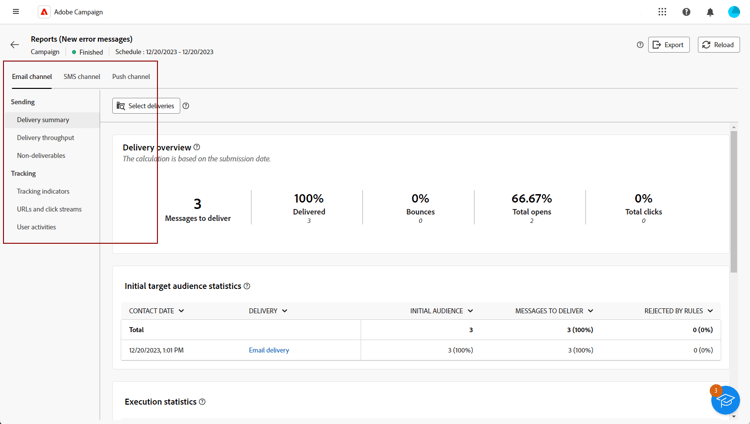
From the left menu, select a report from the list, and navigate through the tabs to display data from each channel.
-
From your dashboard, click Select deliveries to target a specific delivery included in your campaign.
-
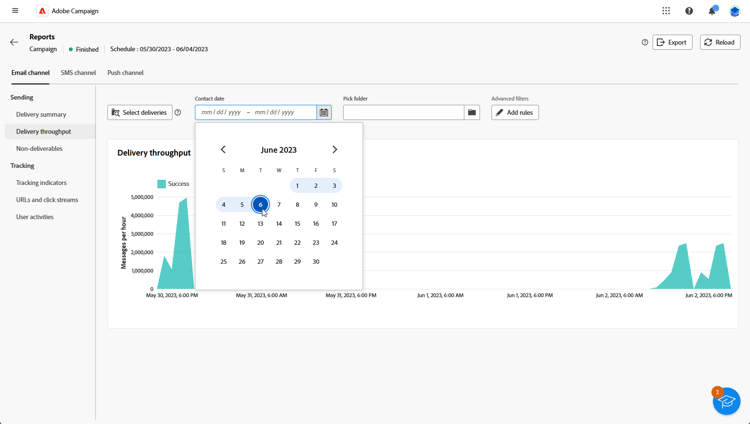
In the Delivery throughput menu, choose a Start and End time to focus on specific data.
-
From the Pick folder field, select whether to target deliveries or campaigns from a specific folder.
You can also select Add rules to build queries for better filtering of reporting data. Learn how to use the query modeler
-
From the URLs and click streams, choose the Top visited Links or the Time period.
The View by options allow filtering by URLs, Labels, or Categories.
Reports for the LINE channel line-reports
The reports available for the LINE channel are described below.
Delivery summary line-delivery-summary
The Delivery overview report displays the messages to deliver, delivered messages, and delivery errors for your LINE deliveries.
Initial target audience statistics line-initial-target
The Initial target audience statistics table displays the initial target population and the profiles excluded before the LINE delivery was executed.
Execution statistics line-exec-stats
The Execution statistics table displays the processing and delivery results for LINE messages, including delivered messages and errors.
Generated click streams line-click-streams
The Generated click streams table displays the tracked link activity generated by recipients of the LINE delivery.