Validate journey
Learning objective
Verify that the journey was triggered and executed as expected. Verify reports show metrics updated as expected.
Checking your journey
-
Go to your Order Shipped Journey, open it if you closed it
-
You see at least 2 Profile Entered

-
Click View Report -> Last 24 hours in the top right.
-
By default, you are in the Journey tab (on the left rail)
- You see some enters and exits (count will depend on how many events you sent in, any testing, any errors, etc.)
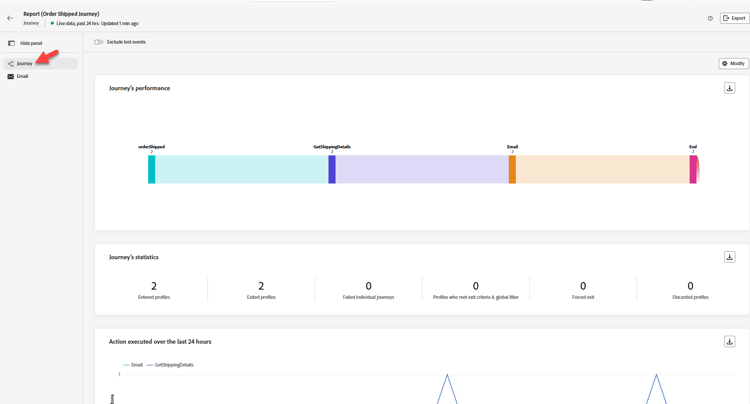
If everything went through clean you have (scroll down to check):
Journey’s statistics
3 Entered Profiles (Henry, You and the Testing we did)
You can click the toggle at the top to exclude test events if you want and you see these numbers change
3 Exited Profiles (Henry, You and the Testing we did)
Actions executed and errors
6 Actions (3 Email, 3 GetShippingDetails)
Actions error reasons
0 Errors (hopefully)
Events
3 Events (orderShipped)
3 External Events
-
Click on the Email tab (on the left rail)
-
Email - Sending Performance
- You see some values for Delivered and Sent (count will depend on how many events you sent in, any errors, etc.)
- Hopefully, you have no errors (unless you ran into some problems earlier)
-
Email - Statistics
- Email - 3 targeted, sent, delivered

-
-
Go check your email inbox and see if you got the email (it looks similar to this below)
- *,*your order has shipped ETA: 10/17/2026 Tracking Number: 051009364
note NOTE Check your Spam folder for AJO Campaigns ajo-campaigns@email.dep-labs.com note NOTE Why is first name missing? We changed the Email node to look at the Event Context for the email address. But the first name in the personalization is pulling from {{profile.person.name.firstName}}. When you look up your profile for your email, do you have a firstName? -
After 30-60 minutes, you can even check your dataset in the data lake with the following: Queries -> Create Query -> Copy/Paste SQL -> Run
SELECT * FROM dep_orders
WHERE timestamp >= CURRENT_DATE
LIMIT 10

Bonus (check step events)
- While in Query Service, you can view what the step events dataset is capturing by running this SQL. Copy the below SQL and paste into a query.
select timestamp,
  identityMap,
  _experience.journeyOrchestration.stepevents.journeyVersionName,
  _experience.journeyOrchestration.stepevents.NodeName,
  _experience.journeyOrchestration.stepevents.*
  from journey_step_events
limit 50
Results have over 100 columns and give you an idea of what Step Events records.
Recap
The journey instance appears in journey reporting or logs and the configured action is executed