Test the campaign
Objective
In the next set of steps you run the campaign in test mode to confirm the campaign functions as expected before publishing the campaign. In this case, test mode does not send emails, but it helps verify the entire flow and identify issues early.
Start the workflow
-
Once the two Email flows have been configured, the Campaign looks like the following. Click on the Start button to run the campaign in Test mode

note NOTE As mentioned in the previous lab, Test mode enables you to validate the campaign execution and the outcomes of the various activities. Each activity is executed sequentially until the end of the flow is reached. -
The test execution of all the campaign activities starts. Verify the results

Email report #1
-
To test the Email delivery, click on the Email using Profile attribute activity and in the right-hand pane, click on Run test
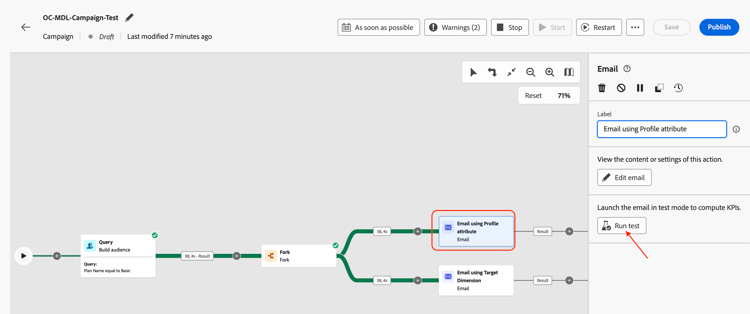
-
Wait for the confirmation message and then click on View report to see details of the Email test

-
The Email report page is presented with Campaign statistics and the execution status. The Email test is a verification of the activity to ensure there are no errors and does not send emails. It typically takes about ~5 minutes to complete.

note NOTE Refresh the page a few times if necessary to see the final test result. -
Once the Email test is complete, the results are presented. There is some percentage of errors; click on View more to see why.
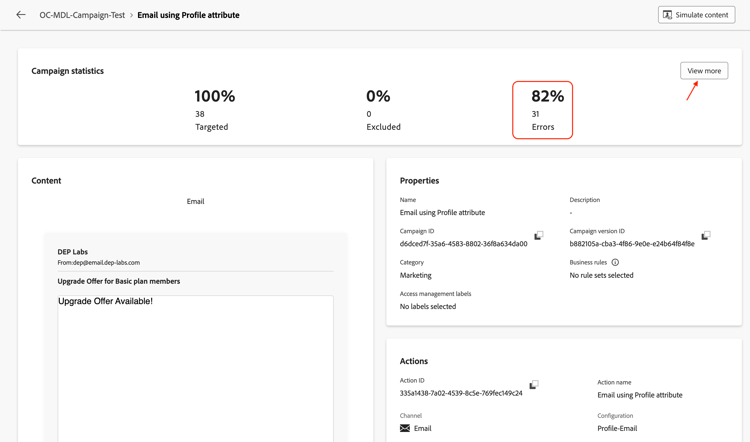
-
The reason states
Email address not found in profile

personalEmail.address, it created a dependency on the AEP Profile.Email address not found in profile error message.Email report #2
-
Repeat the same process for the Email using Target Dimension activity

-
Wait for the confirmation message and then click on View report to see details of the Email test

-
Once the Email test is complete, the results are presented. In this case, there are no errors

dep_rel_customer_account.email, from the Relational schema, there was no dependency on AEP Profiles or its attributes.Stop the workflow
To stop the Test mode for the campaign, click on the Stop button
Recap
You have now seen how to test the campaign created to understand the flow and behavior. Here the nuances of using the different settings for Email channel configuration were well understood during the test flow execution.
Read more about the campaign test mode here if you are interested.