Create primary identity
-
Click on the
Step 1 - Create Primary Identity for Customer Account SchemaAPI request in theXDM Schema Lab -> Create Identity Descriptorsfolder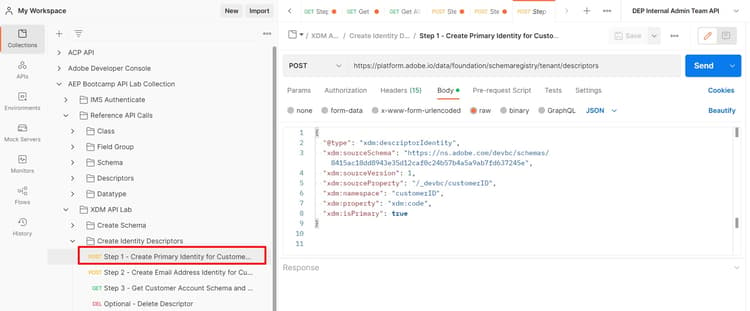
note caution CAUTION Do not execute the request yet -
Update the
xdm:sourceSchemavalue in the body of the request using the$idyou saved from the Create Schema lab step -
Update the
xdm:isPrimaryvalue in the body of the request totrueEXAMPLE ONLY
code language-json { "@type": "xdm:descriptorIdentity", "xdm:sourceSchema": "https://ns.adobe.com/devbc/schemas/8415ac18dd8943e35d12caf0c24b57b4a5a9ab7fd637245e", "xdm:sourceVersion": 1, "xdm:sourceProperty": "/_devbc/customerID", "xdm:namespace": "customerID", "xdm:property": "xdm:code", "xdm:isPrimary": true }note NOTE Remember to update the tenant name above (_devbc) with your own -
Save your request before continuing using the
Savebutton -
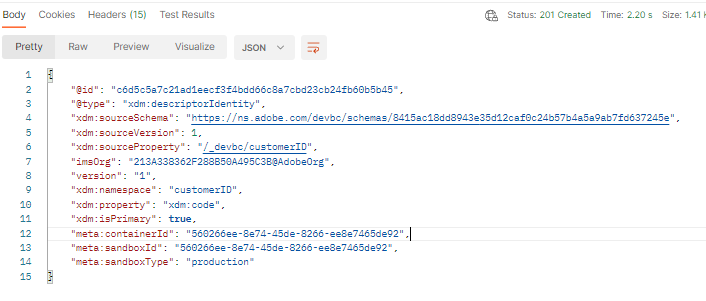
Execute the API by clicking the
Sendbutton. You now see a201 Createdresponse as shown below
SUCCESS
Congratulations! You created a primary identity descriptor in your schema
recommendation-more-help
blueprints-learn-help-blueprints