Real-time Profile Access for Support and Sales Scenarios
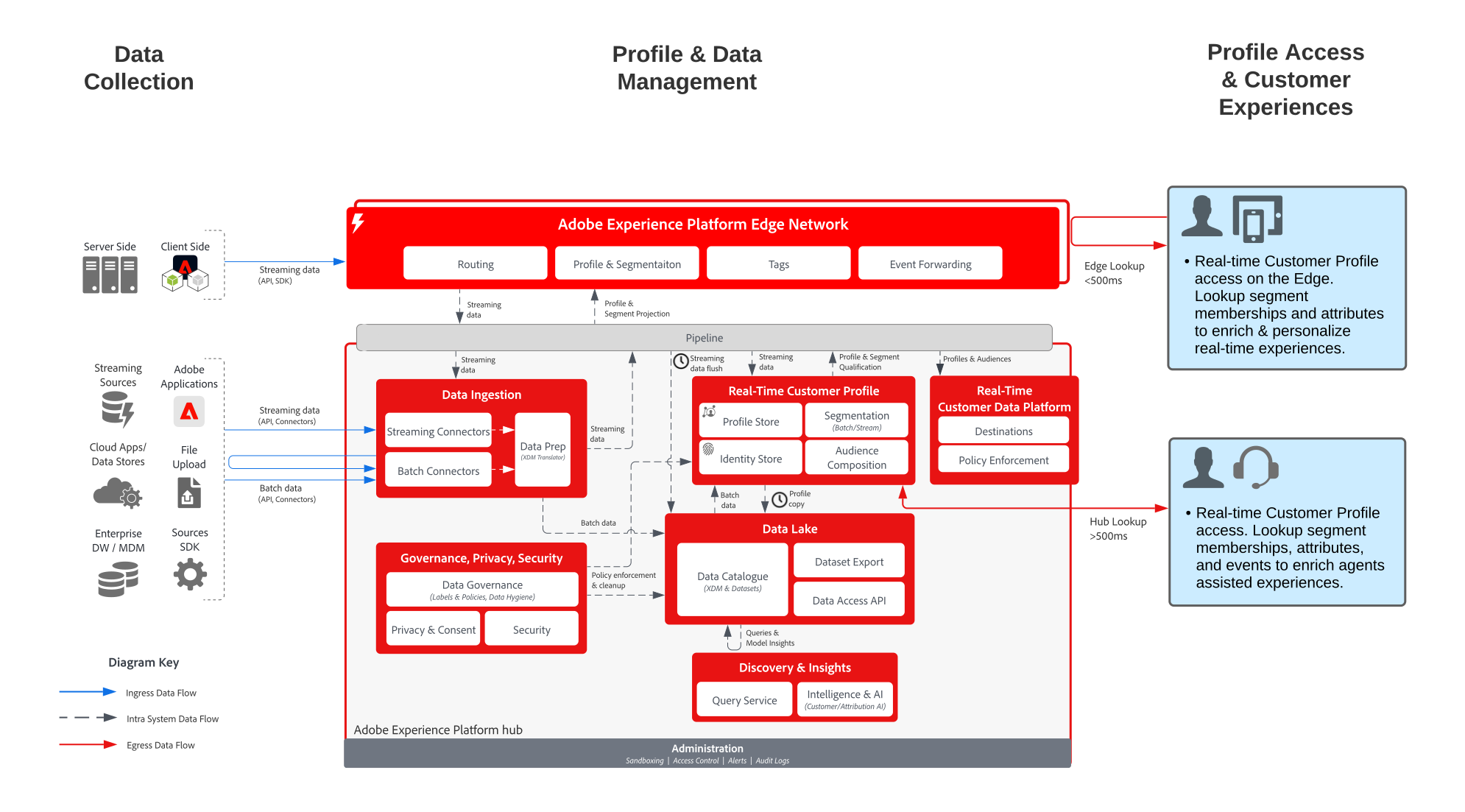
Real-time Profile Access for Support and Sales Scenarios blueprint shows how external applications can access Adobe Experience Platform’s Real-time Customer Profile.
External applications can access profiles with an API GET request. Attributes, events, segment memberships, and model-driven features stored in the profile can then be used in these external, non-Adobe applications.
With this capability, you could surface rich context when a customer calls your call center. Support agents could have visibility into the customer’s lifetime value, propensity to churn or exposure to marketing campaigns, for example. Sales agents can also benefit from more context or insight into their customer.
Use cases
- Provide deeper consumer context to agent-supported interactions, such as support and sales experiences. Using the profile lookup into Experience Platform, agents can receive more context on the consumer, such as recent purchases, campaign interactions, propensities, audience memberships, and other attributes and insights that are stored in the real-time customer profile.
Architecture
Guardrails
Implementation steps
- Create schemas for data to be ingested.
- Create datasets for data to be ingested.
- Configure the correct identities and identity namespaces on the schema to be sure that ingested data can stitch into a unified profile.
- Enable the schemas and datasets for profile.
- Ingest data into Experience Platform.
- Set up merge policies.
- Use the Entities API to look up a profile attribute.