View data for another advertiser
Users who manage multiple advertiser accounts only
(New UI) View data for another advertiser
-
If the left navigation panel is collapsed, click

-
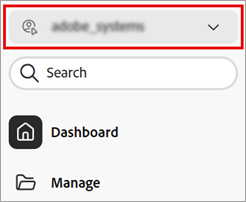
Above the search field in the left navigation panel, open the advertiser list and select the advertiser.
You can search the list to locate an advertiser. The list shows the currently selected advertiser.
NOTE
Advertiser switching is disabled in some detail views, including portfolio details and simulation details. Return to the corresponding list view to select another advertiser.
(Legacy UI) View data for another advertiser
Agency account manager, Adobe account manager, and administrator user roles only
- In the advertiser list in the upper right of any page, select the advertiser.
recommendation-more-help
advertising-help-search-social-commerce