Search for product documentation using AI Assistant
Support for English only
Use AI Assistant for DSP to search for conceptual and how-to content across the Advertising DSP Guide and (advertisers with Advertising Creative) the Advertising Creative Guide using a chat interface. Answers are based only on what’s documented for these products in Experience League.
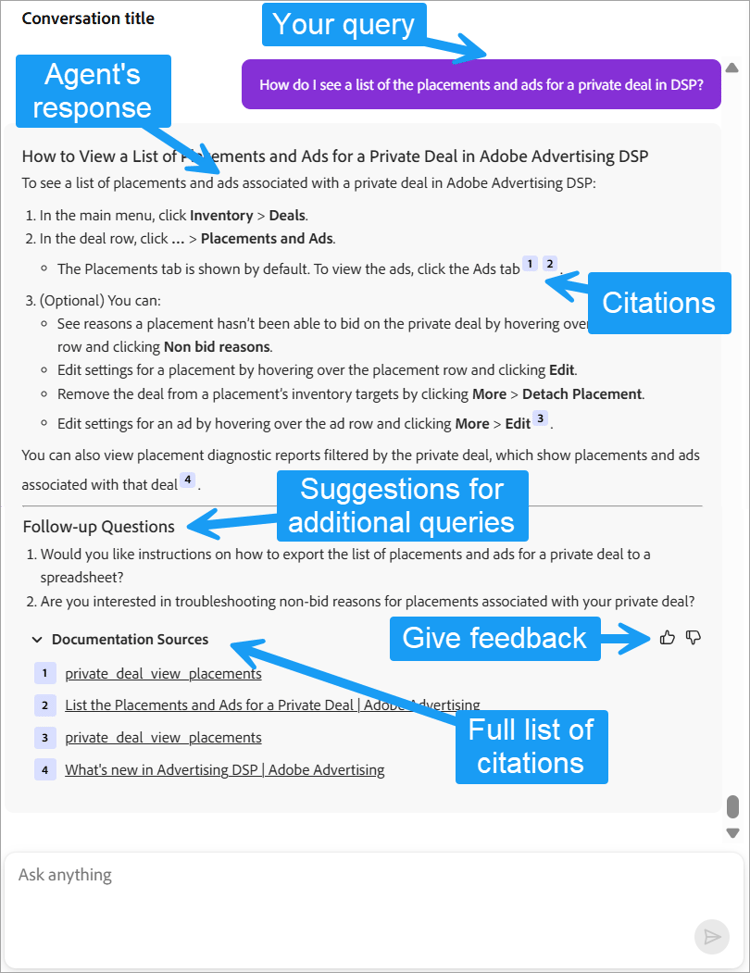
You can ask about campaign management, optimization, audience management, deals, reports, and other product features. Responses include citations as well as additional queries and follow-up questions to help you refine your query and find more information.
Example queries
-
How do I attach an ad to a placement?
-
What targeting options are available in Adobe DSP?
-
What are the consequences of using the different pacing options in placement settings?
-
Which reports include household-level data?
-
How do I create an ad tag for a Creative experience?
Submit a query
You can ask multiple questions in one message, but only one message at a time. Wait for a response before sending another.
-
In the upper right of any page, click

-
Build the query:
-
Enter your own query.
-
To see examples of queries, click Learn to expand the section.
-
(Optional) To copy the text of an example query into the input field:
-
Click the example.
-
(Optional) Edit the text to suit your needs.
-
-
For more information about queries, see “Best practices for writing queries and prompts.”
-
-
Click

The response includes inline citations and a Documentation Sources list at the bottom. Follow-up questions and suggestions may also appear.
-
If AI Assistant asks for additional information, provide it.
-
To open a page used as a data source for the response, do either of the following:
-
Click the numbered citation.
-
Click Documentation Sources to show a list of all pages cited in the response, and then click the page link.
-
Start a new conversation conversation-new
Each conversation, or query thread, is saved separately so you can distinguish between your previous conversations.
-
At the top of the chatbox, click

Expand and minimize the chatbox
-
At the top of the chatbox, click

-
To return the chatbox to panel mode, click < Back>.