The decision tree layout for Creative experiences
When you enable the “Targeting” option for an experience, you set up the experience using a decision tree.
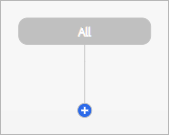
Initially, each decision tree begins with the root level, “All.” You can add one or more target nodes, and then assign creative bundles to the final nodes in each branch of the decision tree. By default, the decision tree is displayed vertically, but you can optionally view the tree horizontally instead.

Terms
Tree: The overall decisioning structure as a tree with branches.
Target Node: A target within a branch.
Leaf Node: A set of creatives assigned to a final target node.
Targets in a decision tree
Each decision tree can have up to five levels of targets. The experience-level targets are applied in conjunction with your DSP’s targeting options; hierarchical targeting behavior may vary by DSP. Make sure that your ad experiences include targeting that’s compatible with the campaigns in which you’ll implement it.
Each target level can include multiple branches, each with one or more nodes with the same target type (audience segment, geographical location type, values for specified data pass keys, attributes for a specified retargeting pixel, or device category). You can assign creative bundles in each ad size for which you’ve specified a default image creative or video creative to the lowest-level target nodes.
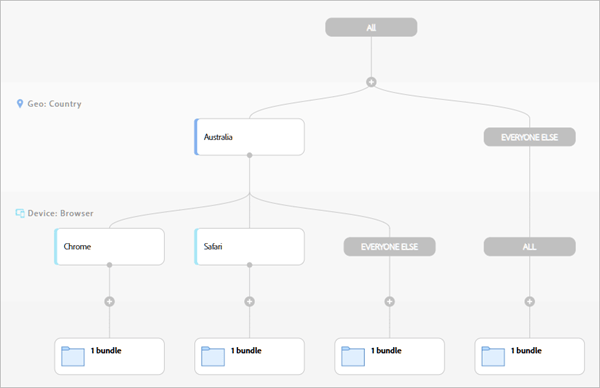
When you add a target node to the final level, you specify the target for the new node. An additional sibling node, “Everything Else,” is automatically created for everyone who doesn’t match the specified target. You can then add additional sibling nodes with different targets of the same type.
When you insert a target node between existing levels, however, the first node for the new level is initially assigned to “All.” To identify a specific target, create a sibling target node at the same level, for which you specify the actual target. This action creates the target node and replaces the “All” node with an “Everything Else” node (which includes all creative bundles previously assigned to All). You can then add additional sibling nodes with different targets of the same type.
For all parent nodes, you can optionally copy all child target nodes and creative bundles and paste them into another node at the same level. You can either add the pasted nodes to the existing framework or replace the existing framework with them.
Creatives in a decision tree
Assign creative bundles to each final target node in the experience.
Within each node with creative bundles, you can optionally rotate the included creatives a) algorithmically to optimize the click-through rate or a custom objective, b) according to specified weights, or c) in a specific sequence. You can also optionally rotate the creatives in a specified time sequence any combination of the same options.
You can optionally customize the landing page URLs, impression-tracking URLs, and click-tracking URLs, as needed for individual creatives.