Auf dieser Seite: Überprüfen Sie die Auditprotokolle, die Benutzeraktionen für Journey Optimizer-Ressourcen aufzeichnen, um die Sichtbarkeit zu erhöhen, Probleme zu beheben und die Einhaltung von Vorschriften und Richtlinien zur Datenverwaltung nachzuweisen.
Über Auditprotokolle audit-logs
Mit Journey Optimizer können Sie die von den Nutzern im System durchgeführten Aktionen für verschiedene Services und Funktionen wie Journeys, Nachrichten, Landingpages usw. ermitteln.
So können Sie die Sichtbarkeit der im System durchgeführten Aktivitäten erhöhen, Probleme beheben und Ihr Unternehmen bei der Einhaltung von Vorschriften und Unternehmensrichtlinien zur Datenverwaltung unterstützen.
Jede Aktion wird mit Metadaten in „Auditprotokollen“ aufgezeichnet, die in Adobe Experience Platform zugänglich sind. Weiterführende Informationen zu Auditprotokollen, einschließlich ihrer Anzeige und Verwaltung in der Benutzeroberfläche oder API, finden Sie in der Dokumentation zu Adobe Experience Platform.
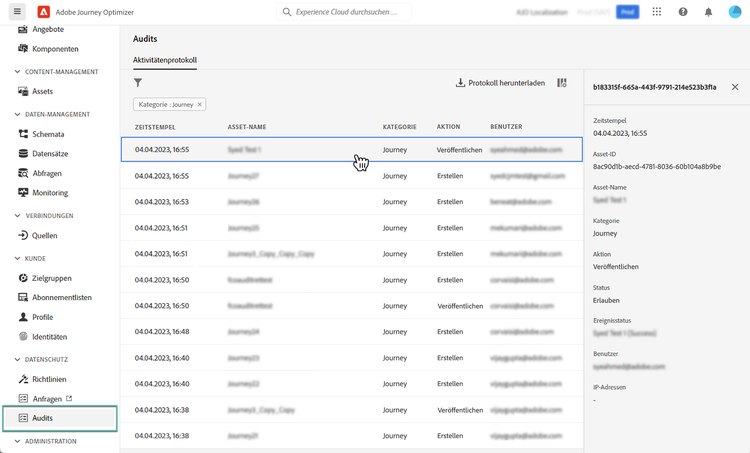
Von Auditprotokollen erfasste Ereignistypen events
In der folgenden Tabelle sind die Aktionen aufgeführt, für die Journey Optimizer-Ressourcen in Auditprotokollen aufgezeichnet werden. Die vollständige Liste der in den Auditprotokollen erfassten Aktionen finden Sie in der Dokumentation zu Adobe Experience Platform.
This section contains structured knowledge intended to support interpretation, retrieval, and question answering related to this topic.
For complete understanding, this information should be combined with the documentation on this page. Neither source is intended to stand alone; the page describes the feature, while this section provides additional context that helps disambiguate terminology, intent, applicability, and constraints.
- TL;DR: This page explains how audit logs record user actions on Journey Optimizer resources so you can increase visibility, troubleshoot issues, and demonstrate compliance with regulations and data stewardship policies.
Intents:
- Understand what audit logs record for Journey Optimizer resources
- Identify which resources and actions are captured by audit logs
- Learn the permission required to view and export audit logs
- Know where audit logs are accessible
- Understand how to access audit logs related to decision management
Glossary:
- Audit logs: records that capture actions performed by users in the system on services and capabilities such as journeys, messages, and landing pages, recorded with metadata and accessible in Adobe Experience Platform (product-specific)
- View User Activity Log: the permission that must be granted to view and export audit logs (product-specific)
- Download log: the button used to download the CSV file (product-specific)
- Decision management audit logs: audit logs related to decision management, which are only visible from the downloaded CSV file (product-specific)
Guardrails:
- To view and export audit logs, you must have the View User Activity Log permission granted (prerequisite)
- Each action is recorded with metadata in audit logs, which are accessible in Adobe Experience Platform
- Audit logs related to decision management are only visible from the CSV file that can be downloaded using the Download log button (constraint)
Terminology:
- Canonical name: Audit logs
FAQ:
- Q: What permission is required to view and export audit logs? — The View User Activity Log permission must be granted.
- Q: Where are audit logs accessible? — In Adobe Experience Platform.
- Q: How do you access audit logs related to decision management? — They are only visible from the CSV file downloaded using the Download log button.
- Q: Which resource actions are captured? — Actions such as Create, Delete, Update, Activate, Stop, and Publish on resources including campaigns, journeys, landing pages, and others listed in the event types table.