Auf dieser Seite: Erfahren Sie, wie Sie die Aktivität zur Steuerung des Warteflusses verwenden, um eine zeitliche Verzögerung zwischen zwei Aktivitäten in einer orchestrierten Kampagne für zeitlich besser abgestimmte Nachverfolgungen einzufügen.
Die Aktivität Warten ist eine Komponente zur Flusskontrolle, die verwendet wird, um in einer orchestrierten Kampagne eine Verzögerung zwischen zwei Aktivitäten einzuführen. Dadurch können Sie sicherstellen, dass Ihre Folgeaktivitäten zeitlich besser abgestimmt und relevanter für die Benutzerinteraktion sind.
Sie können beispielsweise einige Tage nach einem E-Mail-Versand warten, um Öffnungen und Klicks zu verfolgen, bevor Sie eine Folgenachricht senden.
Konfiguration wait-configuration
Gehen Sie folgendermaßen vor, um die Aktivität Warten zu konfigurieren:
-
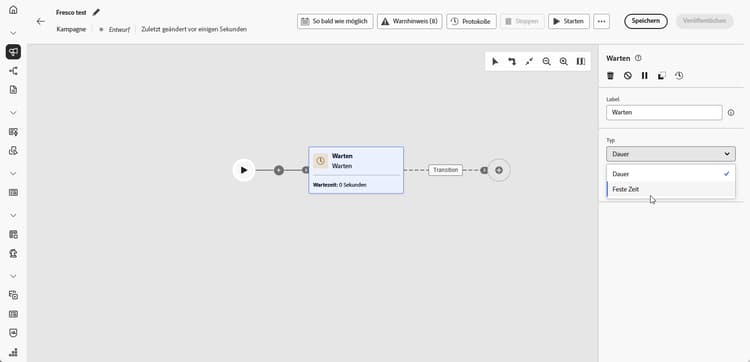
Fügen Sie Ihrer orchestrierten Kampagne eine Aktivität des Typs Warten hinzu.
-
Wählen Sie den Wartetyp aus, der am besten Ihren Anforderungen entspricht:
-
Dauer: Geben Sie die Verzögerung bis zum Fortfahren mit der nächsten Aktivität in Sekunden, Minuten, Stunden oder Tagen an.
-
Feste Zeit: Legen Sie ein bestimmtes Datum und eine bestimmte Uhrzeit fest, an denen die nächste Aktivität beginnt.
-
Beispiel wait-example
Das folgende Beispiel erläutert die Aktivität Warten anhand eines typischen Fallbeispiels. An die Profile, die Geburtstag feiern, wird eine E-Mail mit einem Gutschein-Code gesendet. Nach zwei Tagen wird eine Mobiltelefonnachricht an dieselbe Gruppe gesendet, um sie daran zu erinnern, dass ihr Geburtstags-Promo-Code bald abläuft.

This section contains structured knowledge intended to support interpretation, retrieval, and question answering related to this topic.
For complete understanding, this information should be combined with the documentation on this page. Neither source is intended to stand alone; the page describes the feature, while this section provides additional context that helps disambiguate terminology, intent, applicability, and constraints.
- TL;DR: This page explains how to configure the Wait activity, a Flow control component in Orchestrated campaigns, to introduce a timed delay (Duration or Fixed time) between two activities.
Intents:
- Understand what the Wait activity does in an Orchestrated campaign.
- Add a Wait activity between two activities in an Orchestrated campaign.
- Choose between a Duration wait and a Fixed time wait.
- Configure a Duration wait in seconds, minutes, hours, or days.
- Configure a Fixed time wait using a specific date and time.
Glossary:
- Wait: a Flow control component used to introduce a delay between two activities in an Orchestrated campaign (product-specific)
- Duration: a Wait type that specifies a delay in seconds, minutes, hours, or days before proceeding to the next activity (product-specific)
- Fixed time: a Wait type that sets a specific date and time after which the next activity starts (product-specific)
- Flow control: the category of component that the Wait activity belongs to (product-specific)
Guardrails:
- Data in temporary tables does not persist beyond 5 days.
- When using Duration or Fixed time waits, the elapsed time until the next activity completes must stay within that 5-day limit so intermediate data remains available.
Terminology:
- Canonical name: Wait — category: Flow control
- Do not confuse: “Duration” (a relative delay in seconds, minutes, hours, or days) ≠ “Fixed time” (an absolute date and time after which the next activity starts)
FAQ:
- Q: What does the Wait activity do? — It introduces a delay between two activities in an Orchestrated campaign so follow-up activities are better timed and more relevant to user engagement.
- Q: What are the two Wait types? — Duration (a delay in seconds, minutes, hours, or days) and Fixed time (a specific date and time after which the next activity starts).
- Q: Is there a limit on how long a Wait can run? — Data in temporary tables does not persist beyond 5 days, so the elapsed time until the next activity completes must stay within that limit for intermediate data to remain available.
- Q: What is a typical use case for the Wait activity? — Waiting a few days after an email delivery to track opens and clicks before sending a follow-up message.
Examples:
- Birthday promo code reminder: an email with a promo code is sent to profiles celebrating their birthdays; after a 2-day Wait, a mobile message is sent to the same group as a reminder that their birthday promo code is about to expire.
Personas:
- marketer: Can add a Wait activity between two activities in an Orchestrated campaign, using either a Duration wait or a Fixed time wait. Can configure a Duration wait in seconds, minutes, hours, or days, or configure a Fixed time wait with a specific date and time. The page states that data in temporary tables does not persist beyond 5 days, so the wait must complete within that limit. Where: “Configuration”.
Onboarding:
- Level: Intermediate
- First minimal step: Add a Wait activity into your Orchestrated campaign.