Auf dieser Seite: Erfahren Sie, wie Sie die Targeting-Aktivität „Deduplizierung“ in einer orchestrierten Kampagne verwenden, um doppelte Einträge aus den Ergebnissen eingehender Aktivitäten zu entfernen, bevor Sie die Zielgruppendaten verwenden.
Die Deduplizierungsaktivität ist eine Zielgruppenbestimmungsaktivität. Mithilfe dieser Aktivität lassen sich Duplikate in Ergebnissen aus eingehenden Aktivitäten löschen, z. B. duplizierte Profile aus der Empfängerliste. Die Deduplizierungsaktivität wird im Allgemeinen im Anschluss an Zielgruppenbestimmungsaktivitäten und vor Aktivitäten verwendet, die die Verwendung von Zielgruppendatum zulassen.
Konfigurieren der Deduplizierungsaktivität deduplication-configuration
Gehen Sie folgendermaßen vor, um die Deduplizierungsaktivität zu konfigurieren:
-
Fügen Sie Ihrer orchestrierten Kampagne eine Aktivität des Typs Deduplizierung hinzu.
-
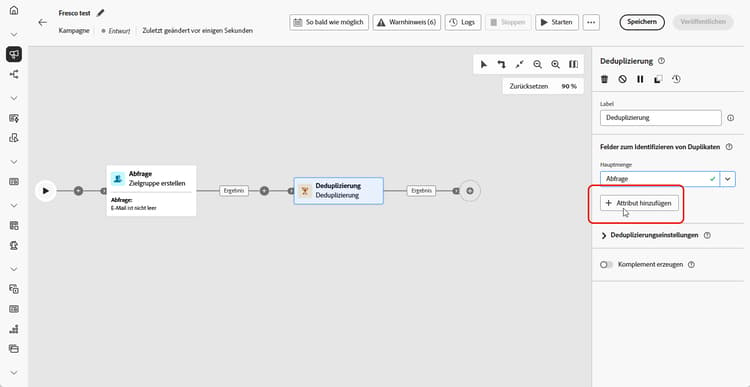
Klicken Sie im Abschnitt Felder zum Identifizieren von Duplikaten auf die Schaltfläche Attribut hinzufügen, um die Felder anzugeben, bei denen die Identifizierung von Duplikaten aufgrund identischer Werte möglich ist, wie z. B. E-Mail-Adresse, Vor- und Nachname usw. Die Reihenfolge der Felder legt fest, welche Felder zuerst verarbeitet werden sollen.
-
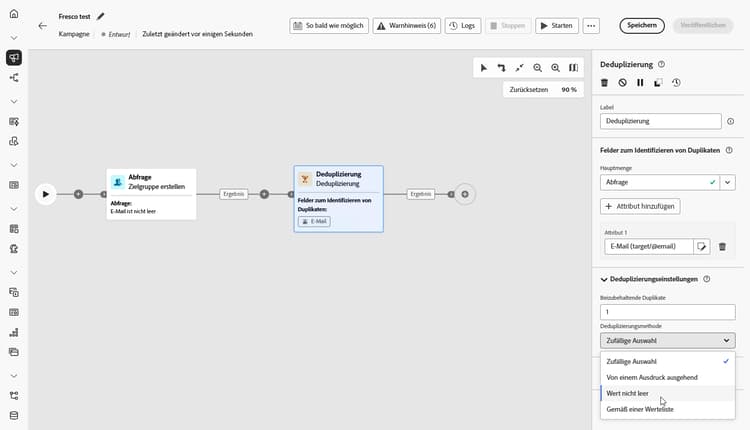
Wählen Sie im Abschnitt Deduplizierungseinstellungen über das Feld „Beizubehaltende Duplikate“ aus, wie viele eindeutige Einträge beibehalten werden sollen. Der Standardwert beträgt 1, wobei ein Eintrag pro Duplikatgruppe beibehalten wird. Legen Sie ihn auf 0 fest, um alle Duplikate zu behalten.
Wenn die Einträge A und B Duplikate von Y sind und der Eintrag C ein Duplikat von Z ist, dann gilt Folgendes:
- Wenn der Wert des Feldes 1 beträgt: Nur die Einträge Y und Z werden beibehalten.
- Wenn der Wert des Feldes 0 beträgt: Alle Einträge (A, B, C, Y, Z) werden beibehalten.
- Wenn der Wert des Feldes 2 beträgt: C und Z werden beibehalten und von den Einträgen A, B und Y werden zwei entweder nach dem Zufallsprinzip oder basierend auf Ihrer Deduplizierungsmethode beibehalten.
-
Wählen Sie eine Deduplizierungsmethode, die definiert, wie das System entscheidet, welche Einträge aus jeder Gruppe von Duplikaten beibehalten werden sollen:
- Zufällige Auswahl: Wählt nach dem Zufallsprinzip unter den Duplikaten den Eintrag aus, der beibehalten werden soll.
- Von einem Ausdruck ausgehend: Behält Einträge mit dem höchsten oder niedrigsten Wert basierend auf einem von Ihnen definierten Ausdruck bei.
- Wert nicht leer: Behält Einträge, bei denen das ausgewählte Feld nicht leer ist, z. B. nur Profile mit einer Telefonnummer.
- Gemäß einer Werteliste: Ermöglicht die Priorisierung bestimmter Werte für ein oder mehrere Felder, z. B. können Einträge priorisiert werden, für die der Wert des Feldes „Land“ auf Frankreich festgelegt ist. Klicken Sie auf Attribut, um ein Feld auszuwählen oder einen benutzerdefinierten Ausdruck zu erstellen. Verwenden Sie die Schaltfläche Hinzufügen, um bevorzugte Werte in der Prioritätsreihenfolge einzugeben.
-
Aktivieren Sie die Option Komplement erzeugen, wenn Sie auch die verbleibende Population verwenden möchten. Das Komplement besteht aus allen Duplikaten. Anschließend wird der Aktivität eine zusätzliche Transition hinzugefügt.
Beispiel deduplication-example
Im folgenden Beispiel wird eine Aktivität des Typs Deduplizierung verwendet, um doppelte Einträge aus der Zielgruppe zu entfernen, bevor ein Versand durchgeführt wird. Die Zielgruppe wird zunächst so gefiltert, dass nur Profile mit einem ausgefüllten E-Mail-Feld einbezogen werden. Anschließend verwendet die Aktivität Deduplizierung die E-Mail-Adresse, um Duplikate zu ermitteln und auszuschließen.

This section contains structured knowledge intended to support interpretation, retrieval, and question answering related to this topic.
For complete understanding, this information should be combined with the documentation on this page. Neither source is intended to stand alone; the page describes the feature, while this section provides additional context that helps disambiguate terminology, intent, applicability, and constraints.
- TL;DR: This page explains how to configure the Deduplication targeting activity in an Orchestrated campaign to remove duplicate records from the results of inbound activities before using the targeted data.
Intents:
- Add a Deduplication activity to an Orchestrated campaign.
- Specify the fields that identify duplicates, in processing order.
- Choose how many unique records to keep per duplicate group using the Duplicates to keep field.
- Choose a Deduplication Method to decide which records are kept from each duplicate group.
- Generate a complement to exploit the remaining (excluded) population.
Glossary:
- Deduplication activity: a Targeting activity that deletes duplicates in the result(s) of the inbound activities, for example duplicated profiles in the recipient list (product-specific)
- Fields to identify duplicates: the section where you specify, in order, the fields whose identical values identify duplicates (for example email address, first name, last name) (product-specific)
- Duplicates to keep: the field that sets how many unique records to keep per duplicate group (product-specific)
- Deduplication Method: the setting that defines how the system decides which records to keep from each group of duplicates (product-specific)
- Random selection: a Deduplication Method that randomly selects the record to keep out of the duplicates (product-specific)
- Using an expression: a Deduplication Method that keeps records with the highest or lowest value based on a defined expression (product-specific)
- Non-empty values: a Deduplication Method that keeps records where the selected field is not empty (product-specific)
- Following a list of values: a Deduplication Method that prioritizes specific values for one or more fields, in a priority order entered using the Add button (product-specific)
- Generate complement: an option that adds an additional outbound transition carrying the remaining population excluded as duplicates (product-specific)
Guardrails:
- The Deduplication activity is a Targeting activity, generally used following targeting activities, and before activities that allow the use of targeted data.
- The default value of Duplicates to keep is 1, which keeps one record per duplicate group.
- Setting Duplicates to keep to 0 keeps all duplicates.
- By default, the record to keep out of the duplicates is randomly selected.
- Enabling Generate complement adds an additional transition to the activity, carrying the complement (all the duplicates).
Terminology:
- Canonical name: Deduplication activity — variants: Deduplication
- Do not confuse: “Random selection” (randomly selects which record to keep) ≠ “Following a list of values” (prioritizes specific field values in a defined order) ≠ “Non-empty values” (keeps records where the selected field is not empty) ≠ “Using an expression” (keeps the highest or lowest value per a defined expression) — these are the four Deduplication Method options.
- Do not confuse: “Duplicates to keep” (how many records survive per duplicate group) ≠ “Deduplication Method” (which records are chosen to survive).
FAQ:
- Q: What does the Deduplication activity do? — It deletes duplicates in the results of the inbound activities, for example duplicated profiles in the recipient list.
- Q: When is the Deduplication activity typically used? — Generally following targeting activities, and before activities that allow the use of targeted data.
- Q: What happens if Duplicates to keep is set to 0? — All duplicates are kept (for example, records A, B, C, Y, Z in the page’s example).
- Q: What is the default Deduplication Method? — By default, the record to keep out of the duplicates is randomly selected (Random selection).
- Q: How do I identify which fields define a duplicate? — In the Fields to identify duplicates section, click Add attribute to specify the fields, such as email address, first name, or last name; the order of the fields specifies which to process first.
- Q: How can I use the records excluded as duplicates? — Toggle on Generate complement to add an additional outbound transition carrying the remaining (duplicate) population.
Personas:
- marketer: Can add a Deduplication activity to an Orchestrated campaign to delete duplicates in the results of inbound activities, and toggle on Generate complement. Can select fields to identify duplicates, such as email address and first name, and choose a Deduplication Method. The page states that the default value of Duplicates to keep is 1, which keeps one record per duplicate group. Where: “Configure the Deduplication activity”.
Onboarding:
- Level: Intermediate
- First minimal step: Add a Deduplication activity to your Orchestrated campaign.
- Success check: An additional transition is added to the activity when the Generate complement option is checked.