Auf dieser Seite: Erfahren Sie, wie Sie mit der Zielgruppenbestimmungs-Aktivität „Kombinieren“ in einer orchestrierten Kampagne die eingehende Population durch Vereinigungs-, Schnittmengen- oder Ausschlussvorgänge segmentieren.
Die Aktivität Kombinieren ist ein Targeting-Aktivitätstyp, mit dem Sie Ihre eingehende Population effektiv segmentieren können. Mit ihr können Sie mehrere Populationen zusammenführen, bestimmte Segmente ausschließen oder nur die Daten beibehalten, die mehreren Zielen gemeinsam sind.
Die folgenden Segmentierungsoptionen sind verfügbar:
-
Vereinigung: Führt die Ergebnisse mehrerer Aktivitäten zu einer einheitlichen Zielgruppe zusammen.
-
Schnittmenge: Behält nur die Elemente bei, die in allen eingehenden Populationen gleich sind.
-
Ausschluss: Entfernt Elemente anhand festgelegter Kriterien aus einer Population.
Konfigurieren der Aktivität „Combine“ combine-configuration
Führen Sie die folgenden Schritte aus, um mit der Konfiguration der Aktivität Kombinieren zu beginnen:
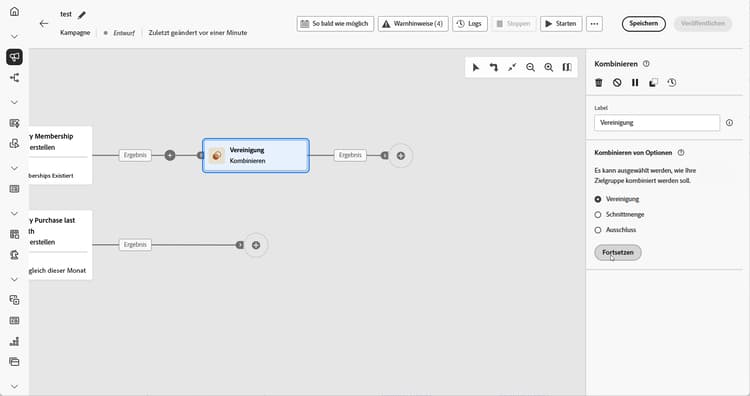
- Fügen Sie mehrerer Aktivitäten wie Zielgruppe erstellen hinzu, um mindestens zwei verschiedene Ausführungsverzweigungen zu bilden.
- Fügen Sie die Aktivität Kombinieren zu einer der vorherigen Verzweigungen hinzu.
- Wählen Sie einen der Segmentierungstypen aus: Vereinigung, Schnittmenge oder Ausschluss.
- Klicken Sie auf Fortfahren.
- Aktivieren Sie im Abschnitt Zusammenzuführende Mengen alle vorherigen Aktivitäten, die Sie zusammenfügen möchten.
Union combine-union
Innerhalb der Aktivität Kombinieren können Sie eine Vereinigung konfigurieren, indem Sie einen Abstimmtyp auswählen, um die Verwaltung doppelter Einträge zu bestimmen:
-
Nur die Schlüssel (Standard): Behält einen einzelnen Eintrag bei, wenn mehrere eingehende Transitionen denselben Schlüssel verwenden. Diese Option kann nur angewendet werden, wenn die eingehenden Populationen homogen sind.
-
Auswahl an Spalten: Ermöglicht die Angabe der Spalten, die für die Datenabstimmung verwendet werden sollen. Wählen Sie Attribut hinzufügen aus.
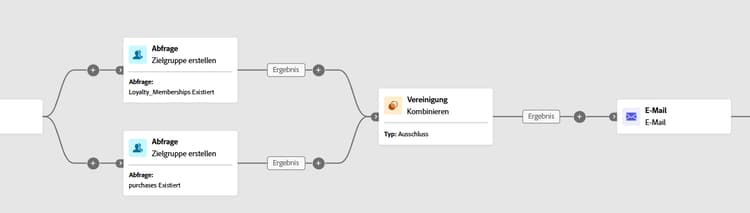
Im folgenden Beispiel wird eine Aktivität des Typs Kombinieren mit einer Vereinigung verwendet, um die Ergebnisse zweier Abfragen, Mitglieder des Treueprogramms und Käuferinnen und Käufer, zu einer einzigen, größeren Zielgruppe zusammenzuführen, die alle Profile aus beiden Segmenten enthält.
Schnittmenge combine-intersection
In der Aktivität Kombinieren können Sie eine Schnittmenge konfigurieren. Dafür müssen Sie die folgenden zusätzlichen Schritte ausführen:
-
Wählen Sie den Abstimmtyp aus, um zu definieren, wie Duplikate behandelt werden:
-
Nur die Schlüssel (Standard): Behält einen einzelnen Eintrag bei, wenn mehrere eingehende Transitionen denselben Schlüssel verwenden. Diese Option kann nur angewendet werden, wenn die eingehenden Populationen homogen sind.
-
Auswahl an Spalten: Ermöglicht die Angabe der Spalten, die für die Datenabstimmung verwendet werden sollen. Wählen Sie Attribut hinzufügen aus.
-
-
Aktivieren Sie Komplement erzeugen, wenn Sie die restliche Population verwenden möchten. Das Komplement enthält die Vereinigung aller eingehenden Aktivitätsergebnisse, mit Ausnahme der Schnittmenge. Der Aktivität wird eine zusätzliche ausgehende Transition hinzugefügt.
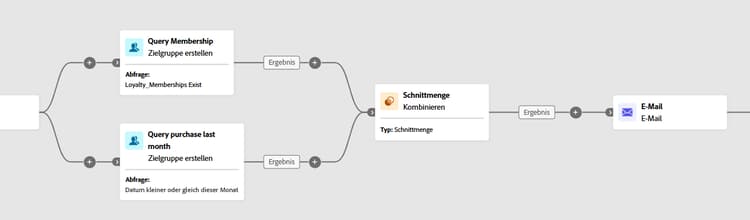
Das folgende Beispiel zeigt die Verwendung der Schnittmenge der zwei Abfrageaktivitäten. Sie wird verwendet, um Profile zu identifizieren, die Mitglieder des Treueprogramms sind und innerhalb des letzten Monats einen Kauf getätigt haben.
Ausschluss combine-exclusion
In der Aktivität Kombinieren können Sie einen Ausschluss konfigurieren. Dafür müssen Sie die folgenden zusätzlichen Schritte ausführen:
-
Wählen Sie im Abschnitt Zusammenzuführende Mengen die Hauptmenge, die die Hauptpopulation darstellt. Die in den anderen Mengen gefundenen Einträge werden aus dieser Hauptmenge ausgeschlossen.
-
Bei Bedarf können Sie eingehende Tabellen anpassen, um Zielgruppen aus verschiedenen Dimensionen anzugleichen. Um eine Zielgruppe aus einer anderen Dimension auszuschließen, muss diese zunächst in dieselbe Zielgruppendimension wie die Hauptpopulation aufgenommen werden. Klicken Sie dazu auf Regel hinzufügen und definieren Sie die Bedingungen zum Ändern der Dimension. Die Abstimmung erfolgt dann entweder mit einem Attribut oder einem Join.
-
Aktivieren Sie Komplement erzeugen, wenn Sie die restliche Population verwenden möchten. Das Komplement enthält die Vereinigung aller eingehenden Aktivitätsergebnisse, mit Ausnahme der Schnittmenge. Der Aktivität wird eine zusätzliche ausgehende Transition hinzugefügt.
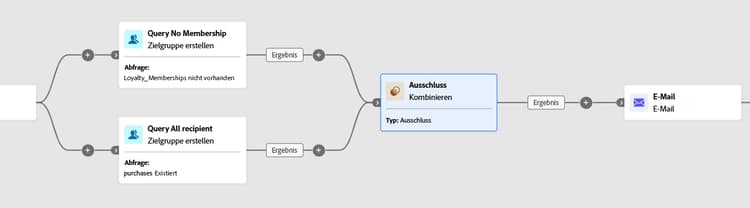
Das folgende Beispiel eines Ausschlusses zeigt zwei Abfragen, die zum Filtern von Profilen konfiguriert wurden, die ein Produkt gekauft haben. Die Profile, die über keine Mitgliedschaft im Treueprogramm verfügen, werden dann aus der ersten Menge ausgeschlossen.
This section contains structured knowledge intended to support interpretation, retrieval, and question answering related to this topic.
For complete understanding, this information should be combined with the documentation on this page. Neither source is intended to stand alone; the page describes the feature, while this section provides additional context that helps disambiguate terminology, intent, applicability, and constraints.
- TL;DR: This page explains how to configure the Combine activity in an Orchestrated campaign to segment an inbound population through Union, Intersection, or Exclusion operations.
Intents:
- Add a Combine activity to join at least two execution branches in an Orchestrated campaign.
- Merge multiple populations into a single target using Union.
- Keep only the elements common to all inbound populations using Intersection.
- Remove elements from one population based on specified criteria using Exclusion.
- Choose a reconciliation type (Keys only or A selection of columns) to handle duplicates in a Union or Intersection.
- Process the remaining population after an Intersection or Exclusion by enabling Generate completement.
Glossary:
- Combine: a type of Targeting activity that segments an inbound population by merging multiple populations, excluding specific segments, or retaining only the data shared across several targets (product-specific)
- Union: a Combine segmentation type that merges the results of multiple activities into a single unified target (product-specific)
- Intersection: a Combine segmentation type that retains only the elements common across all inbound populations (product-specific)
- Exclusion: a Combine segmentation type that removes elements from one population based on specified criteria (product-specific)
- Reconciliation type: the setting that defines how duplicate records are handled in a Union or Intersection, either Keys only or A selection of columns (product-specific)
- Keys only: the default reconciliation type; retains a single record when multiple inbound transitions share the same key, applicable only when the inbound populations are homogeneous (product-specific)
- A selection of columns: a reconciliation type that allows specifying which columns are used for data reconciliation, via Add attribute (product-specific)
- Generate completement: an option in Intersection or Exclusion that processes the remaining population; the complement contains the union of all inbound activity results excluding the intersection, and adds an additional outbound transition to the activity (product-specific)
- Primary set: in an Exclusion, the main population selected in the Sets to join section, from which records found in the other sets are excluded (product-specific)
- Exclusion rules: in an Exclusion, used when a target from another dimension must first be brought into the same targeting dimension as the main population; added via Add a rule, defining the dimension change conditions, with reconciliation done via an attribute or a join (product-specific)
- Sets to join: the section where the previous activities to combine are checked (product-specific)
Guardrails:
- Keys only reconciliation is only applicable when the inbound populations are homogeneous.
Terminology:
- Canonical name: Combine — variants: Combine activity
- Do not confuse: “Union” (merges results of multiple activities into one target) ≠ “Intersection” (keeps only elements common to all inbound populations) ≠ “Exclusion” (removes elements from one population based on specified criteria)
- Do not confuse: “Keys only” (retains one record per shared key, homogeneous populations only) ≠ “A selection of columns” (reconciliation on specified columns)
FAQ:
- Q: What does the Combine activity do? — It segments an inbound population by merging multiple populations, excluding specific segments, or retaining only the data shared across several targets.
- Q: What are the three segmentation types in the Combine activity? — Union, Intersection, and Exclusion.
- Q: What is the default reconciliation type for a Union or Intersection? — Keys only, which retains a single record when multiple inbound transitions share the same key.
- Q: When is Keys only applicable? — Only when the inbound populations are homogeneous.
- Q: What does Generate completement do? — It processes the remaining population in an Intersection or Exclusion; the complement contains the union of all inbound activity results excluding the intersection, and adds an additional outbound transition.
- Q: What is the Primary set in an Exclusion? — The main population chosen in the Sets to join section, from which records found in the other sets are excluded.
- Q: How do you exclude a target from a different dimension in an Exclusion? — Click Add a rule in the Exclusion rules section and define the dimension change conditions; reconciliation is then done via an attribute or a join.
Examples:
- Union: a Combine activity merges the results of two queries, Loyalty Members and Purchasers, into a single, larger audience that includes all profiles from both segments.
- Intersection: a Combine activity identifies profiles who are Loyalty Members and have made a purchase within the last month.
- Exclusion: two queries are configured to filter profiles who purchased a product; profiles who do not have a loyalty membership are then excluded from the first set.
Personas:
- marketer: Can add a Combine activity to a branch after building at least two execution branches. Can select Union, Intersection, or Exclusion as the segmentation type, then check previous activities in the Sets to join section. The page states that Keys only reconciliation is only applicable when the inbound populations are homogeneous. Where: “Configure the Combine activity”.
Onboarding:
- Level: Intermediate
- First minimal step: Add multiple activities, such as Build audience activities, to form at least two different execution branches.
- Success check: The Union merges the results of two queries, Loyalty Members and Purchasers, into a single, larger audience that includes all profiles from both segments.