Auf dieser Seite: Erfahren Sie, wie Sie die Flusssteuerungsaktivität „Und-Verknüpfung“ in einer orchestrierten Kampagne verwenden können, um mehrere Ausführungszweige zu synchronisieren, damit die Kampagne nur fortgesetzt wird, nachdem alle vorherigen Aktivitäten abgeschlossen sind.
Die Aktivität Und-Verknüpfung ist eine Aktivität zur Flusskontrolle. Mit ihr können Sie die Ausführung verschiedener Verzweigungen einer orchestrierten Kampagne synchronisieren.
Diese Aktivität löst ihre ausgehende Transition erst aus, wenn alle eingehenden Transitionen aktiviert sind, d. h. wenn alle vorangegangenen Aktivitäten beendet sind. So können Sie sicherstellen, dass bestimmte Aktivitäten abgeschlossen wurden, bevor Sie mit der Ausführung der orchestrierten Kampagne fortfahren.
Konfigurieren der Aktivität „Und-Verknüpfung“ and-join-configuration
Führen Sie die folgenden Schritte aus, um die Aktivität Und-Verknüpfung zu konfigurieren:
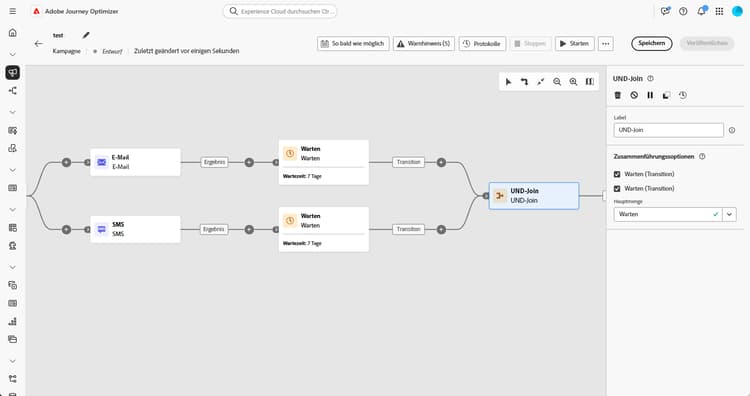
-
Fügen Sie mehrere Aktivitäten wie z. B. Kanalaktivitäten hinzu, um mindestens zwei verschiedene Ausführungsverzweigungen zu erstellen.
-
Fügen Sie eine Aktivität des Typs Und-Verknüpfung zu einer der Verzweigungen hinzu.
-
Wählen Sie im Abschnitt Zusammenführungsoptionen alle vorherigen Aktivitäten aus, die Sie verknüpfen möchten.
-
Wählen Sie in der Dropdown-Liste Hauptmenge die Population der eingehenden Transition aus, die Sie beibehalten möchten.
Beispiel and-join-example
Dieses Beispiel zeigt zwei koordinierte Kampagnenverzweigungen, von denen jede einen E-Mail-Versand enthält, wobei sich der eine an Gold-Mitglieder und der andere an Silber-Mitglieder richtet. Die UND-Verknüpfung wird aktiviert, sobald beide eingehenden Transitionen ausgelöst werden, und die SMS wird erst nach Abschluss beider E-Mail-Sendungen und einer Verzögerung von 7 Tagen gesendet.

This section contains structured knowledge intended to support interpretation, retrieval, and question answering related to this topic.
For complete understanding, this information should be combined with the documentation on this page. Neither source is intended to stand alone; the page describes the feature, while this section provides additional context that helps disambiguate terminology, intent, applicability, and constraints.
- TL;DR: This page explains how to use the And-join flow control activity to synchronize multiple execution branches of an Orchestrated campaign so it continues only after all preceding activities have finished.
Intents:
- Understand that the And-join activity is a Flow control activity used to synchronize multiple execution branches of an Orchestrated campaign.
- Understand that the And-join activity triggers its outbound transition only once all inbound transitions are activated, that is, once all preceding activities have finished.
- Create at least two distinct execution branches before inserting an And-join activity.
- Select, under Merging options, which preceding activities to join.
- Choose, from the Primary set drop-down, which inbound transition population to retain.
Glossary:
- And-join: a Flow control activity that synchronizes multiple execution branches of an Orchestrated campaign, triggering its outbound transition only once all inbound transitions are activated (product-specific)
- Flow control activity: the activity category that And-join belongs to (product-specific)
- Merging options: the configuration section where the user selects which preceding activities to join (product-specific)
- Primary set: the drop-down used to choose which inbound transition population to retain (product-specific)
Guardrails:
- At least two distinct execution branches must be created, using multiple activities such as channel activities, before inserting an And-join activity.
Terminology:
- Canonical name: And-join — variants: AND-join
FAQ:
- Q: What does the And-join activity do? — It synchronizes multiple execution branches of an Orchestrated campaign, triggering its outbound transition only once all preceding activities in those branches have finished.
- Q: How do I configure the And-join activity? — Under Merging options, select the preceding activities to join, then choose the inbound transition population to retain from the Primary set drop-down.
- Q: What is the Primary set used for? — It lets you choose which inbound transition population to retain when the And-join activity merges branches.
Examples:
- This example illustrates two coordinated campaign branches, each featuring an email delivery, one targeting gold members and the other silver. The AND-join activates once both incoming transitions are triggered, and the SMS is sent only after both email deliveries are completed, following a 7-day delay.
Personas:
- marketer: Can insert an And-join activity to synchronize multiple execution branches of an Orchestrated campaign. Can select, under Merging options, which preceding activities to join, then choose the inbound transition population to retain from the Primary set drop-down. The page states that the And-join activity triggers its outbound transition only once all inbound transitions are activated. Where: “Configure the And-join activity”.
Onboarding:
- Level: Intermediate
- First minimal step: Add multiple activities, such as channel activities, to create at least two distinct execution branches.
- Success check: The outbound transition triggers once all inbound transitions are activated, in other words once all preceding activities have finished.