KI-gestützte Entwicklung
Die KI-unterstützte Entwicklung verwendet eine KI-gestützte IDE oder Codierungsagenten zusammen mit AGENTS.md, Agent Skills und MCP-Servern, um hochwertigen, produktionsbereiten Code für AEM as a Cloud Service-Projekte zu erstellen.
Tools wie Cursor, GitHub Copilot in Visual Studio Code, Claude Code und ähnliche KI-gestützte IDEs und Codierungs-Agenten helfen in einigen wichtigen Punkten:
- Schnellere Iteration: Generieren oder Refaktorieren von Code aus Eingabeaufforderungen in natürlicher Sprache, die die gewünschte Funktion oder Änderung beschreiben.
- Lernhilfe: Beschreiben Sie bei Aufforderung unbekannte Code-Pfade, Konfigurationen, Konzepte oder Best Practices.
Diese Vorteile hängen jedoch stark vom Kontext des Codierers ab. Generische Schulungsdaten und ein einziger Repository-Schnappschuss sind häufig nicht ausreichend um zuverlässig produktionsbereiten AEM-Code zu erstellen.
Warum KI allein nicht ausreicht
Ohne den richtigen Kontext können KI-Modelle (über eine KI-gestützte IDE oder einen Kodierer):
- Halluzinate APIs or Lifecycle: Schlagen Sie Code oder Konfigurationen vor, die nicht den Best Practices oder neuesten Funktionen von AEM as a Cloud Service entsprechen.
- Fehlende Verfahrensschritte: Lassen Sie erforderliche Schritte aus, die im Code-Repository oder in Schulungsdaten nicht sichtbar sind.
- Von Projektstandards abweichen: Ignoriert etablierte Muster für Komponenten, OSGi-Services, Workflows oder Dispatcher-Konfigurationen.
In dieser Lücke werden strukturierter Kontext (Agent Skills and AGENTS.md) und Runtime Visibility (MCP-Server) unerlässlich, um die KI-unterstützte Entwicklung produktiv und zuverlässig zu machen.
Wie Adobe bei der KI-gestützten Entwicklung hilft
Für AEM as a Cloud Service-Projekte bietet Adobe Folgendes:
- Agent Skills und AGENTS.md über Adobe Skills for AI Coding Agents
- Lokale MCP-Server für AEM SDK und lokale Dispatcher über das Software Distribution-Portal
- Der einheitliche AEM MCP-Server (Inhalt, Experience Governance) sowie der separate Cloud Manager MCP-Server von Ihrer IDE- oder Chat-Anwendung
In den folgenden Abschnitten werden die einzelnen Elemente zusammengefasst. In den Abschnitten Setup und Anwendungsfälle am Ende dieser Seite finden Sie Informationen zur Installation und zu exemplarischen Vorgehensweisen für die KI-unterstützte Entwicklung.
Was sind Agentenfähigkeiten?
Agent Skills sind verfahrenstechnische Kenntnisse oder Fachkenntnisse um Kodieragenten zu helfen echte Arbeit zuverlässig auszuführen. Weitere Informationen finden Sie unter Agentenfertigkeiten.
Für ein AEM as a Cloud Service-Projekt sind Agentenkenntnisse im Repository Adobe-Kenntnisse für KI-Kodierungs-Agenten verfügbar.
Was ist AGENTS.md
AGENTS.md stellt den Kontext und Anweisungen bereit, um beim Kodieren von Agenten Arbeiten an Ihrem Projekt). Weitere Informationen finden Sie unter AGENTS.md.
Bei einem AEM as a Cloud Service-Projekt erstellt die ensure-agents-md Bootstrap-Kenntnis AGENTS.md im Repository-Stamm wenn sie fehlt. Die Qualifikation überprüft Ihr Projekt (z. B. die pom.xml und Module) und generiert eine maßgeschneiderte Anleitung anstelle einer statischen Datei. Wenn AGENTS.md bereits vorhanden ist, wird nicht.
Sobald die Datei vorhanden ist, können Sie sie bearbeiten, um mehr Kontext und Anweisungen für die Best Practices Ihres Teams oder Ihrer Organisation hinzuzufügen. Die Qualifikation kann auch CLAUDE.md erstellen, das auf AGENTS.md verweist, sodass Claude-basierte Tools dieselbe Anleitung übernehmen.
Was sind MCP-Server?
MCP-Server stellen dem Codierungsagenten Tools und Daten über das Model Context Protocol zur Verfügung, das Aktionen wie Debuggen, Überprüfen, Ausführen und Validieren von Änderungen unterstützt. Ein MCP-Server kann auf Ihrer Workstation (lokal) oder als gehosteter Dienst (remote) ausgeführt werden.
Für lokale Entwicklung gegen AEM SDK und Dispatcher installieren Sie diese lokalen MCP-Server über das Software Distribution-Portal:
- AEM Quickstart Local MCP Server: Zeigt Live-Laufzeitdaten aus einer lokalen AEM SDK-Instanz an, um die Fehlerbehebung und Entwicklung zu unterstützen. Weitere Informationen finden Sie unter AEM QuickStart MCP Server.
- Dispatcher Local MCP Server: Ermöglicht die Laufzeitvalidierung und -überprüfung einer lokalen Dispatcher-Instanz. Weitere Informationen finden Sie unter Dispatcher MCP Server.
Von Adobe gehostete AEM-MCP-Server umfassen den einheitlichen AEM-MCP-Server (Inhalt, Experience Governance) und den separaten Cloud Manager-MCP-Server.
Einrichtung
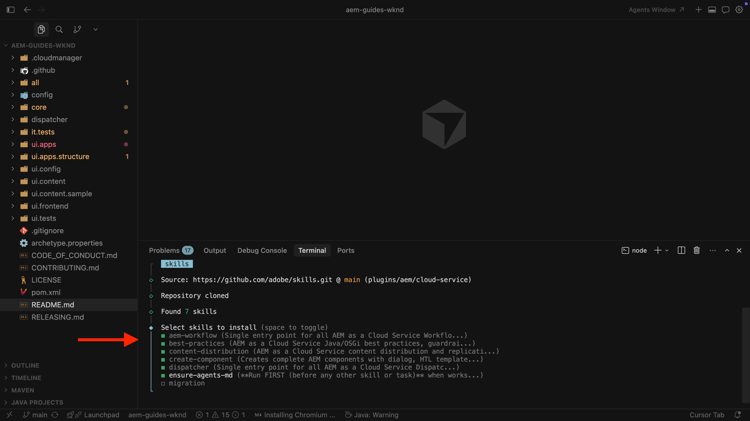
Einrichten von AEM Agent-Kenntnissen
Erfahren Sie, wie Sie AEM Agent Skills für KI-unterstützte Entwicklung einrichten.
Anwendungsszenarien
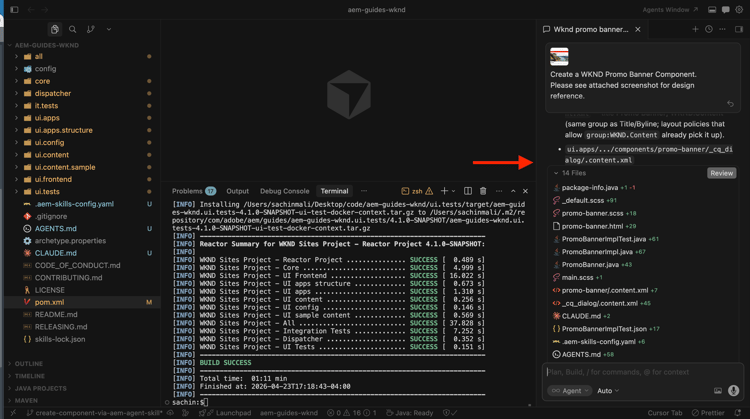
Erstellen der AEM-Komponente mit KI-unterstützter Entwicklung
Erfahren Sie, wie Sie mit KI-unterstützter Entwicklung AEM-Komponenten entwickeln können.