在Adobe Workfront View中新增更新
您可以在Adobe Workfront View應用程式中檢閱專案,並將更新新增至正在檢閱的專案。
您無法在Workfront View中將更新新增至任務或問題。
存取需求
展開以檢視本文中功能的存取需求。
| table 0-row-2 1-row-2 layout-auto html-authored no-header | |
|---|---|
| Adobe Workfront套件 | 任何 |
| Adobe Workfront授權 |
投稿人或以上 評論或以上 |
如需詳細資訊,請參閱Workfront檔案中的存取需求。
在Workfront View中將更新新增至專案
-
從Workfront檢視的首頁,點選專案以存取。
-
(選用)將更新 Widget新增至您的檢視。
如需有關將Widget新增至專案檢視的詳細資訊,請參閱專案詳細資料檢視中的更新Widget。 -
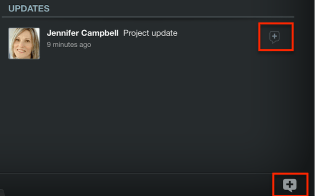
點選更新 Widget中更新的 [更新] 圖示(右下方)或(條件式) +圖示。
-
輸入更新。
-
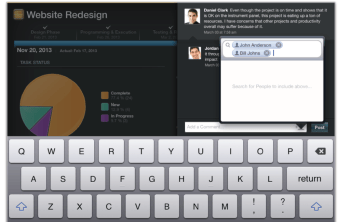
(選擇性)點選人員圖示並指定其他使用者的名稱,將其他人加入更新中。
-
點選貼文。
更新會顯示在專案的更新 Widget中。
recommendation-more-help
5f00cc6b-2202-40d6-bcd0-3ee0c2316b43