申請不會開始
本頁列出 Substance 3D Designer 無法正確啟動的常見原因,並依作業系統分類提供各項故障排除步驟:
設計師 15.0 及以上版本

Designer 15.0 及以上版本無法在同時配備整合 GPU(iGPU)與獨立 GPU(dGPU)的系統上啟動。

更新 iGPU 的顯示卡驅動程式。 你可以在這裡找到最新的驅動程式: Intel | AMD
Windows 10/11
Substance 3D Designer 在使用 Windows 10 或 Windows 11 的系統上無法啟動。
舊版 Designer 可能因授權驗證過程中使用的過時 libeay32.dll函式庫而無法在 Windows 10 或 Windows 11 上啟動。
你可以嘗試用 更新版本 取代函式庫,例如這裡🔗發佈的版本(選擇 32-bit Windows 的檔案),方法是依照以下步驟操作:
- 在 Designer 的安裝目錄中找到該
libeay32.dll檔案 - 如果以後需要還原,記得把檔案備份到安全的地方
- 將檔案替換為更新版本
- Start Designer
Windows 7/8/8.1
Substance 3D Designer 在使用 Windows 7、Windows 8 或 Windows 8.1 的系統上無法啟動。
作為 11.3.0 版本更新的一部分,我們升級了多個圖書館、工具和 SDK,導致 與低於 Windows 10 版本的相容 性下降。
我們 強烈 建議升級到 Windows 10,因為 Microsoft 本身已不再支援主流使用的舊版本 Windows(詳見 此處 與 此處)。 因此,持續使用這些版本會 帶來安全問題。
如果無法升級到 Windows 10, 請不要將 Designer 安裝更新到 11.2.2 之後。
Linux
關閉主畫面並顯示主視窗時會當機。
Designer 無法載入 Python 元件,因為它載入的是系統的 libffi.so 函式庫,而非系統自身。
為了確保 Designer 能載入自己的函式庫,請在 Designer 的安裝目錄中使用此指令,並用你執行 Designer 的指令替換 %command% :
LD_PRELOAD=./plugins/pythonsdk/lib/python3.11/lib-dynload/libffi.so.6 %command%
請注意,Python 版本號會依執行的 Designer 版本而異:
- 低於 14.0.0:python3.9
- 低於 12.1.0 版本:python3.7
Linux 用戶若從 Steam 啟動 Designer,可在 Designer 的啟動選項中設定 LD_PRELOAD 指令,如下所示。
完成後,未來所有遊戲階段都可以正常從 Steam 啟動 Designer。
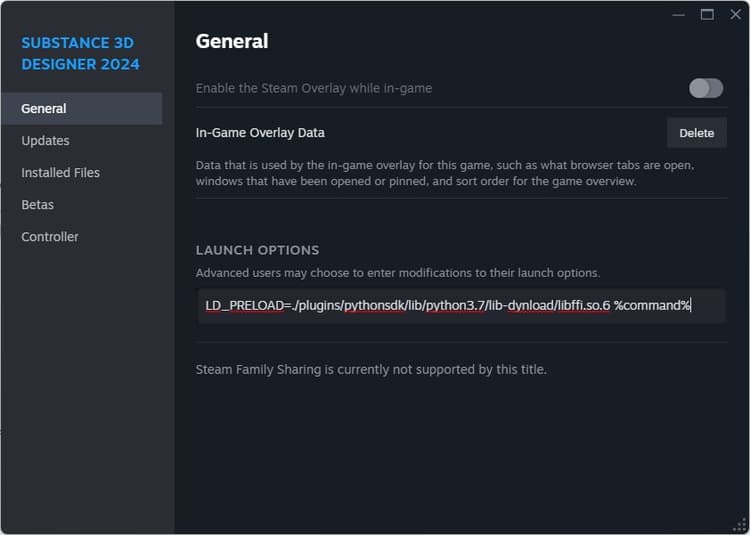
Steam 版 Designer 無法啟動,且不會出現錯誤訊息。
你可以透過登入 Steam 應用程式來獲取錯誤訊息。
如這裡🔗建議,完全關閉 Steam,然後從終端機執行以下指令(或為此指令建立捷徑):
steam 2>&1 | tee /path/to/logfile
<b>xcb</b>外掛無法載入。命令列中顯示以下訊息:
qt.qpa.plugin: Could not load the Qt platform plugin "xcb" in "" even though it was found.

This application failed to start because no Qt platform plugin could be initialized. Reinstalling the application may fix this problem.


Available platform plugins are: minimal, offscreen, xcb.


Aborted (core dumped)
有些必需的包裹不見了。 從 Designer 的安裝目錄執行以下指令:
ldd libQt5XcbQpa.so.5
檢查列印清單中是否有被報告為 not found的套件,然後對每個遺失的套件執行以下指令:
apt-get install <package-name>
E.g.
apt-get install libxcb-xinput0
啟動 Designer 時會產生這個錯誤:
error while loading shared libraries: libcrypt.so.1: cannot open shared object file: No such file or directory
由 Designer 載入的系統函式庫與 Designer 自有 的 libcrypto.so.1.1 函式庫不相容。
將該函式庫從 Designer 的安裝目錄中移除 libcrypto.so.1.1 ,讓系統的函式庫被取代。
Substance 3D Designer 在使用 Arch 架構的 Linux 發行版系統上無法啟動。
試著安裝 progl(AMDGPU-PRO🔗 驅動程式的一部分),然後透過它啟動 Designer。你可以透過應用程式 progl 啟動指令中的前綴來完成:
progl <designer-application-path>
要注意這 progl 可能不穩定。 因此,這應該作為 最後手段嘗試。